



 本文深入探讨了SideBand在Android图形渲染中的作用,分析了SideBand Flow,特别是针对Tunneled Playback时可能出现的黑屏现象。在黑屏问题的分析中,提到了SurfaceFlinger的合成过程,指出了由于tunneled video playback的背景SurfaceView覆盖导致的问题,并通过检查SurfaceView的isOpaque属性找到关键。文章最后提供了修复该问题的Google源码修改方案。
•Brief Introduction SideBand
•SideBand Flow
•Tunneled Playback: Analysis Black Frame
•Brief Introduction SideBand
App在运行的过程会create Surface, 并会产生对应的BufferQueue及Layer, BufferQueue里面有好几个Slot可以存Graphic Buffer。所以App在绘制的过程就是不断的Dequeue和Enqueue这些Buffer。
SurfaceFlinger会拿这些Enqueue的Buffer去做后续处理, SurfaceFlinger会将各Layer当前的Buffer封裝成imageKHR, 当成texure再去给OpenGL Composer到Framebuffer上, 最后透过HWC的set 里面调用了gralloc, 经过层层呼叫会到OSD driver的pandisplay去显示。
•CompositionType
–HWC_FRAMEBUFFER
–HWC_OVERLAY
–HWC_BACKGROUND
–HWC_FRAMEBUFFER_TARGET
–HWC_SIDEBAND
–HWC_CURSOR_OVERLAY
•HWC_OVERLAY

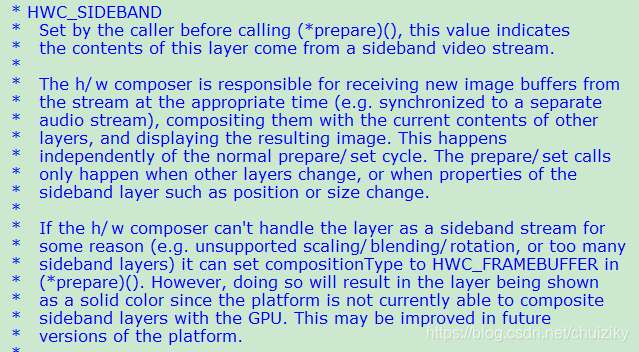
•HWC_SIDEBAND
l this layer's contents are taken from a sideband buffer stream. Added in HWC_DEVICE_API_VERSION_1_4.
•SideBand Flow
sideband相关类图
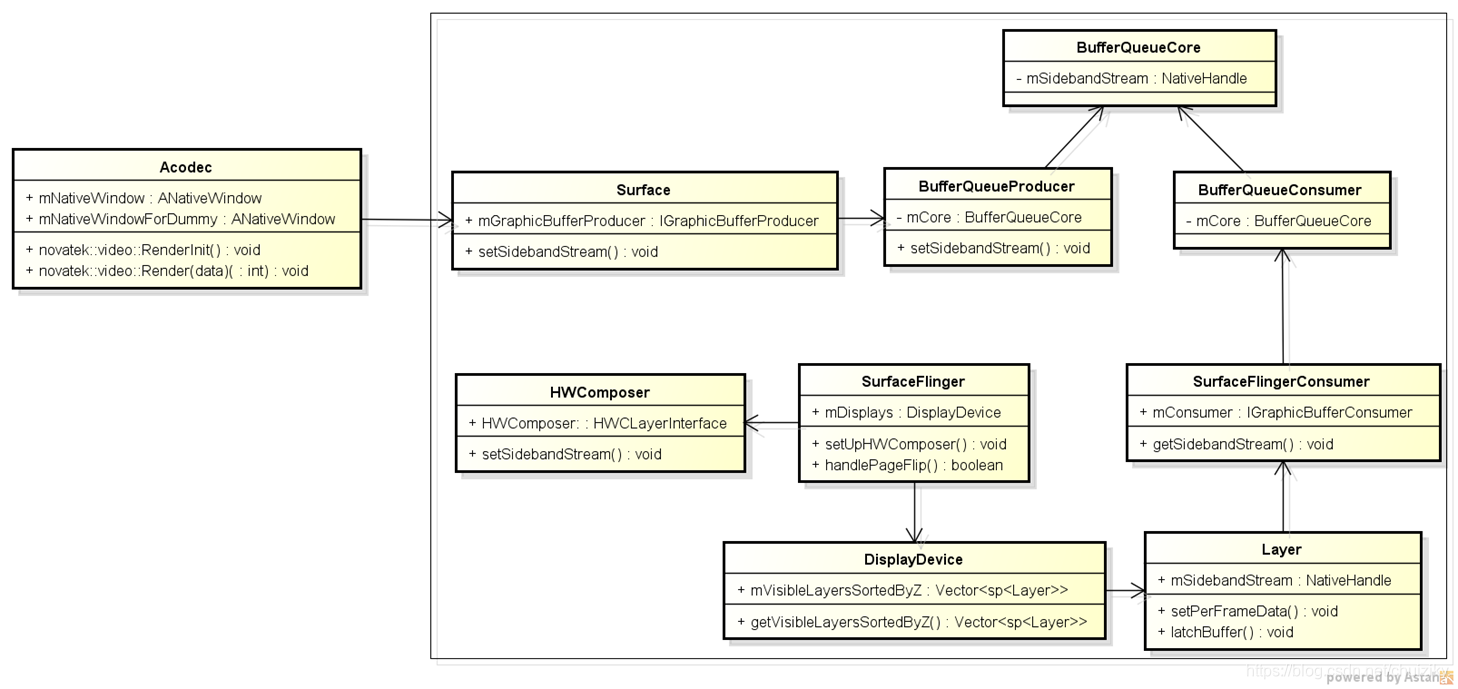
sideband flow
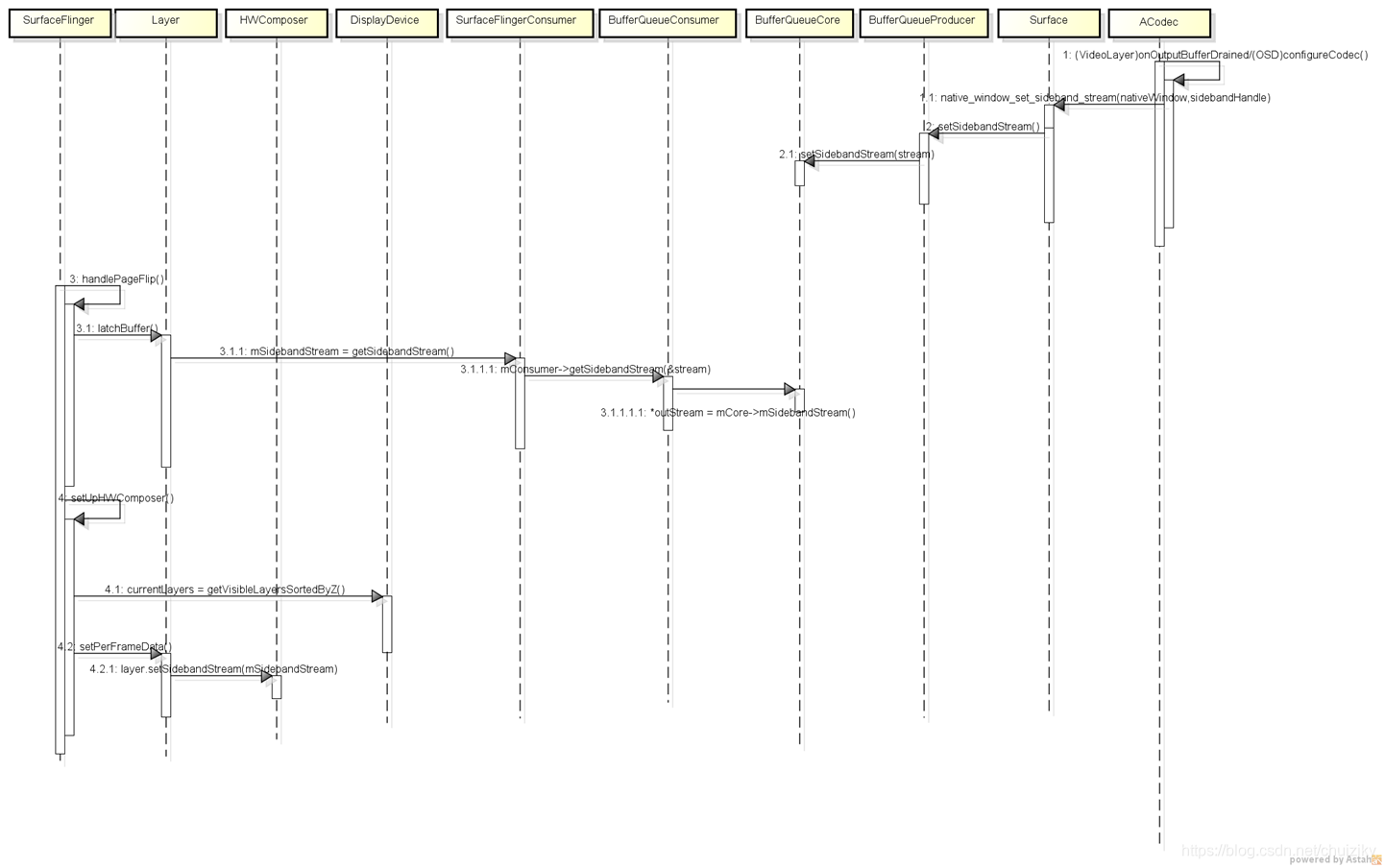
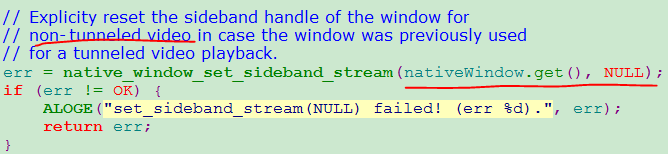
l non-tunneled video,ACodec的configureCodec中设置sideband的为NULL
ltunneled-playback,在ACodec的configureTunneledVideoPlayback设置sidebandHandle,非NULL
status_t ACodec::configureTunneledVideoPlayback(
        int32_t audioHwSync, const sp<ANativeWindow> &nativeWindow) {
    native_handle_t* sidebandHandle;

    status_t err = mOMXNode->configureVideoTunnelMode(
            kPortIndexOutput, OMX_TRUE, audioHwSync, &sidebandHandle);
    if (err != OK) {
        ALOGE("configureVideoTunnelMode failed! (err %d).", err);
        return err;
    }

    err = native_window_set_sideband_stream(nativeWindow.get(), sidebandHandle);
    if (err != OK) {
        ALOGE("native_window_set_sideband_stream(%p) failed! (err %d).",
                sidebandHandle, err);
        return err;
    }

    return OK;
}
•How the hwcomposer handle sideband
l在prepare阶段,hwcomposer会将sideband compositionType修改为OVERLAY
并调用DRM的driver设置crop ,displayFrame等信息
l因为在OSD no-tunneled playback设置的sideband为NULL
hwcomposer prepare阶段未做任何处理,合成有GLES来完成
•Tunneled Playback: Analysis Black Frame
dumpsys SurfaceFlinger
type | handle | hint | flag | tr | blnd | format | source crop (l,t,r,b) | frame | name
-----------+----------+------+------+----+------+-------------+--------------------------------+------------------------+------
GLES | 00000000 | 0000 | 0001 | 00 | 0105 | ? ffffffff | 0, 0, -1, -1 | 0, 0, 1920, 1080 | Background for - SurfaceView - com.google.android.exoplayer2.demo/com.google.android.exoplayer2.demo.PlayerActivity#0
HWC | ad7a4640 | 0002 | 0000 | 00 | 0105 | ? ffffffff | 0, 0, -1, -1 | 0, 0, 1920, 1080 | SurfaceView - com.google.android.exoplayer2.demo/com.google.android.exoplayer2.demo.PlayerActivity#0
GLES | addcae00 | 0000 | 0000 | 00 | 0105 | RGBA_8888 | 0, 0, 1920, 1080 | 0, 0, 1920, 1080 | com.google.android.exoplayer2.demo/com.google.android.exoplayer2.demo.PlayerActivity#0
FB TARGET | addc96e0 | 0000 | 0000 | 00 | 0105 | RGBA_8888 | 0, 0, 1920, 1080 | 0, 0, 1920, 1080 | HWC_FRAMEBUFFER_TARGET
可以发现tunneled video playback在SurfaceFlinger进行合成时,多了一层Background SurfaceView,将surfaceview给遮住了,查看SurfaceView的isOpaque = 0,这个数值异常,
在SurfaceFlinger的rebuildLayerStacks中会去computeVisibleRegions,其中就会使用到这个参数isOpaque,因为其为0;这样就导致在计算background surfaceview时,就是全屏了,因为surfaceview没有将background遮住
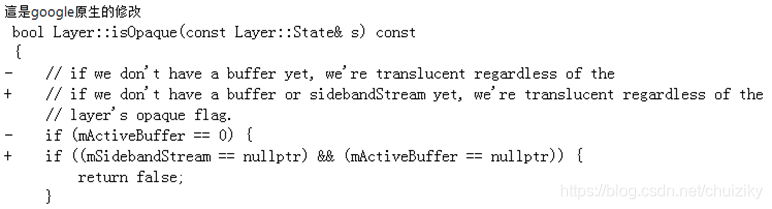
定位到isOpaque这个函数,查看Google源码发现,Google在8.1版本对此处有修改
Sync过来这个修改,问题就解了


 扫一扫
扫一扫


 4008
4008

 被折叠的 条评论
为什么被折叠?
被折叠的 条评论
为什么被折叠?
 到【灌水乐园】发言


