Sending email through Amazon SES using software packages
There are a number of commercial and open source software packages that support sending email through SMTP. Here are some examples:
-
Blogging platforms
-
RSS aggregators
-
List management software
-
Workflow systems
You can configure any such SMTP-enabled software to send email through the Amazon SES SMTP interface. For instructions on how to configure SMTP for a particular software package, see the documentation for that software.
The following procedure shows how to set up Amazon SES sending in JIRA, a popular issue-tracking solution. With this configuration, JIRA can notify users through email whenever there is a change in the status of a software issue.
To configure JIRA to send email using Amazon SES
-
Using your web browser, log in to JIRA with administrator credentials.
-
In the browser window, choose Administration.
-
On the System menu, choose Mail.
-
On the Mail administration page, choose Mail Servers.
-
Choose Configure new SMTP mail server.
-
On the Add SMTP Mail Server form, fill in the following fields:
-
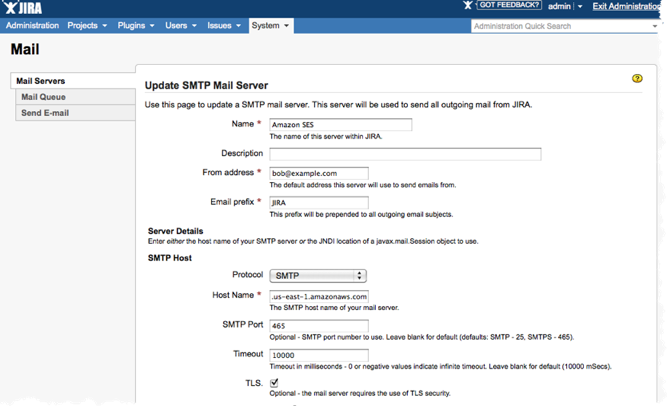
Name—A descriptive name for this server.
-
From address—The address from which email will be sent. You must verify this email address with Amazon SES before you can send from it. For more information about verification, see Verified identities in Amazon SES.
-
Email prefix—A string that JIRA prepends to each subject line prior to sending.
-
Protocol—Choose SMTP.
Note
If you can't connect to Amazon SES using this setting, try SECURE_SMTP.
-
Hostname—See Connecting to an Amazon SES SMTP endpoint for a list of Amazon SES SMTP endpoints. For example, if you want to use the Amazon SES endpoint in the US West (Oregon) Region, the hostname would be email-smtp.us-west-2.amazonaws.com.
-
SMTP port—25, 587, or 2587 (to connect using STARTTLS), or 465 or 2465 (to connect using TLS Wrapper).
-
TLS—Select this check box.
-
User name—Your SMTP user name.
-
Password—Your SMTP password.
You can see the settings for TLS Wrapper in the following image.
-
-
Choose Test Connection. If the test email that JIRA sends through Amazon SES arrives successfully, then your configuration is complete.

