Product Documentation
Abstract
This FAQ is applicable to IBM MQ 9.0 and later releases. Starting with IBM MQ 9.0, IBM MQ introduced the support model described in the following diagram.
Content
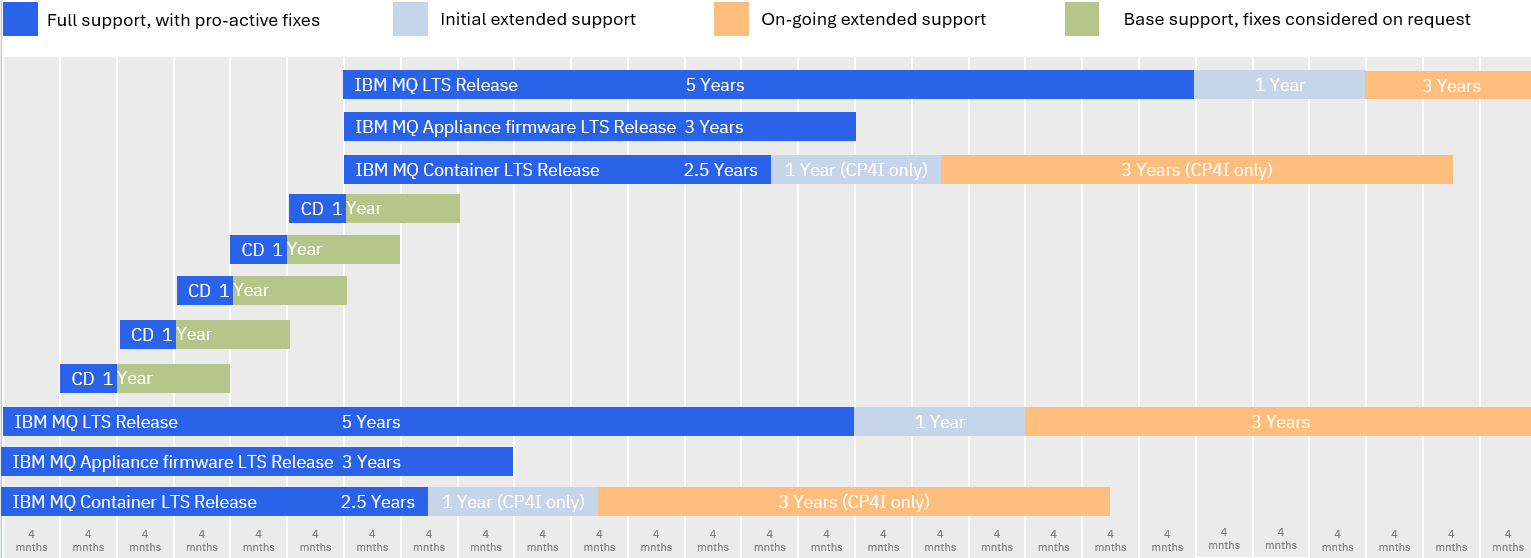
IBM MQ Support Lifecycle FAQ
IBM MQ follows a continuous delivery model with regular update packages. Each update incrementally delivers new capability and defect fixes. Long Term Support (LTS) packages receive only security and defect fixes through fix packs and individual fixes, with no incremental functional enhancements.
| Feature | IBM MQ Software | IBM MQ Appliance | IBM MQ Operator & Containers |
|---|---|---|---|
| Support Policy | Support Cycle-5 (Multiplatforms) Continuous Delivery (z/OS) | Support Cycle-3 | Support Cycle-2.5 |
| LTS support duration | 5 years minimum | 3 years (no extension) | 2.5 years |
| Extended Support available? | Yes, up to 4 additional years (defect fixes in year 1 only) | No | For Cloud Pak for Integration only, up to 4 additional years (defect fixes in year 1 only) 1 |
| CD fix eligibility | 12 months from GA or 2 most recent CD releases, whichever is longer | Latest CD release; previous CD considered if less than 6 months old | Latest CD release |
| Are interim fixes provided on back-level fix packs? | Yes (iFix/APAR on installed LTS level where possible) | No, you must be on the latest fix pack of your chosen LTS | No, you must be on the latest fix pack and revision |
| Maintenance cadence | Every 2 months - CD: Alternating CD and CSU releases - LTS: CSUs, of which 2-3 per year become fix packs, which include functional fixes | Every 2 months - CD: Alternating CD and CSU releases - LTS: CSUs, of which 2-3 per year become fix packs, which include functional fixes | Monthly CSU and fix pack updates through the Operator channel |
| Roll-back supported? | No, except for IBM MQ for z/OS backward migration for LTS releases | No | No |
1 Extended support is available only for IBM MQ in containers, when you use certain versions of IBM Cloud Pak for Integration, identified in the tables on page Lifecycle dates for IBM MQ in containers.
Versions 9.0 through 9.3 of IBM MQ for Multiplatforms, IBM MQ for z/OS, and IBM MQ Appliance followed the Continuous Delivery policy. Long Term Support for IBM MQ for Multiplatforms and IBM MQ for z/OS was a minimum of 5 years with an option for up to 3 years of extended support. Long Term Support for IBM MQ Appliance was 3 years with no support extensions. These terms do not apply to current releases.
System Requirements and Lifecycle links
- For supported operating systems and other system requirements on both CD and LTS releases, see the IBM MQ system requirements page.
- For available LTS and CD releases and latest fixes, see the IBM MQ planned maintenance and recommended fixes page.
- For available IBM MQ Operator and Container lifecycle information see Lifecycle dates for IBM MQ in containers.
Continuous Delivery (CD) update packages
- You can request defect fixes for a CD update, according to the previous table.
- A CD update might be declared an LTS release, then be supported for a longer period according to the previous table.
- If a CD update is no longer eligible for defect fixes, update to a newer, eligible package; if the defect can be recreated, a fix will be provided.
Fix Packs and Cumulative Security Updates (CSU)
IBM MQ delivers two types of maintenance updates:
- Fix packs: functional and security fixes, delivered 2–3 times per year per LTS release.
- Cumulative Security Updates: security fixes only, delivered between fix packs.
IBM MQ — General Questions
In this section:
Understanding LTS and CD Releases Release Numbering Licensing and Availability Support Model Features in CD and LTS Releases Command Level (CMDLEVEL) Interoperability Migration: LTS and CD Migration: z/OS
Understanding LTS and CD Releases
Q. What do LTS and CD releases mean?
LTS (Long Term Support) releases are for systems that demand the highest levels of stability; updates contain only fixes to identified problems and vulnerabilities.
CD (Continuous Delivery) releases add new function to IBM MQ on a regular cadence, intended for customers who want to exploit the latest features without waiting for the next LTS release cycle. Fixes are provided only on the LTS and two most recent CD releases.
Q. What is the frequency of LTS and CD releases?
The exact duration between releases is not fixed but the expected frequency is as follows: LTS releases approximately every two years, and CD releases approximately every 4 months.
In between these releases, fix pack and Cumulative Security Updates (CSUs) are delivered every 2 months for installable software, and every month for containerized software. See question How are maintenance deliveries numbered? for further information on maintenance.
Release Numbering
Q. How are LTS releases numbered?
Using the V.R.M.F format described in IBM Software product versioning explained, a newly released LTS release is in the format X.Y.0.0, where either X or Y increased since the previous LTS release, and the modification number and fix level are zero. Subsequent fix packs or security maintenance deliveries increase the fix level. IBM MQ for z/OS is similar but uses a three-digit V.R.M format and does not have fix packs.
Q. How are CD releases numbered?
Using the V.R.M.F format described in IBM Software product versioning explained, a newly released CD release is in the format X.Y.Z.0, where X and Y match the most recent LTS release, and Z (the modification number) indicates the CD delivery since that LTS release. The final .0 might be omitted for the GA level in some cases. If security maintenance is made available for a CD release, the fix level is increased (for example X.Y.Z.1).
Q. How are maintenance deliveries numbered?
There are two types of maintenance delivery for LTS releases. Both increment the fix level in the V.R.M.F version identifier:
- Fix pack: a roll-up of fixes that increments the fix level to the next multiple of 5 (for example 9.3.0.10 or 9.3.0.15). These updates contain both functional and security fixes.
- Cumulative Security Update (CSU): increments the fix level to the next number that is not a multiple of 5 (for example 9.3.0.11 or 9.3.0.12). These updates contain only contain security fixes. Functional fixes might be included in exceptional circumstances.
The latest CD release also receives CSU maintenance. CD releases do not receive fix pack maintenance; functional fixes are delivered in the next CD release.
For more information, see changes to IBM MQ's maintenance delivery model.
Licensing and Availability
Q. Do I need a different license to install LTS or CD releases?
No. Both types of release are covered by the same license.
Q. Where do I obtain an LTS or CD installation?
LTS and CD releases are installed from separate installation binaries. Both are available through Passport Advantage or IBM Fix Central for distributed platforms, or ShopZ for z/OS. For ShopZ, ensure that you download the correct orderable feature (LTS or CD) to match the upgrade path that you wish to follow.
Q. What happens with the IBM MQ on IBM Cloud service?
The IBM MQ on IBM Cloud managed service uses continuous delivery releases. Each time a new release is made available, the service provides a 30-day window for the update to be completed.
Support Model for LTS and CD Releases
Q. What is the support model for an LTS release?
- For IBM MQ software products, an LTS release is supported for at least five years from general availability.
- For IBM MQ Appliance, an LTS release is supported for three years from general availability.
- For IBM MQ Operator and queue manager container images, an LTS release is supported for 2.5 years from general availability.
Q. What are the Continuous Delivery-only components?
The following components are updated only by IBM MQ Continuous Delivery releases, but you can use them with any supported IBM MQ offering:
- IBM MQ Explorer
- IBM MQ Agent
- IBM MQ OTel Tracing Exit
- Kafka components: MQ Source, MQ Sink, Kafka Connect framework and Kafka Connect XML Converter. Support for the IBM MQ Kafka connectors includes support for the Kafka Connect XML Converter (https://github.com/ibm-messaging/kafka-connect-xml-converter), provided that the converter is deployed in a Kafka Connect pipeline in conjunction with the IBM MQ source or sink connector, for communication with IBM MQ.
Q. What is the support model for a CD release?
Support for a CD release is based on the support lifetime of the related LTS release. So, support for CD release X.0.3 is provided while X.0.0.0 is in support. For urgent problem resolution, an iFix or APAR fix can be provided for a CD release for 12 months from availability of the release, or while it remains one of the two most recent CD releases, whichever is longer.
Q. Does that mean the last CD release before an LTS release also gets fixed?
The "two most recent CD releases" policy applies across new LTS releases. For example, if a problem is identified on V.R.5 but a new LTS release V.R+1.0.0 was delivered with subsequent CD releases V.R+1.1.0 and V.R+1.2.0, fixes can be provided only for those most recent CD releases.
Q. How do I raise a problem with an LTS or CD release?
There is no change to how problems are raised for IBM MQ. As before, if you have a problem that requires IBM investigation, raise a Case through the IBM support portal.
Q. How are fixes delivered for an LTS release?
If a fix is required for an LTS release, IBM provides an iFix or APAR fix for the level of LTS that is installed on your system, where possible. While an LTS release is in support, identified fixes are shipped as PTFs for z/OS, or rolled up into fix packs on distributed platforms at regular intervals. For IBM MQ Appliance-specific fix delivery, see IBM MQ Appliance Questions.
Q. How are fixes delivered for a CD release?
If a fix is required for a CD release, IBM aims to deliver it in the next CD or LTS release. For urgent resolution of problems, an iFix or APAR fix can be provided for a CD release for 12 months from availability of the release, or while it remains one of the two most recent CD releases, whichever is longer. A new CD release contains fixes that were identified since the previous CD release, much like a fix pack. For IBM MQ Appliance-specific fix delivery, see IBM MQ Appliance Questions.
Features in CD and LTS Releases
Q. What features appear in a CD release?
New features are delivered in each CD release. By the nature of regular delivery, large features might be delivered across multiple CD releases, increasing in scope each time.
Q. Will new features be exactly the same from one CD release to another?
Potentially not. CD releases provide new capabilities as rapidly as possible, which might mean a feature that was delivered in one CD release is improved in a subsequent release based on further development or user feedback. This process might change the external administration and behavior of a new feature and could require some migration work when new CD features are enabled.
Q. How do I identify if a feature is liable to change under subsequent CD releases?
The documentation for the feature indicates if it is currently available only through CD releases and therefore liable to change.
Q. Can I prevent new CD features being available on a queue manager?
No. All new CD features are enabled on a queue manager. Depending on the nature of the feature, you might be able to disable it through configuration, or simply not use it, but new features are enabled and available by default.
Q. What features appear in an LTS release?
When a new LTS is released, it contains versions of features that shipped in the CD releases that were produced on top of the previous LTS release. Occasionally, features that were introduced in a CD release just prior to a new LTS release might not be included, or might be included in a modified form.
Q. Do new features change from one LTS release to another?
No. After features are delivered in an LTS release, every effort is made to maintain the external administration and behavior of those features, in the same way as has been done in the past.
Q. Are all new features in a CD release supported?
Yes. If you choose to use any new feature, support is provided through the standard methods, and any required fix is delivered as previously described.
Q. Where do I find documentation for LTS and CD releases?
Documentation for an IBM MQ LTS release and its following CD releases are combined in the same IBM MQ release documentation. The About IBM MQ section contains "What's new and changed" topics for the LTS and each CD release. Content is annotated to indicate which LTS or CD release introduced the capability:
• LTS content: dark blue icon showing the LTS release and fix pack number. For example 
• CD content: light blue icon showing the CD release number. For example 
Command Level (CMDLEVEL)
Q. How does the CMDLEVEL change with a CD or LTS release?
The CMDLEVEL is automatically set to match the installed CD or LTS release. You cannot reduce or hold back the command level. The command level does not change between fix packs of an LTS release, for example between V.R.0.0 and V.R.0.4.
Interoperability
Q. Can I install both LTS and CD based systems on the same OS image?
Yes.
Q. Can channels from LTS based systems connect with CD based systems?
Yes. All IBM MQ queue managers interoperate with queue managers running at a different version, whether using an LTS or CD release.
Q. On z/OS, can LTS and CD based systems access the same shared queues?
Generally, yes. From time to time a new LTS or CD release might introduce new function with specific restrictions.
Q. Can an IBM MQ cluster contain both LTS and CD queue managers?
Yes. Queue managers of different levels can interoperate in an IBM MQ cluster. However, you might not be able to use newer cluster capabilities that are available only in some of the queue managers.
Q. Can an IBM MQ cluster's full repository queue managers be from an LTS release when other queue managers are at new CD releases?
Yes. However, if you want the CD queue managers to exploit new clustering capabilities, you might also need to upgrade the full repository queue managers. This requirement will be documented for the feature.
Migration: LTS and CD
Q. Can I migrate a queue manager from an LTS release to a CD release?
You can migrate from an LTS release to a CD release at the same or higher version or release number, for example from X.0.0.4 to X.0.3.
Q. Can I migrate a queue manager from a CD release to an LTS release?
You can migrate from a CD release to an LTS release at a higher version or release number, for example from X.0.3 to X.1.0.0. From IBM MQ for z/OS V9.2, you can have both a CD and LTS release with the same V.R.M number, in which case migration between the two is also possible.
Q. Can I migrate a queue manager from one CD release to another CD release?
You can migrate from a CD release to another CD release at a higher version, release, or modification number, for example from X.0.3 to X.0.5.
Q. Do I have to move up through every CD or LTS release to migrate?
No. Migration is possible from any in-support LTS or CD release to a later LTS or CD release.
Q. Will a queue manager that runs under one CD release run under a new CD release?
Yes. You can migrate the queue manager along with its data. However, features that were provided under the earlier CD release might be modified in the later release, possibly requiring some configuration changes.
Q. Will a queue manager that runs under an LTS release run under a new CD release?
Yes. You can migrate the queue manager along with its data.
Q. Will a queue manager that runs under a CD release run under a new LTS release?
Yes. You can migrate the queue manager along with its data. However, features that were provided under the earlier CD release might be modified in the later release, possibly requiring some configuration changes.
Q. For distributed platforms, is backward migration supported after migrating from an LTS release to a CD release?
No. After you migrate the queue manager data and objects to the new CD release, you cannot go backwards. Prior to moving to a CD release, consider taking a backup of the LTS installation, which you can later restore.
Q. Can I roll back a CD installation to an earlier CD or LTS release?
No. You cannot roll back any CD installation.
Q. Can I roll back an LTS release to an earlier CD release?
No. You cannot roll back to a CD installation.
Migration: z/OS
Q. For z/OS, is backward migration supported after migrating from an LTS release to a CD release?
In general, no; this restriction is indicated by message CSQY040I in the queue manager's logs. Prior to moving to a CD release, consider taking a backup of the LTS installation, which you can later restore.
However, backward migration is supported if you migrated from an LTS release to a CD release with a modification number of 0. For example, migrating from 9.1.0 LTS to 9.2.0 CD supports backward migration to 9.1.0 LTS. Message CSQY039I is displayed if backward migration is supported.
Q. For z/OS, is backward migration supported after migrating from a CD release to an LTS release?
In general, no; this restriction is indicated by message CSQY040I. However, from IBM MQ for z/OS V9.2, where both a CD and LTS release share the same V.R.M number (for example 9.2.0), migration between the two releases is possible because they are functionally identical.
Q. What are the differences between IBM MQ for z/OS CD and LTS releases that have the same V.R.M number?
From a functional perspective there is no real difference. The main difference is the way the two releases are serviced and the fact that they are installed using different FMIDs. You can migrate queue managers between CD and LTS releases with the same V.R.M number. Note that 9.2.0 CD supports backward migration even though it is a CD release.
Q. On z/OS, can PTFs upgrade from one CD release to a second CD release across an LTS boundary?
Yes, if the upgrade is within a version (the first digit is the same). For example, you can use PTFs to upgrade from 9.3.5 to 9.4.1. You cannot use PTFs to upgrade from 8.3.5 to 9.0.1 because the upgrade crosses a version boundary. In this case, order and install a new CD product.
Q. On z/OS, can PTFs upgrade from a CD release to a subsequent LTS release?
No. You cannot upgrade from a CD release to an LTS release by installing PTFs. For example, you cannot upgrade from 9.0.5 to 9.1.0 by using PTFs. You must order and install a new LTS product (hence FMID). You can, however, migrate queue managers from a CD release to a subsequent LTS release, for example from 9.0.5 to 9.1.0.
IBM MQ Appliance Questions
The IBM MQ Appliance ships firmware rather than installable software. This section covers the specific ways that the support and fix delivery model differs from IBM MQ software products.
For general LTS/CD support model questions that also apply to the Appliance, see the IBM MQ General section.
LTS Support Duration
Q. How long is an LTS firmware release supported on the MQ Appliance?
IBM MQ Appliance LTS firmware releases are supported for three years from general availability. This duration is shorter than the five-year LTS support period for IBM MQ software products. There is no Extended Support option for the IBM MQ Appliance.
Interim Fixes for Appliance Firmware
Q. How are interim fixes for LTS firmware releases on the MQ Appliance handled differently from IBM MQ software?
IBM MQ Appliance firmware interim fixes are always provided on the latest available fix pack level of your chosen LTS release. Interim firmware fixes cannot be produced on back-level fix packs.
Q. How are interim fixes for CD firmware releases on the MQ Appliance handled differently from IBM MQ software?
IBM MQ Appliance firmware interim fixes are provided on the latest available CD release. If the time since the release of the previous CD firmware is less than 6 months, IBM will, on request, assess the feasibility of making reasonable efforts to provide an interim fix on the previous CD firmware level. However, IBM cannot guarantee that all fixes can be retrofitted into earlier code.
IBM MQ Operator & Container Images Questions
This section covers the support and fix delivery model for the IBM MQ Operator and queue manager container images that are used in Kubernetes and Red Hat OpenShift environments.
For general LTS/CD support model questions, see the IBM MQ General section.
LTS Availability
Q. Is there an LTS release of the IBM MQ Operator and queue manager container?
Yes. IBM MQ Operator and queue manager container images are available as both LTS and CD releases, regardless of entitlement. LTS releases (available from IBM MQ 10.0.0, Operator 4.0) follow Support Cycle-2.5, providing 2.5 years of support from general availability. This duration is intentionally shorter than the five-year LTS support period for IBM MQ software products, reflecting the support lifecycle of underlying dependencies such as Red Hat OpenShift Container Platform.
Fix Delivery for Operator and Container Images
Q. How are fixes for LTS releases of the IBM MQ Operator and queue manager containers handled differently?
IBM MQ Operator and queue manager fixes are always provided on the latest available fix pack and revision of your chosen LTS release. Fixes cannot be produced on back-level fix packs or revisions. IBM MQ Operator fixes are delivered through the Operator channel as a fix version, as part of ongoing scheduled release updates.
CD releases are intended to overlap by at least 6 months, as shown in the diagram near the beginning of this page. This schedule enables a planning window for migrations if other dependency updates are required to reach a new LTS release, for example a Red Hat OpenShift Container Platform upgrade.
Q. How are fixes for CD releases of the IBM MQ Operator and queue manager containers handled differently?
IBM MQ Operator and queue manager fixes are provided on the latest available CD release of the queue manager and IBM MQ Operator. IBM MQ Operator fixes are delivered through the Operator channel as a fix version, as part of ongoing scheduled release updates.
Deprecations and Removals
Q. How are deprecations and removals handled for the IBM MQ Operator?
Any value of .spec.version that is not the latest fix version might be marked as deprecated. Values of .spec.version are removed only in major changes in semantic version of the Operator (for example, when moving from IBM MQ Operator 1.x.y to 2.0.0). Values of .spec.version are not removed for at least six months from the initial CD release (as measured from the original CD release, not the most recent fix).
IBM MQ General | IBM MQ Appliance | IBM MQ Operator & Containers | Top of page
Document Location
Worldwide
Was this topic helpful?
Document Information
Modified date:
27 August 2026
UID
swg27047919
