

Semantic HTML, sitemap, and robots.txt are essential components of SEO in Next.js that help search engines understand, discover, and crawl website content effectively. Together, they improve website visibility, indexing, and the overall search experience.
- Semantic HTML provides a meaningful structure for page content.
- Sitemap helps search engines discover website pages.
- robots.txt controls how search engine crawlers access the website.
- Together, they contribute to better SEO and discoverability.
Importance of SEO in Next.js
SEO is essential in Next.js to improve a website's visibility in search engine results and help users discover relevant content more easily. Next.js provides built-in features that make it easier to create search engine-friendly applications.
- Improves website visibility in search engine results.
- Helps search engines crawl and index pages efficiently.
- Increases organic traffic and user reach.
- Enhances the discoverability of website content.
Semantic HTML for SEO
Semantic HTML uses meaningful HTML elements to describe the structure and purpose of webpage content. In Next.js, using semantic elements helps search engines better understand page content, improving accessibility and SEO.
- Defines the structure and meaning of webpage content.
- Helps search engines understand page hierarchy.
- Improves accessibility for assistive technologies.
- Contributes to better SEO and user experience.
Common Semantic Elements
Semantic HTML elements define the structure and meaning of webpage content, making it easier for search engines to understand and index pages.
- <header>: Defines the introductory section or page header.
- <nav>: Represents navigation links.
- <main>: Contains the primary content of the page.
- <section>: Groups related content into sections.
- <article>: Represents independent, self-contained content.
- <aside>: Contains supplementary or sidebar content.
- <footer>: Defines the footer of a page or section.
Example:
export default function Home() {
return (
<>
<header
style={{
background: "#0d6efd",
color: "#fff",
textAlign: "center",
padding: "30px",
}}
>
<h1>Next.js SEO Guide</h1>
<p>Build search engine-friendly applications with Next.js</p>
</header>
<nav
style={{
display: "flex",
justifyContent: "center",
gap: "30px",
background: "#f2f2f2",
padding: "15px",
}}
>
<a href="/">Home</a>
<a href="/guides">Guides</a>
<a href="/blog">Blog</a>
<a href="/contact">Contact</a>
</nav>
<main
style={{
maxWidth: "800px",
margin: "40px auto",
padding: "0 20px",
fontFamily: "Arial, sans-serif",
}}
>
<section>
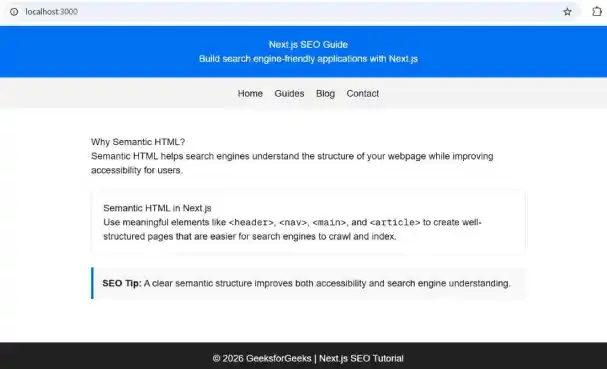
<h2>Why Semantic HTML?</h2>
<p>
Semantic HTML helps search engines understand the structure of your
webpage while improving accessibility for users.
</p>
</section>
<article
style={{
marginTop: "30px",
padding: "20px",
border: "1px solid #ddd",
borderRadius: "10px",
background: "#fff",
}}
>
<h3>Semantic HTML in Next.js</h3>
<p>
Use meaningful elements like{" "}
<code><header></code>,{" "}
<code><nav></code>,{" "}
<code><main></code>, and{" "}
<code><article></code> to create well-structured pages that
are easier for search engines to crawl and index.
</p>
</article>
<aside
style={{
marginTop: "25px",
padding: "15px",
borderLeft: "5px solid #0d6efd",
background: "#f8f9fa",
}}
>
<strong>SEO Tip:</strong> A clear semantic structure improves both
accessibility and search engine understanding.
</aside>
</main>
<footer
style={{
background: "#222",
color: "#fff",
textAlign: "center",
padding: "15px",
marginTop: "50px",
}}
>
© 2026 GeeksforGeeks | Next.js SEO Tutorial
</footer>
</>
);
}
Output:
Sitemap for SEO
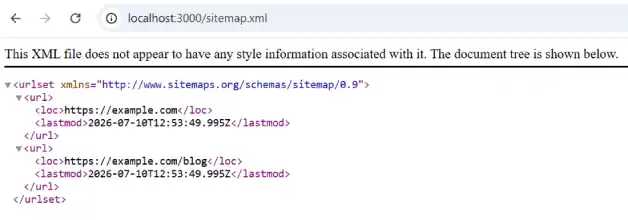
A sitemap is a file that lists the important pages of a website, helping search engines discover and index content more efficiently. In Next.js, a sitemap can be generated to improve the visibility of website pages in search results.
- Page Discovery: Helps search engines find important pages on the website.
- Improved Indexing: Makes it easier for search engines to index new and updated content.
- Large Websites: Ensures deep or less frequently visited pages are discovered.
- Built-in Support: Next.js supports sitemap generation using the app/sitemap.js or app/sitemap.ts file.
Example:
export default function sitemap() {
  return [
    {
      url: "https://example.com",
      lastModified: new Date(),
    },
    {
      url: "https://example.com/blog",
      lastModified: new Date(),
    },
  ];
}
Output:
robots.txt for SEO
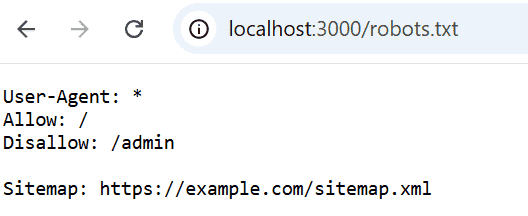
The robots.txt file provides instructions to search engine crawlers about which parts of a website they can or cannot access. In Next.js, it helps manage crawling behavior and optimize how search engines explore website content.
- Crawler Control: Specifies which pages or directories search engine crawlers can access.
- Crawl Optimization: Prevents crawlers from visiting unnecessary or restricted content.
- Sitemap Reference: Can include the location of the website's sitemap for easier page discovery.
- Built-in Support: Next.js supports generating a robots.txt file using the app/robots.js or app/robots.ts file.
Example:
export default function robots() {
  return {
    rules: {
      userAgent: "*",
      allow: "/",
      disallow: "/admin",
    },
    sitemap: "https://example.com/sitemap.xml",
  };
}
Output:
Working of Semantic HTML, Sitemap, and robots.txt Together
Semantic HTML, sitemap, and robots.txt work together to help search engines understand website content, discover important pages, and crawl the site efficiently, resulting in improved SEO and better indexing.
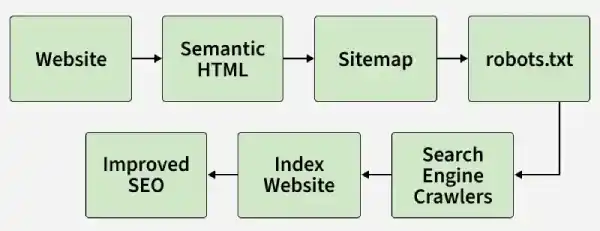
- Semantic HTML: Organizes webpage content using meaningful elements, making it easier for search engines to understand the page structure.
- Sitemap: Lists important URLs, helping search engines discover and prioritize website pages.
- robots.txt: Guides search engine crawlers by specifying which pages or directories should or should not be crawled.
- Combined Impact: Together, they improve crawling, indexing, and the overall visibility of a Next.js website in search results.
Note: While Semantic HTML helps search engines interpret content, the sitemap assists in page discovery, and robots.txt controls crawler access. Together, they form the foundation of effective SEO in Next.js.
Comparison of Semantic HTML, Sitemap, and robots.txt
Semantic HTML | Sitemap | robots.txt |
|---|---|---|
Defines the structure and meaning of webpage content. | Lists important website URLs for search engines. | Specifies which pages or directories crawlers can access. |
Helps search engines understand page content. | Helps search engines discover website pages. | Controls crawler behavior during website crawling. |
Improves accessibility and content organization. | Improves page discovery and indexing. | Prevents crawling of unnecessary or restricted content. |
Implemented using semantic HTML elements such as <header>, <main>, and <article>. | Generated as an XML sitemap. | Configured through the robots.txt file. |
Focuses on content structure. | Focuses on page discovery. | Focuses on crawl management. |
Enhances content relevance for SEO. | Ensures important pages are indexed efficiently. | Optimizes crawl budget by guiding search engine bots. |
Benefits of Using Semantics, Sitemap, and robots.txt for SEO
Semantic HTML, sitemap, and robots.txt work together to improve how search engines crawl, understand, and index a Next.js website.
- Improves search engine crawling and indexing.
- Enhances website visibility in search results.
- Helps search engines understand webpage structure and content.
- Enables faster discovery of important pages.
- Optimizes crawler access by restricting unnecessary pages.
- Improves accessibility and overall user experience.
- Supports better SEO performance for large and dynamic websites.
