

The req.params property is an object that contains route parameters extracted from the URL. For example, if you define a route as /student/:id, you can access the value of id using req.params.id. If a route has no parameters, req.params is an empty object ({}).
Syntax:
req.paramsParameter: No parameters.
Return Value: Returns an object containing the route parameters as key-value pairs.
Steps to Install the express module:
Step 1: You can install this package by using this command.
npm install expressStep 2: After installing the express module, you can check your express version in the command prompt using the command.
npm version expressStep 3: After that, you can just create a folder and add a file, for example, index.js. To run this file you need to run the following command.
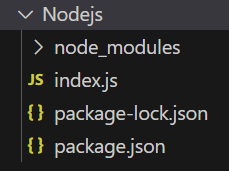
node index.jsProject Structure:
Example 1: Below is the code of req.params Property implementation.
const express = require('express');
const app = express();
const PORT = 3000;
app.get('/:id', function (req, res) {
    console.log(req.params.id);
    res.send();
});
app.listen(PORT, function (err) {
    if (err) console.log(err);
    console.log("Server listening on PORT", PORT);
});
Steps to run the program:
Run the index.js file using the below command:
node index.jsConsole Output:
Server listening on PORT 3000Browser Output: Now open your browser and go to http://localhost:3000/123, now you can see the following output on your console:

Example 2: Below is the code of req.params Property implementation.
const express = require('express');
const app = express();
const PORT = 3000;
const student = express.Router();
app.use('/student', student);
student.get('/profile/:start/:end', function (req, res) {
    console.log("Starting Page: ", req.params.start);
    console.log("Ending Page: ", req.params.end);
    res.send();
})
app.listen(PORT, function (err) {
    if (err) console.log(err);
    console.log("Server listening on PORT", PORT);
});
Steps to run the program: Run the index.js file using the below command:
node index.jsOutput: Send a GET request to http://localhost:3000/student/profile/12/17, now you can see the following output on your console:

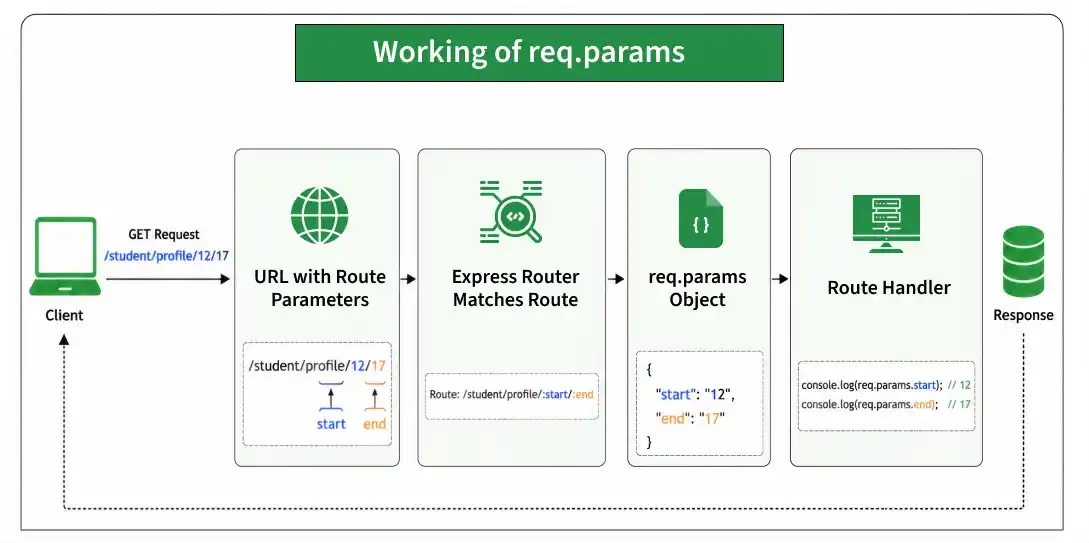
Working of req.params
- The client sends a request containing route parameters in the URL.
- Express matches the URL with the defined route.
- The route parameters are extracted and stored in req.params.
- You can access individual values using their parameter names, such as req.params.id.
Common Use Cases of req.params
- Accessing user IDs from URLs.
- Retrieving product or order IDs.
- Loading blog posts using a slug.
- Creating RESTful APIs with dynamic routes.
