

The express.raw() function is a built-in middleware function in Express. It parses incoming request bodies into a Buffer object and is based on body-parser. It is commonly used when working with raw request payloads.
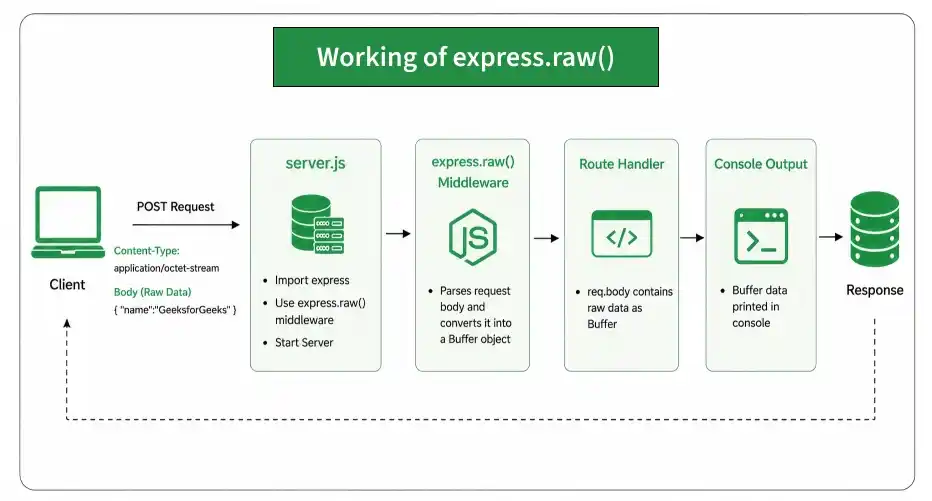
- Buffer: A Node.js object used to store raw binary data.
- Binary Data: Non-text data such as images, videos, audio, or files.
Syntax:
express.raw( [options] )Parameter: The options parameter contains various properties like inflate, limit, type, etc.
Return Value: It returns an Object.
Prerequisites: Before using express.raw(), make sure Express is installed in your project.
npm install express
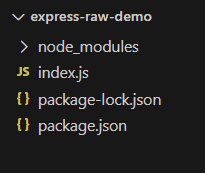
After that, you can just create a folder and add a file, for example, index.js. To run this file you need to run the following command.
node index.jsProject Structure:
Example 1: Filename: index.js
const express = require('express');
const app = express();
const PORT = 3000;
app.use(express.raw());
app.post('/', function (req, res) {
    console.log(req.body);
    res.end();
})
app.listen(PORT, function (err) {
    if (err) console.log(err);
    console.log("Server listening on PORT", PORT);
});
Steps to run the program:
Make sure you have installed the express module using the following command:
npm install expressRun the index.js file using the below command:
node index.jsOutput:
Console Output:
Server listening on PORT 3000Browser Output:
Now make a POST request to http://localhost:3000/ with header set to 'content-type' - 'application/octet-stream' and body { "name":"GeeksforGeeks" }, then you will see the following output on your screen: 
Example 2: Filename: index.js
const express = require('express');
const app = express();
const PORT = 3000;
// Without this middleware
// app.use(express.raw());
app.post('/', function (req, res) {
    console.log(req.body);
    res.end();
})
app.listen(PORT, function (err) {
    if (err) console.log(err);
    console.log("Server listening on PORT", PORT);
});
Steps to run the program:
Run the index.js file using the below command:
node index.jsNow make a POST request to http://localhost:3000/ with header set to 'content-type' - 'application/octet-stream' and body { "name":"GeeksforGeeks" }, then you will see the following output on your screen:
Output:
Server listening on PORT 3000
undefined
