

Zoom is a real-time video conferencing platform that allows users to join meetings, communicate through audio and video, share screens, exchange messages, and collaborate online. Since thousands or even millions of users may participate in meetings simultaneously, the system must be designed to provide low latency, high availability, and reliable media transmission.
- Supports real-time audio/video communication, screen sharing, chat, recording, and participant management.
- Designed to handle millions of concurrent participants while maintaining smooth communication across different geographical regions.
1. Problem Statement
The goal is to design a scalable Zoom-like video conferencing system that enables users to create and join online meetings with high-quality audio and video communication. The system should support real-time collaboration while maintaining low latency and high availability.
- Support one-to-one calls, group meetings, screen sharing, chat, recording, and participant management.
- Ensure smooth audio/video communication, reliable meeting connectivity, and scalability to handle millions of concurrent users across different geographical regions.
1. Requirements
The next section is Requirements, following the same structure as your WhatsApp and TikTok articles.
1.1 Functional Requirements
Functional requirements describe the core features that the Zoom system must support.
- Users should be able to register, log in, and manage their profiles.
- Users should be able to create, schedule, join, and leave meetings.
- Users should be able to communicate using real-time audio and video.
- Users should be able to share their screen during a meeting.
- Users should be able to exchange messages through in-meeting chat.
- Hosts should be able to mute participants, remove users, and manage meeting permissions.
- Users should be able to record meetings for later playback.
- The system should support both one-to-one calls and group meetings.
1.2 Non-Functional Requirements
Non-functional requirements define how well the system should perform under different conditions.
- Availability: The system should remain highly available with minimal downtime.
- Scalability: It should support millions of concurrent users and thousands of simultaneous meetings.
- Low Latency: Audio and video communication should have minimal delay for a smooth meeting experience.
- Reliability: Meetings should continue even if individual servers fail.
- Performance: Audio, video, and screen sharing should remain smooth under varying network conditions.
- Security: Meeting data, user authentication, and media streams should be securely encrypted.
- Fault Tolerance: The system should automatically recover from server or network failures.
- Maintainability: The architecture should be modular and easy to extend with new collaboration features.
2. Capacity Estimation
Before designing the architecture, we estimate the expected traffic, bandwidth, and infrastructure requirements. These estimations help us choose the appropriate servers, media infrastructure, and storage systems.
Assumptions
| Parameter | Assumption |
|---|---|
| Registered Users | 500 Million |
| Daily Active Users | 100 Million |
| Concurrent Users | 10 Million |
| Concurrent Meetings | 1 Million |
| Average Participants per Meeting | 10 |
| Average Meeting Duration | 45 Minutes |
| Average Video Bitrate | 2 Mbps |
2.1 Bandwidth Estimation
Assume each participant transmits an average 2 Mbps video stream.
Incoming Bandwidth
= 10 Million × 2 Mbps
= 20 Tbps
Outgoing Bandwidth
≈ 20 Tbps
Estimated Total Media Bandwidth: ≈ 40 Tbps
2.2 Storage Estimation
Assume 10% of meetings are recorded.
Recorded Meetings per Day
= 100,000
Assume
- Average Recording Size = 500 MB
Daily Storage
= 100,000 × 500 MB
≈ 50 TB/day
Monthly Storage
= 50 × 30
≈ 1.5 PB
Estimated Storage: ≈ 1.5 PB/month (recordings only)
2.3 Media Server Estimation
Assume one media server can handle 10,000 concurrent participants.
Number of Media Servers
= 10 Million / 10,000
= 1,000 Servers
Estimated Media Servers: ≈ 1,000 Servers
3. High Level Design
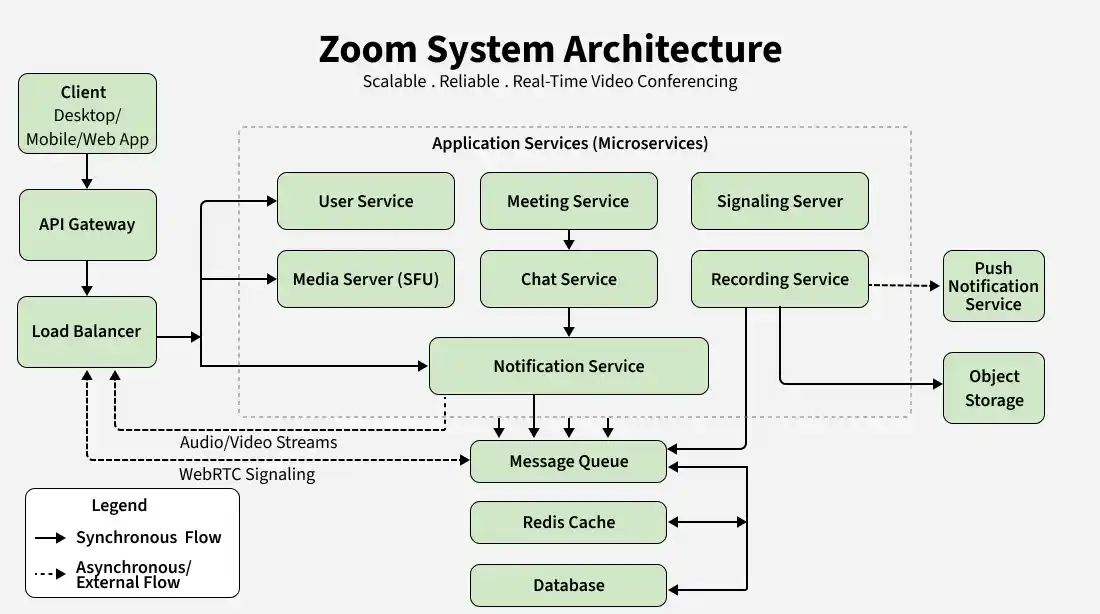
The High-Level Design (HLD) describes the overall architecture of the Zoom system and explains how different components work together to provide scalable, reliable, and low-latency video conferencing.
Core Components
After the architecture diagram, explain each component one by one.
- Client: The client represents the Zoom application running on desktop, mobile, or web browsers. It allows users to create meetings, join meetings, communicate using audio/video, share screens, and chat.
- API Gateway: The API Gateway acts as the single entry point for all client requests. It authenticates users, applies rate limiting, and routes requests to the appropriate backend services.
- Load Balancer: The Load Balancer distributes incoming requests across multiple application servers, ensuring high availability and preventing server overload.
- User Service: The User Service manages user registration, authentication, profiles, contacts, and account settings.
- Meeting Service: The Meeting Service creates, schedules, joins, and manages meeting sessions. It also keeps track of participants and meeting metadata.
- Signaling Server: The Signaling Server establishes connections between participants by exchanging session information, ICE candidates, and SDP messages required for WebRTC communication.
- Media Server (SFU): The Media Server (Selective Forwarding Unit) receives audio and video streams from participants and forwards them to other users without re-encoding, significantly reducing bandwidth consumption and latency.
- Chat Service: The Chat Service manages real-time text messaging exchanged during meetings.
- Recording Service: The Recording Service captures meeting audio, video, and screen-sharing streams and stores recordings for later playback.
- Notification Service: The Notification Service sends meeting invitations, reminders, participant events, and other notifications.
- Redis Cache: Redis stores frequently accessed data such as active meeting sessions, participant information, and user sessions to improve response time.
- Message Queue: A Message Queue processes background tasks such as recording, notifications, analytics, and meeting logs asynchronously.
- Database: The database stores user accounts, meeting information, participant details, chat history, and recording metadata.
- Object Storage: Object Storage stores recorded meetings, shared files, chat attachments, and other media assets.
Request Flow
After explaining the components, describe how a user joins and participates in a meeting.
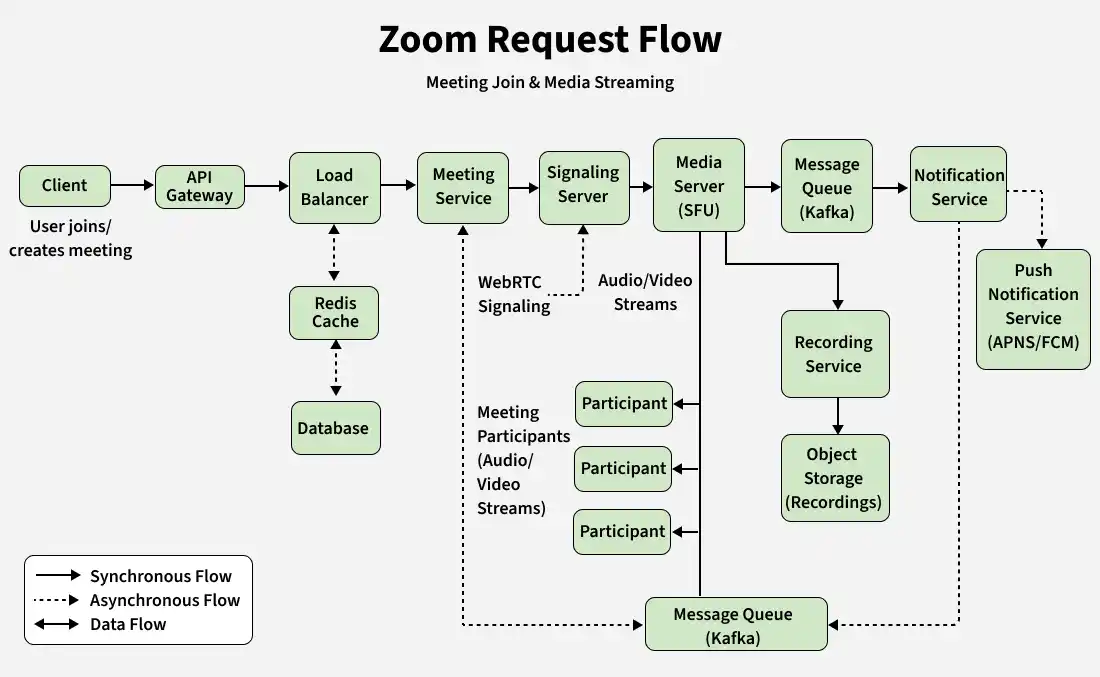
- A user creates or joins a meeting using the Zoom application.
- The request reaches the API Gateway, which authenticates the user.
- The Load Balancer forwards the request to the Meeting Service.
- The Meeting Service validates the meeting details and registers the participant.
- The Signaling Server exchanges connection information required to establish a WebRTC session.
- Once the connection is established, audio and video streams are sent to the Media Server (SFU).
- The Media Server forwards media streams to all meeting participants with minimal latency.
- Chat messages, participant events, and notifications are processed asynchronously through the Message Queue.
- If recording is enabled, the Recording Service stores the meeting in Object Storage.
- Redis Cache and the Database continuously synchronize meeting state, participant information, and metadata.
Data Flow
The data flow shows how meeting requests, media streams, and recordings move through different components of the Zoom system during a video conference.
- The client sends a meeting request to the API Gateway, which authenticates the user and forwards it to the Meeting Service.
- The Meeting Service validates the meeting and retrieves session information from Redis Cache or the Database if required.
- The Signaling Server establishes the WebRTC connection by exchanging signaling information between participants.
- Once connected, audio, video, and screen-sharing streams are forwarded through the Media Server (SFU) for low-latency communication.
- Chat messages, notifications, and recording tasks are processed asynchronously using the Message Queue.
- If recording is enabled, the Recording Service stores meeting recordings in Object Storage, while metadata is maintained in the Database.
Real-Time Communication
Real-time communication is the core of Zoom, enabling low-latency audio, video, and screen sharing between participants.
- WebRTC: Establishes real-time communication between meeting participants.
- UDP: Used for audio, video, and screen sharing because it provides low latency, ensuring smooth communication even if a few packets are lost.
- TCP: Used for reliable operations such as authentication, meeting creation, chat messages, notifications, and other control data where reliable delivery is required.
5. Technology Stack
The technology stack defines the tools and technologies used to build different components of the Zoom system. Choosing the right technologies helps achieve scalability, reliability, and low-latency communication.
| Component | Technology |
|---|---|
| Client | Web, Android, iOS |
| API | REST API |
| Real-Time Communication | WebRTC |
| Signaling | WebSocket |
| Cache | Redis |
| Message Queue | Kafka |
| Database | PostgreSQL / MySQL |
| Object Storage | Amazon S3 |
| CDN | CloudFront |
| Load Balancer | Nginx / HAProxy |
5. Data Model Design
The data model defines how Zoom stores and manages users, meetings, participants, recordings, and chat messages. A well-designed schema ensures efficient meeting management, participant tracking, and reliable storage of meeting data.
- Identify the core entities required for video conferencing and collaboration.
- Define relationships between entities to maintain data consistency.
- Select appropriate databases based on scalability and performance requirements.
Core Entities
The Zoom system consists of the following core entities:
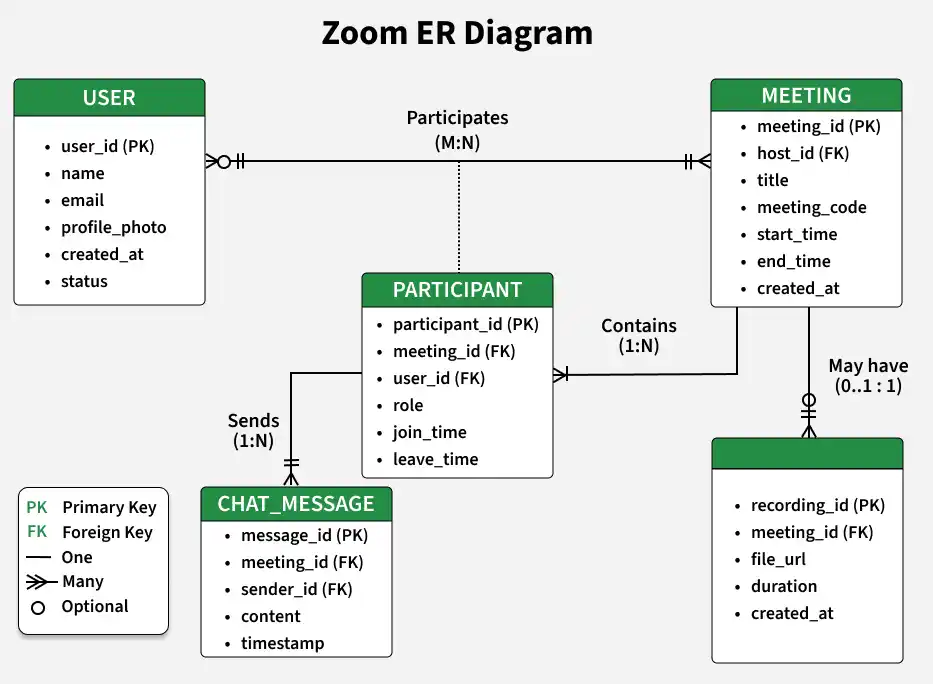
- User: Stores user profile information, account details, and authentication data.
- Meeting: Represents a scheduled or ongoing meeting with its metadata.
- Participant: Stores participant information, roles (Host, Co-host, Participant), and meeting status.
- ChatMessage: Stores messages exchanged during a meeting.
- Recording: Stores metadata of recorded meetings, while the actual recording files are stored in Object Storage.
Database Selection
A combination of SQL and Object Storage can be used depending on the type of data being stored.
- SQL Database is suitable for storing users, meetings, participants, chat messages, and meeting metadata because these entities have structured relationships.
- Object Storage is used to store meeting recordings, shared files, and screen-sharing assets, while only their metadata is maintained in the database.
7. API Design
The API design defines how the Zoom client communicates with backend services to perform operations such as user authentication, meeting management, chat, and recordings.
- Design REST APIs that are simple, scalable, and easy to consume.
- Use appropriate HTTP methods for meeting lifecycle and collaboration features.
- Secure APIs using authentication mechanisms such as JWT or OAuth.
Authentication APIs
| Method | Endpoint | Description |
|---|---|---|
| POST | /api/v1/auth/register | Register a new user |
| POST | /api/v1/auth/login | Authenticate a user |
| POST | /api/v1/auth/logout | Logout the current user |
Meeting APIs
| Method | Endpoint | Description |
|---|---|---|
| POST | /api/v1/meetings/create | Create a new meeting |
| POST | /api/v1/meetings/join | Join an existing meeting |
| GET | /api/v1/meetings/{meetingId} | Get meeting details |
| POST | /api/v1/meetings/{meetingId}/leave | Leave a meeting |
Chat APIs
| Method | Endpoint | Description |
|---|---|---|
| POST | /api/v1/chat/messages | Send a chat message |
| GET | /api/v1/chat/{meetingId}/messages | Fetch meeting chat messages |
Recording APIs
| Method | Endpoint | Description |
|---|---|---|
| POST | /api/v1/recordings/start | Start meeting recording |
| POST | /api/v1/recordings/stop | Stop meeting recording |
| GET | /api/v1/recordings/{recordingId} | Fetch recording details |
Sample Request
POST /api/v1/meetings/join
{
"meetingId": "meeting_123",
"userId": "user_101",
"meetingPassword": "123456"
}
Sample Response
{
"meetingId": "meeting_123",
"participantId": "participant_456",
"status": "joined",
"joinTime": "2026-07-24T10:30:45Z"
}
8. Low Level Design
The Low-Level Design (LLD) describes the internal structure of the Zoom system by defining the key classes, their responsibilities, and their interactions. It helps organize the application into modular, maintainable, and extensible components.
Core Classes
The Zoom system can be designed using the following core classes:
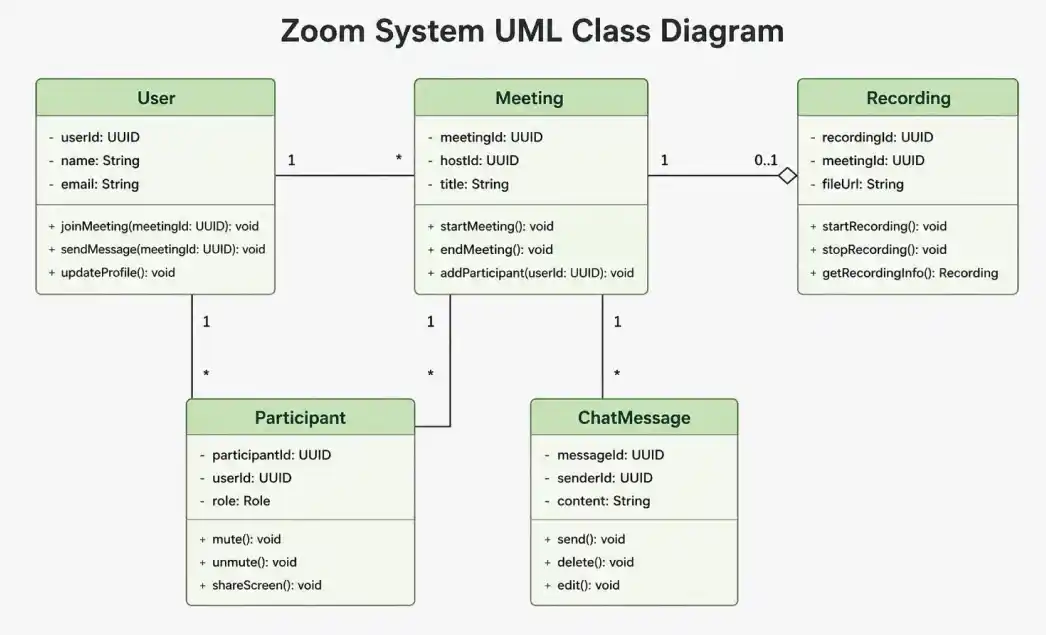
- User: Manages user profile information, authentication, and meeting participation.
- Meeting: Represents a meeting session and manages participants.
- Participant: Stores participant details, role, and meeting status.
- ChatMessage: Handles real-time messages exchanged during meetings.
- Recording: Manages meeting recordings and recording metadata.
SOLID Principles
The Zoom system follows SOLID principles to keep the code modular, maintainable, and easy to extend.
- Single Responsibility Principle (SRP): Each class has a single responsibility. For example, the MeetingService manages meetings, while the RecordingService handles meeting recordings.
- Open/Closed Principle (OCP): New collaboration features such as virtual backgrounds, breakout rooms, or live captions can be added without modifying existing meeting logic.
- Liskov Substitution Principle (LSP): Different participant roles such as Host, Co-host, and Participant can be used wherever a generic participant is expected.
- Interface Segregation Principle (ISP): Services expose only the operations they require, preventing unnecessary dependencies between meeting, chat, and recording modules.
- Dependency Inversion Principle (DIP): High-level services depend on abstractions, allowing components such as databases, caches, media servers, or notification providers to be replaced without affecting business logic.
Design Patterns
The following design patterns can be used in the Zoom system:
| Design Pattern | Usage |
|---|---|
| Singleton | Database, Redis cache, and configuration management |
| Factory | Create different meeting types (Instant, Scheduled, Webinar) |
| Strategy | Handle different video quality and streaming strategies |
| Observer | Notify participants about joins, leaves, chat messages, and meeting events |
9. Scalability & Performance
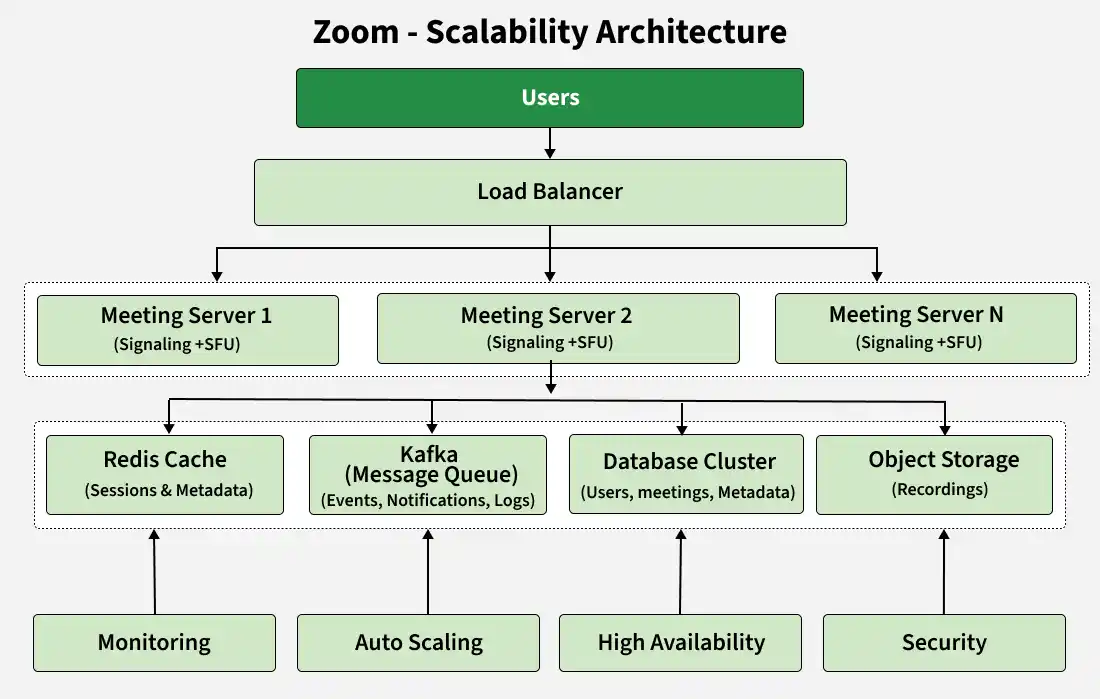
Scalability and performance ensure that the Zoom system can support millions of concurrent users while providing low-latency audio/video communication, reliable meetings, and high availability.
- Media Server Scaling (SFU): Multiple SFU servers distribute media streams across participants, reducing bandwidth usage and enabling large meetings.
- Load Balancing: A Load Balancer distributes meeting requests across application and signaling servers to prevent overload and ensure high availability.
- Redis Cache: Redis stores active meeting sessions, participant states, and user sessions to reduce database access and improve response time.
- Database Replication: Read replicas improve performance for user accounts, meeting metadata, and recordings while providing fault tolerance.
- Database Sharding: Meeting data and recordings are partitioned across multiple database servers, allowing the system to scale horizontally.
- Asynchronous Processing: Message Queues process recordings, notifications, analytics, and meeting logs in the background without affecting live meetings.
- Horizontal Scaling: Additional Meeting Servers, Signaling Servers, Media Servers, and Recording Servers can be added dynamically during peak traffic.
- Adaptive Media Streaming: Audio and video quality automatically adjusts according to available network bandwidth, ensuring smooth communication.
- Rate Limiting: Prevents excessive API requests, meeting abuse, and bot traffic from overloading backend services.
- Auto Scaling: Cloud infrastructure automatically provisions or removes resources based on concurrent meeting traffic.
10. Bottlenecks & Improvements
This section discusses the common challenges a Zoom system may face at scale and the techniques used to maintain low-latency communication, high availability, and reliable video conferencing.
- Identify common bottlenecks that affect large-scale video conferencing.
- Apply suitable techniques to improve scalability, reliability, and user experience.
Common Bottlenecks
As the number of meetings and participants increases, the Zoom system may encounter several bottlenecks.
- Media Server Overload: A single SFU server can become overloaded when handling thousands of audio and video streams. Horizontal scaling distributes participants across multiple SFU servers.
- Bandwidth Consumption: High-quality video streams consume significant network bandwidth. Adaptive bitrate streaming and efficient video codecs reduce bandwidth usage.
- Database Bottleneck: A single database server may struggle with millions of users and meetings. Database replication and sharding distribute the load.
- Signaling Server Congestion: Large numbers of participants joining meetings simultaneously can overload signaling servers. Multiple signaling servers behind a Load Balancer improve scalability.
- Recording Delays: Processing and storing large meeting recordings can become slow. Asynchronous recording pipelines reduce processing delays.
Possible Improvements
The following techniques further improve the scalability, reliability, and overall performance of the Zoom system.
- Auto Scaling: Automatically add or remove Meeting Servers, SFU Servers, and Signaling Servers based on participant load.
- Failover Mechanism: Redirect participants to healthy servers if a Media Server or Meeting Server fails.
- Multi-Region Deployment: Deploy infrastructure across multiple regions to reduce latency and improve availability for global users.
- Monitoring & Alerting: Continuously monitor server health, meeting quality, CPU usage, packet loss, and latency to detect issues early.
- Adaptive Video Quality: Dynamically adjust video resolution and bitrate based on the user's network conditions for a smooth conferencing experience.
