

Adding custom local fonts in a Next.js project enhances the typography while improving performance because the fonts are loaded directly from the project. Using the built-in next/font/local module, you can automatically optimize and apply local fonts across your application.
Approach
To add custom local fonts in Next.js, place the font files inside your project, import them using next/font/local, and apply the generated font class to your application or specific components.
Steps to add Custom Fonts in Next.js
Prerequisite: Before following this tutorial, make sure you have already created a Next.js project. If not, refer to the Next.js Installation and First Application article.
Step 1: Download the Required Font
If you already have the fonts, then skip this step. Download the required fonts from Google Fonts.

For this project, we are downloading Rubik font from Google Fonts.
Step 2: Create a fonts Directory
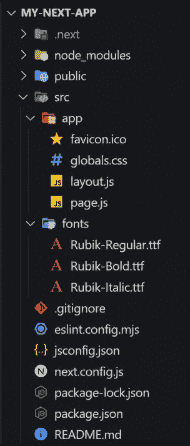
Open the project in your code editor, and create a new folder fonts inside the src directory and move the downloaded font files into the src/fonts folder.
Project Structure:
Step 3: Import the Local Font
Open the src/app/layout.js file and import the local font using next/font/local.
// File Path: src/app/layout.js
import localFont from "next/font/local";
import "./globals.css";
const rubik = localFont({
    src: [
        {
            path: "../fonts/Rubik-Regular.ttf",
            weight: "400",
            style: "normal",
        },
        {
            path: "../fonts/Rubik-Bold.ttf",
            weight: "700",
            style: "normal",
        },
        {
            path: "../fonts/Rubik-Italic.ttf",
            weight: "400",
            style: "italic",
        },
    ],
});
export const metadata = {
    title: "Local Fonts Example",
    description: "Using local fonts in Next.js",
};
export default function RootLayout({ children }) {
    return (
        <html lang="en">
            <body className={rubik.className}>
                {children}
            </body>
        </html>
    );
}
Here, localFont() imports the local font files and automatically generates the required CSS. Applying rubik.className to the <body> element makes the font available throughout the application.
Step 4: Test the added fonts
Open the src/app/page.js file and replace its contents with the following code.
// File Path: src/app/page.js
export default function Home() {
    return (
        <main>
            <h1>Hello Geeks</h1>
            <p>
                This text is displayed using the Rubik local font.
            </p>
        </main>
    );
}
Step 5: Run the Application:
Use the below command to run the application
npm run devOutput:

