

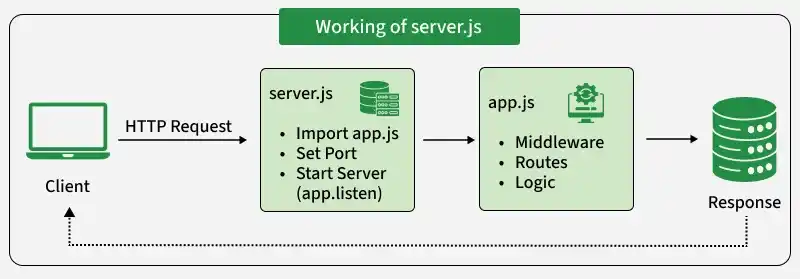
In Express.js applications, separating the app.js and server.js files is a common best practice that keeps the project organized, easier to maintain, and scalable. The app.js file contains the application logic, while the server.js file is responsible for starting the server.
Purpose of the app.js File
The app.js file contains the core logic of your Express application. It’s responsible for defining routes, middleware, and how requests should be handled.
- Setting up Express: The app.js file creates and configures the Express application
- Handling Middleware: Middleware like express.json() is used for parsing incoming requests.
- Defining Routes: You define the routes that handle HTTP requests in this file.
- Exporting the App: The Express app is exported so it can be used in another file (like server.js) to run the application.
Example of app.js:
const express = require("express");
const app = express();
app.use(express.json());
app.get("/", (req, res) => {
    res.send("Hello, World!");
});
module.exports = app;
Explanation:
- Middleware: express.json() is used to parse incoming JSON request bodies.
- Routes: A route is defined for the root path (/) that responds with "Hello, World!".
- Exporting the App: app is exported so it can be used in server.js.
Purpose of the server.js File
The server.js file is responsible for configuring and starting the server. It imports the Express app from app.js, sets the port, and tells the app to listen for incoming requests.
- Importing the Express App: It imports the app created in app.js.
- Setting Up the Port: The server listens on a specific port (e.g., 3000).
- Starting the Server: The server is started using app.listen() to handle incoming requests.
- Logging the Server Status: It logs a message when the server starts successfully.
//server.js
const app = require('./app');  // Import the Express app from app.js
const PORT = process.env.PORT || 3000;  // Set the port to use (default is 3000)
app.listen(PORT, () => {
  console.log(`Server is running at http://localhost:${PORT}`);
});
Explanation:
- Importing the App: The Express app is imported from app.js to run the routes and middleware defined there.
- Setting the Port: The server listens on a specific port (either from the environment or defaulting to 3000).
- Starting the Server: The app.listen() function starts the server and listens for requests.
- Logging: It logs a message when the server is successfully running.
Advantages of Separating app.js and server.js
- Clear Separation of Concerns: By separating the app and server logic, each file has a clear purpose—app.js handles the application logic, while server.js takes care of server configuration. This makes the code easier to understand.
- Better Code Organization: It allows developers to focus on specific tasks, such as adding new routes or middleware in app.js, without worrying about server setup, keeping the codebase neat and manageable.
- Easier Maintenance: If there’s an issue with the server or routes, you can quickly find and address the problem in the appropriate file. This makes debugging and updating faster.
- Scalability: As the application grows, having separate files makes it easier to add features or adjust configurations without breaking other parts of the code.
- Improved Testability: Since the Express application is exported from app.js, it can be imported into test files without starting the server.
