

Adding a video player in a Next.js application enhances the user experience by enabling video playback. The react-player library simplifies integrating various video sources such as YouTube, Vimeo, and local files.
Approach
To add a Video Player in Next.js, we will use the react-player package. This package allows us to easily embed a video player anywhere in our application. Install the package, import the ReactPlayer component, and then use it inside your page to display the video player.
Steps to Add Video Player in Next.js
Prerequisite: Before following this tutorial, make sure you have already created a Next.js project. If not, refer to the Next.js Installation and First Application article.
Step 1: Install the required package:
Run the following command inside your project directory:
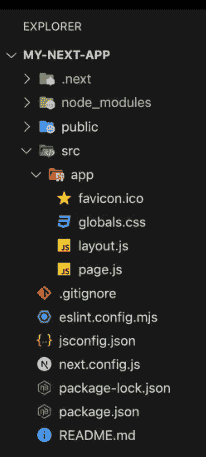
npm install react-playerProject Structure: It will look like this.
Step 2: Add the Video Player
Open the src/app/page.js file and add the following code.
// File Path: src/app/page.js
"use client";
import ReactPlayer from "react-player";
export default function Home() {
    return (
        <main>
            <h2>Next.js Video Player - GeeksforGeeks</h2>

            <ReactPlayer
                url="https://www.youtube.com/watch?v=wWgIAphfn2U"
                controls
                width="100%"
            />
        </main>
    );
}
Explanation: Here, we first import the ReactPlayer component from the installed package. Then, we use the component inside our page and pass the video URL using the url prop. The controls prop displays the video controls, while width="100%" makes the player responsive.
Step 3: Run the application:
Run the below command in the terminal to run the app.
npm run devOutput:
