

Digital forensic investigations often involve analyzing unknown strings, suspicious files or encoded data. Before performing any forensic examination, investigators must determine whether the evidence is a cryptographic hash, encrypted ciphertext or steganographic content. Each serves a different security objective and requires different analysis techniques.
Identifying Cryptographic Hashes
A cryptographic hash is a fixed-length output generated using a one-way mathematical algorithm. Since the original data cannot be reconstructed from the digest, hashes are widely used for integrity verification, password storage, malware identification and digital signatures.
- Collision Resistance: Makes it computationally infeasible to generate two different inputs producing the same hash value.
- Pre-image Resistance: Prevents recovery of the original input from its hash, ensuring one-way security.
- Second Pre-image Resistance: Prevents an attacker from finding another input with the same digest as an existing input.
- Deterministic Processing: Identical inputs always generate identical hash values, enabling reliable integrity verification.
- Algorithm-Specific Digest Length: Each hashing algorithm generates a predefined digest length that assists in algorithm identification during forensic analysis.
- Example: The below digest contains 32 hexadecimal characters, indicating that it is likely an MD5, NTLM or LM hash.
5d41402abc4b2a76b9719d911017c592Common Hash Lengths
| Algorithm | Output Length |
|---|---|
| MD5 | 32 Characters |
| SHA-1 | 40 Characters |
| SHA-224 | 56 Characters |
| SHA-256 | 64 Characters |
| SHA-384 | 96 Characters |
| SHA-512 | 128 Characters |
Identifying Encryption (Ciphers)
Encryption converts readable plaintext into ciphertext using a cryptographic algorithm and one or more keys. Unlike hashing, encryption is reversible and allows authorized users to recover the original information using the correct decryption key.
- Ciphertext Structure: May contain initialization vectors (IVs), salts, authentication tags or padding depending on the encryption algorithm.
- Encoding Formats: Frequently represented in Base64, hexadecimal or binary format for storage and transmission.
- Entropy Analysis: Properly encrypted data exhibits high entropy (typically close to 8 bits/byte), indicating a high degree of randomness.
- Block and Stream Processing: Symmetric ciphers operate either as block ciphers (AES, DES) or stream ciphers (ChaCha20), which influences ciphertext structure.
Encryption Indicators
- U2FsdGVkX1... generally indicates OpenSSL encryption.
- -----BEGIN PGP MESSAGE----- identifies a PGP encrypted message.
- -----BEGIN PUBLIC KEY----- represents a PEM public key.
- -----BEGIN RSA PRIVATE KEY----- indicates a private RSA key.
Common Encryption Algorithms
| Symmetric | Asymmetric |
|---|---|
| AES | RSA |
| DES | ECC |
| 3DES | ElGamal |
| Blowfish | DSA |
| ChaCha20 | Diffie-Hellman |
Using Entropy for Identification
Entropy measures the randomness of digital data and helps investigators distinguish encrypted or compressed files from ordinary text. Higher entropy generally indicates greater randomness, although compressed files may produce similar values.
- High entropy alone does not confirm encryption.
- Compare entropy with file signatures and metadata.
- Analyze multiple indicators before drawing conclusions.
- Use entropy as a supporting forensic metric rather than primary evidence.
Typical Entropy Values
| Data Type | Entropy |
|---|---|
| Plain Text | 4–5 bits/byte |
| Compressed Files | 7–8 bits/byte |
| Encrypted Data | 7.9–8 bits/byte |
Identifying Steganography
Steganography hides secret information inside another digital object while preserving the normal appearance of the carrier file. Instead of protecting the content through encryption, it conceals the existence of the information itself.
- Magic Number Mismatch: File header differs from the file extension, indicating possible disguise.
- Metadata Anomalies: Unexpected comments, software names, timestamps or author information suggest hidden processing.
- Abnormal File Structure: Extra bytes, unexpected data segments or modified file headers indicate embedded content.
- Statistical Irregularities: Pixel, audio sample or byte distributions deviate from their expected patterns due to data embedding.
- Embedded Objects: Presence of hidden archives, executable files or compressed data within the carrier file.
Common Carrier Media
| Carrier Type | Common Formats |
|---|---|
| Images | JPEG, PNG, BMP, GIF |
| Audio | WAV, MP3, FLAC |
| Video | MP4, AVI, MKV |
| Documents | PDF, DOCX, PPTX |
Least Significant Bit (LSB) Steganography
LSB steganography stores information by modifying the least significant bit of image pixels. Since only one bit changes per pixel, the visual appearance remains almost identical to the original image.
Example:
Original : 11001010
Modified : 11001011
Common Identification Tools
- HashID: Hash Identification.
- Name-That-Hash: Automatic Hash Detection.
- CyberChef: Encoding and Cryptographic Analysis.
- Binwalk: Embedded File Detection.
- ExifTool: Metadata Analysis.
- StegExpose: Image Steganography Detection.
- Steghide: Hidden Data Extraction.
- zsteg: LSB Detection.
- Hex Editor: Binary Structure Analysis.
Lab 1: Identifying Hashes
You receive a list of suspicious strings found in logs. Determine if these are hashes and which algorithm is used.
Sample Strings:
5f4dcc3b5aa765d61d8327deb882cf99
098f6bcd4621d373cade4e832627b4f6Tools: hash-identifier, CrackStation, Hash Analyzer
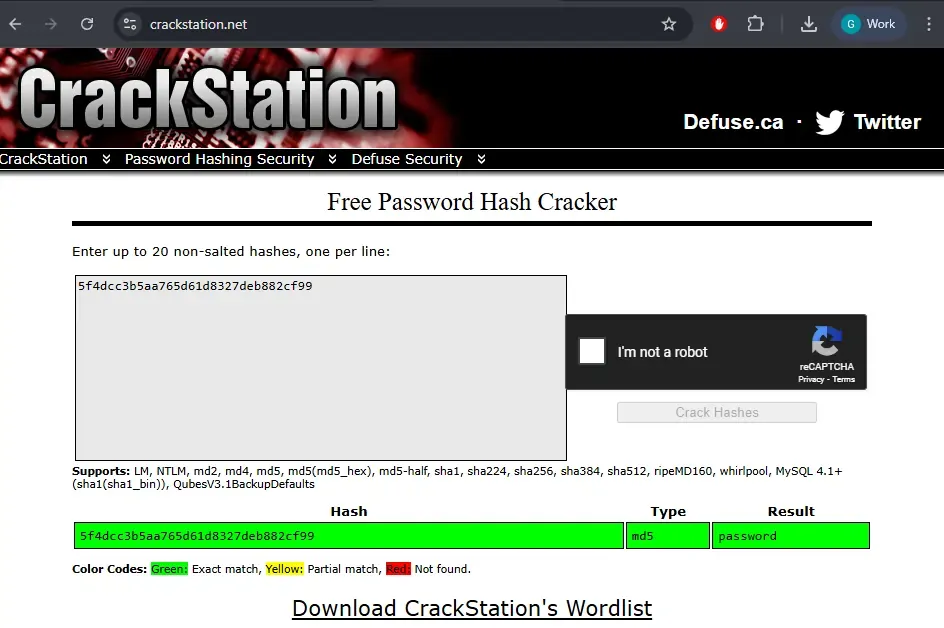
Lab 2: Identifying Ciphers or Encoded Text
Try to decode this flag found in a text file named secret.txt
Gur synt vf: frpergZrffntr123Tasks:
- Identify the encoding/cipher
- Decode the message
- Determine how you can automate this process
Tools: CyberChef, Rot13 Decoder, Base64
Lab 3: Spotting Steganography in Images
You receive a suspicious file: victim.png

Tasks:
- Use
strings victim.pngto find embedded readable text. - Use
exiftool victim.pngto check image metadata. - Try
steghide extract -sf victim.png(try common passwords like "password", "1234").
cli commands:
strings victim.png
exiftool victim.png
steghide extract -sf victim.png
Online based:
- Steganography
- Steganography encode-decode
Hint: Try uploading this image into the first steganography tool listed and decode it
Hashes vs. Ciphers vs. Steganography
| Feature | Hashing | Encryption | Steganography |
|---|---|---|---|
| Purpose | Integrity Verification | Data Confidentiality | Data Concealment |
| Reversible | No | Yes | Yes (after extraction) |
| Uses Key | No | Yes | Optional |
| Output | Fixed-Length Digest | Ciphertext | Carrier File |
| Primary Use | Passwords, Integrity | Secure Communication | Hidden Communication |
