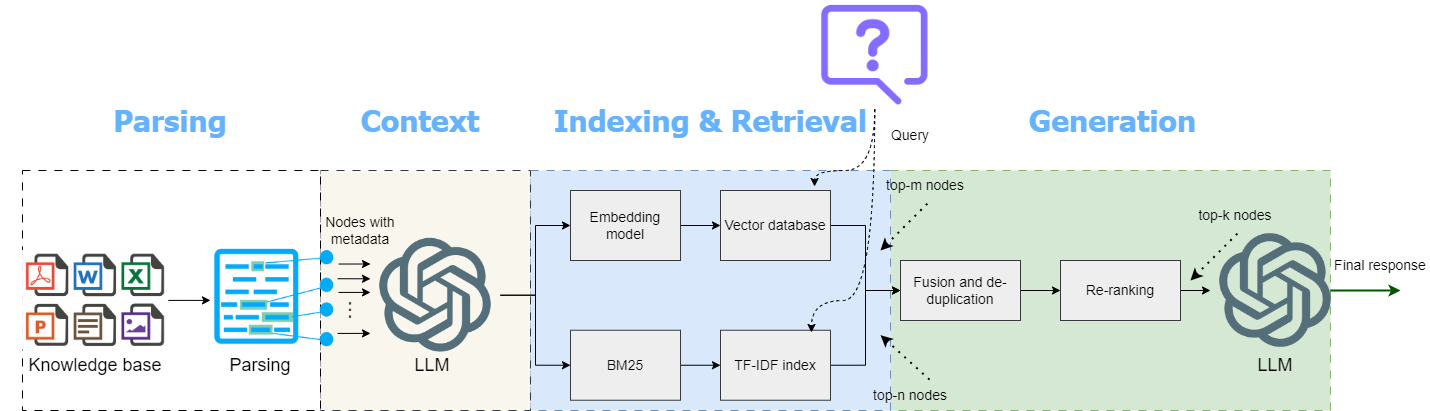
Building LLMs-Powered Apps with OPL Stack
OPL: OpenAI, Pinecone, and Langchain for knowledge-based AI assistant

I remember a month ago, Eugene Yan posted a poll on Linkedin:
Are you feeling the FOMO from not working on LLMs/Generative AI?
Most answered "Yes". It's easy to understand why, given the sweeping attention generated by chatGPT and now the release of gpt-4. People describe the rise of Large Language Models (LLMs) feels like the iPhone moment. Yet I think there's really no need to feel the FOMO. Consider this: missing out on the opportunity to develop iPhones doesn't preclude the ample potential for creating innovative iPhone apps. So too with LLMs. We have just entered the dawn of a new era and now it's the perfect time to harness the magic of integrating LLMs to build powerful applications.
In this post, I'll cover below topics:
What is the OPL stack?
How to use the OPL to build chatGPT with domain knowledge? (Essential components with code walkthrough)
Production considerations
Common misconceptions
1. What is the OPL stack?
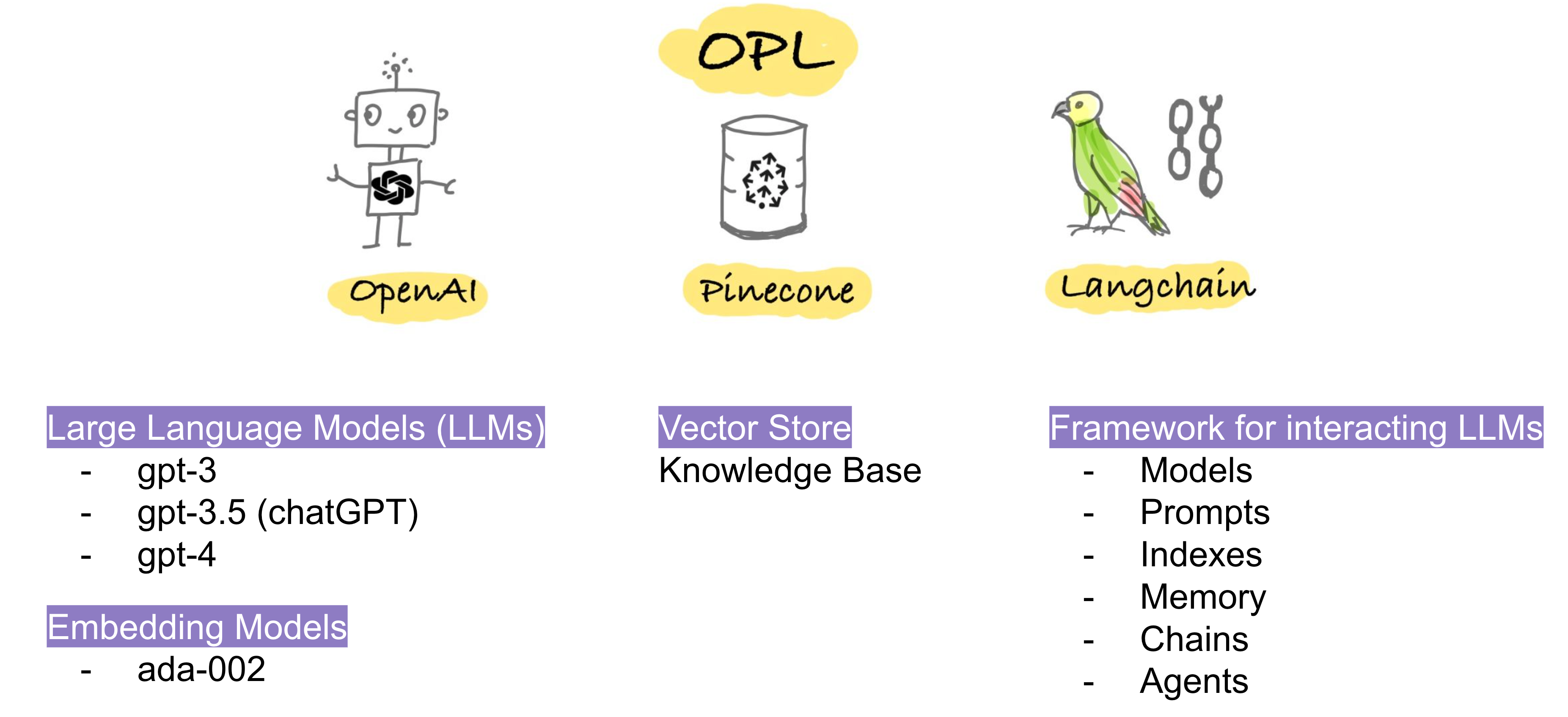
OPL stands for OpenAI, Pinecone, and Langchain, which has increasingly become the industry solution to **** overcome the two limitations of LLMs:
LLMs hallucination: chatGPT will sometimes provide wrong answers with overconfidence. One of the underlying causes is that those language models are trained to predict the next word very effectively, or the next token to be precise. Given an input text, chatGPT will return words with high probability, which doesn't mean that chatGPT has reasoning ability.
Less up-to-date knowledge: chatGPT's training data is limited to internet data prior to Sep 2021. Therefore, it will produce less desirable answers if your questions are about recent trends or topics.
The common solution is to add a knowledge base on top of LLMs and use Langchain as a framework to build the pipeline. The essential components of each technology can be summarized below:
OpenAI:
provides API access to powerful LLMs such as chatGPT and gpt-4
provides embedding models to convert text to embeddings.
Pinecone: it provides embedding vector storage, semantic similarity comparison, and fast retrieval.
Langchain: it comprises 6 modules (
Models,Prompts,Indexes,Memory,ChainsandAgents).Modelsoffers flexibility in embedding models, chat models, and LLMs, including but not limited to OpenAI's offerings. You can also use other models from Hugging Face like BLOOM and FLAN-T5.Memory: there are a variety of ways to allow chatbots to remember past conversation memory. From my experience, entity memory works well and is efficient.Chains: If you're new to Langchain, Chains is a great starting point. It follows a pipeline-like structure to process user input, select the LLM model, apply a Prompt template, and search the relevant context from the knowledge base.
Next, I'll walk through the app I built using the OPL stack.
2. How to use the OPL to build chatGPT with domain knowledge? (Essential components with code walkthrough)
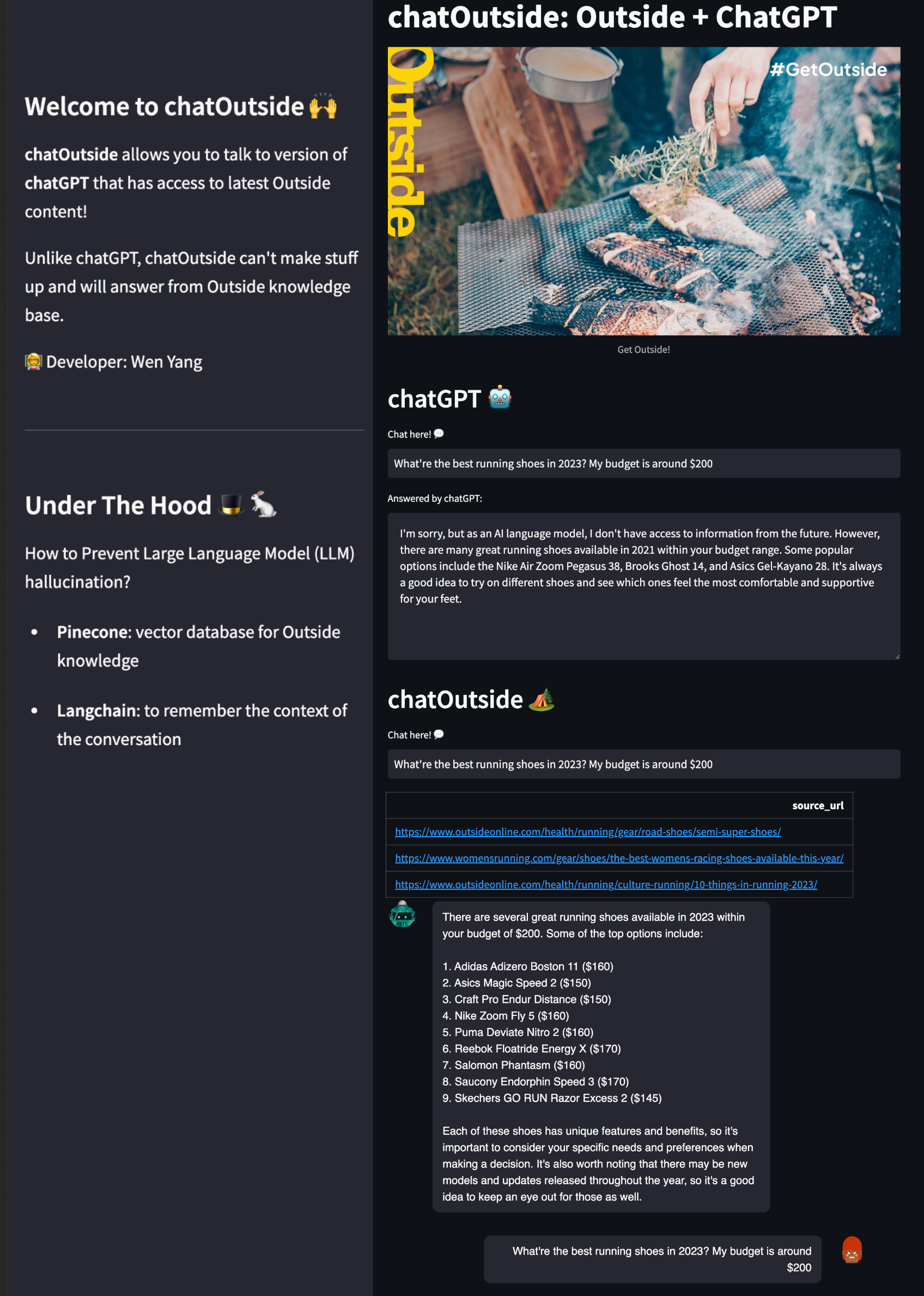
The app I built is called chatOutside , which has two primary sections:
chatGPT: lets you chat with chatGPT directly, and the format is similar to a Q&A app, where you receive a single input and output at a time.
chatOutside: allows you to chat with a version of chatGPT with expert knowledge of Outdoor activities and trends. The format is more like a chatbot style, where all messages are recorded as the conversation progresses. I've also included a section that provides source links, which can boost user confidence and is always useful to have.
As you can see, if you ask the same question: "What're the best running shoes in 2023? My budget is around $200". chatGPT will say "as an AI language model, I don't have access to information from the future." While chatOutside will provide you with more up-to-date answers, along with source links.
There are three major steps involved in the development process:
Step 1: Build an Outside Knowledge Base in Pinecone
Step 2: Use Langchain for Question & Answering Service
Step 3: Build our app in Streamlit
Implementation details for each step are discussed below.
Step 1: Build an Outside Knowledge Base in Pinecone
Step 1.1: I connected to our Outside catalog database and selected articles published between January 1st, 2022, and March 29th, 2023. This provided us with approximately 20,000 records.
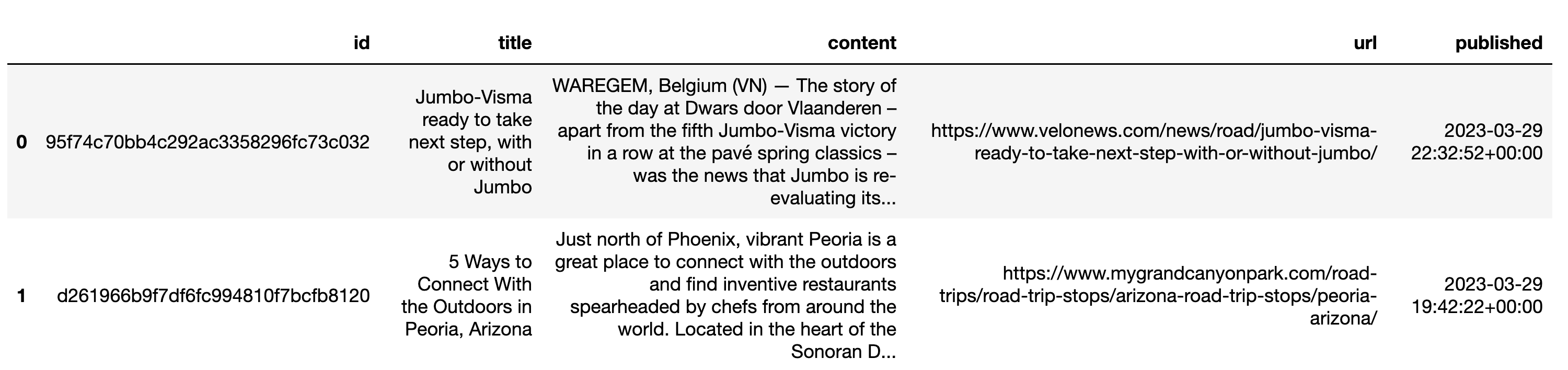
Next, we need to perform two data transformations.
Step 1.2: convert the above dataframe to a list of dictionaries to ensure data can be upserted correctly into Pinecone.
Step 1.3: Split the
contentinto smaller chunks using Langchain'sRecursiveCharacterTextSplitter. The benefit of breaking down documents into smaller chunks is twofold:A typical article might be more than 1000 characters, which is very long. Imagine we want to retrieve top-3 articles as context to prompt the chatGPT, we could easily hit the 4000 token limit.
Smaller chunks provide more relevant information, resulting in better context to prompt chatGPT.
After splitting, each record's content was broken down into multiple chunks, each having less than 400 tokens.
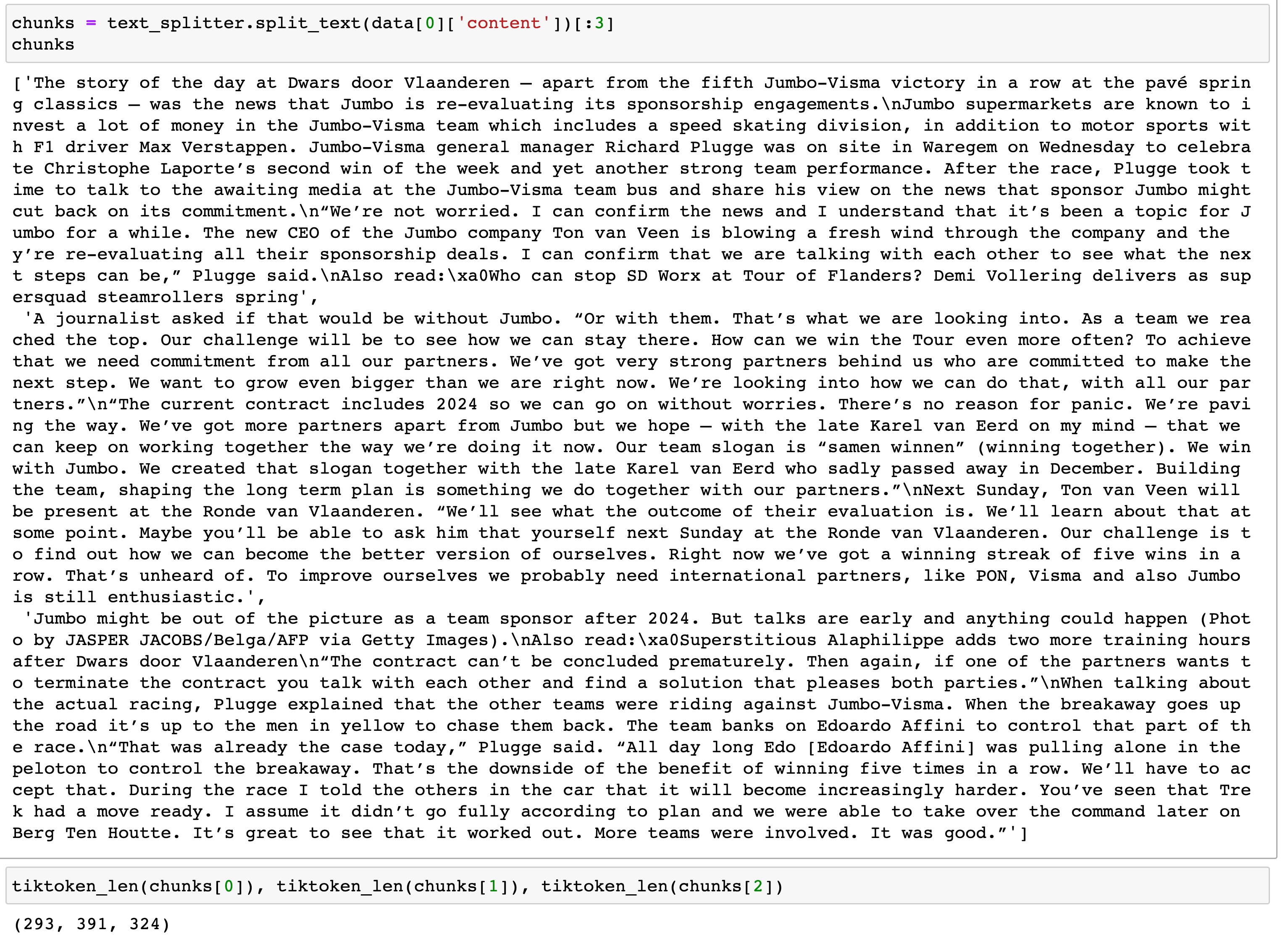
One thing worth noting is that the text splitter used is called RecursiveCharacterTextSplitter , which is recommended use by Harrison Chase, the creator of Langchain. The basic idea is to first split by the paragraph, then split by sentence, with overlapping (20 tokens). This helps preserve meaningful information and context from the surrounding sentences.
Step 1.4: Upsert data to Pinecone. The below code is adapted from James Briggs's wonderful tutorial.
We batch upload and embed all articles. which took about 20 minutes to upsert 20k records. Be sure to adjust the tqdmimport accordingly based on your env (you don't need to import both!)
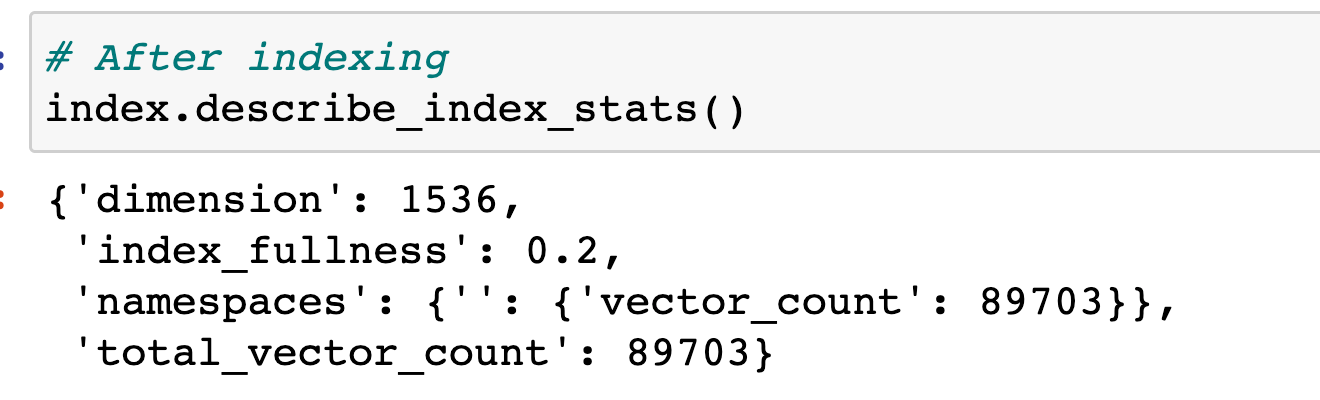
After upserting the Outside articles data, we can inspect our pinecone index by using index.describe_index_stats() . One of the stats to pay attention to is index_fullness, which was 0.2 in our case. This means the Pinecone pod was 20% full, suggesting that a single p1 pod can store approximately 100k articles.
Step 2: Use Langchain for Question & Answering Service
Note: Langchain updates so fast these days, the version used below code is 0.0.118 .
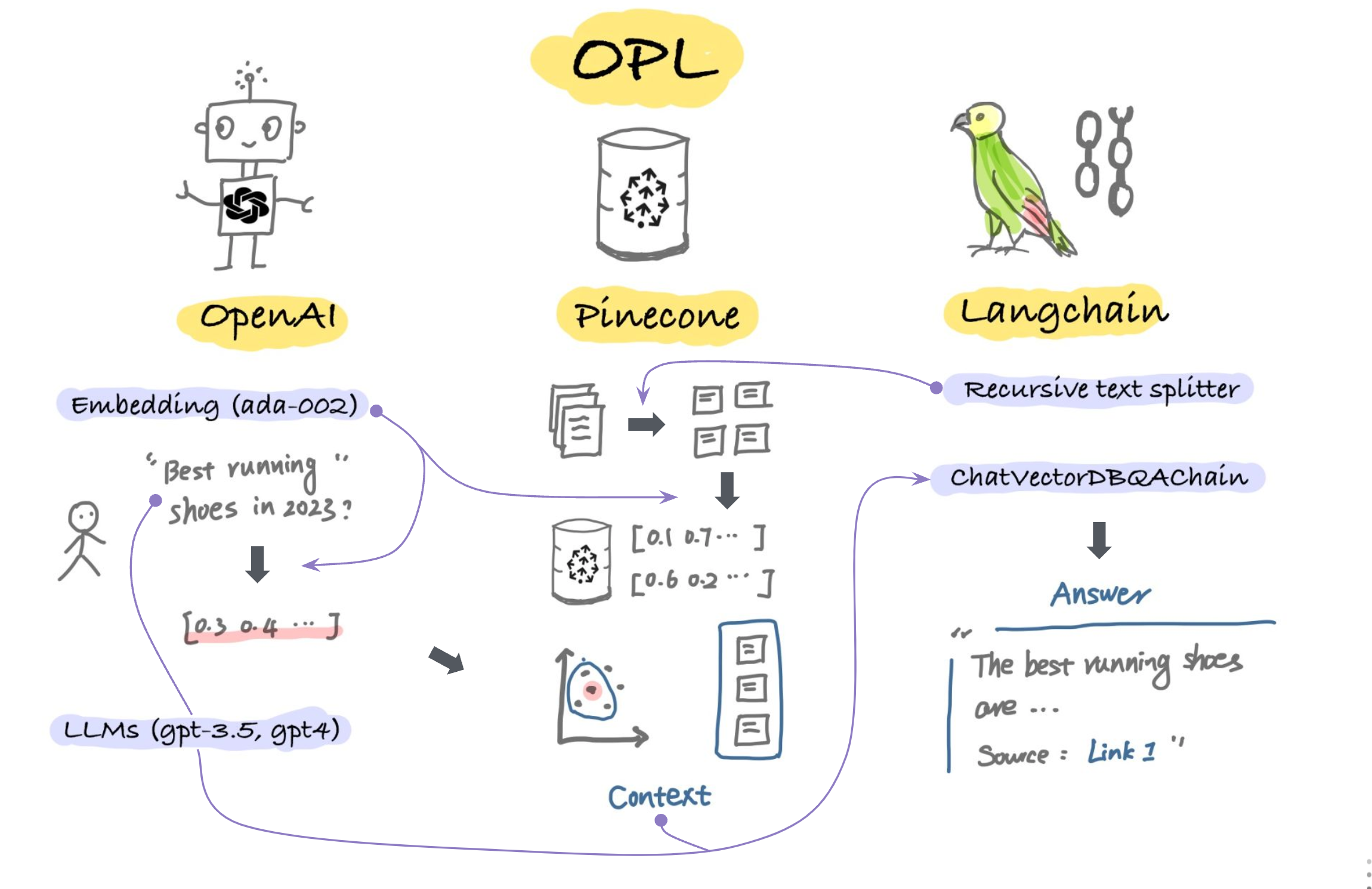
The above sketchnote illustrates how data flows during the inference stage:
The user asks a question: "What are the best running shoes in 2023?".
The question is converted into embedding using the
ada-002model.The user question embedding is compared with all vectors stored in Pinecone using
similarity_searchfunction, which retrieves the top 3 text chunks that are most likely to answer the question.Langchain then passes the top 3 text chunks as
context, along with the user question to gpt-3.5 (ChatCompletion) to generate the answers.
All can be achieved with less than 30 lines of code:
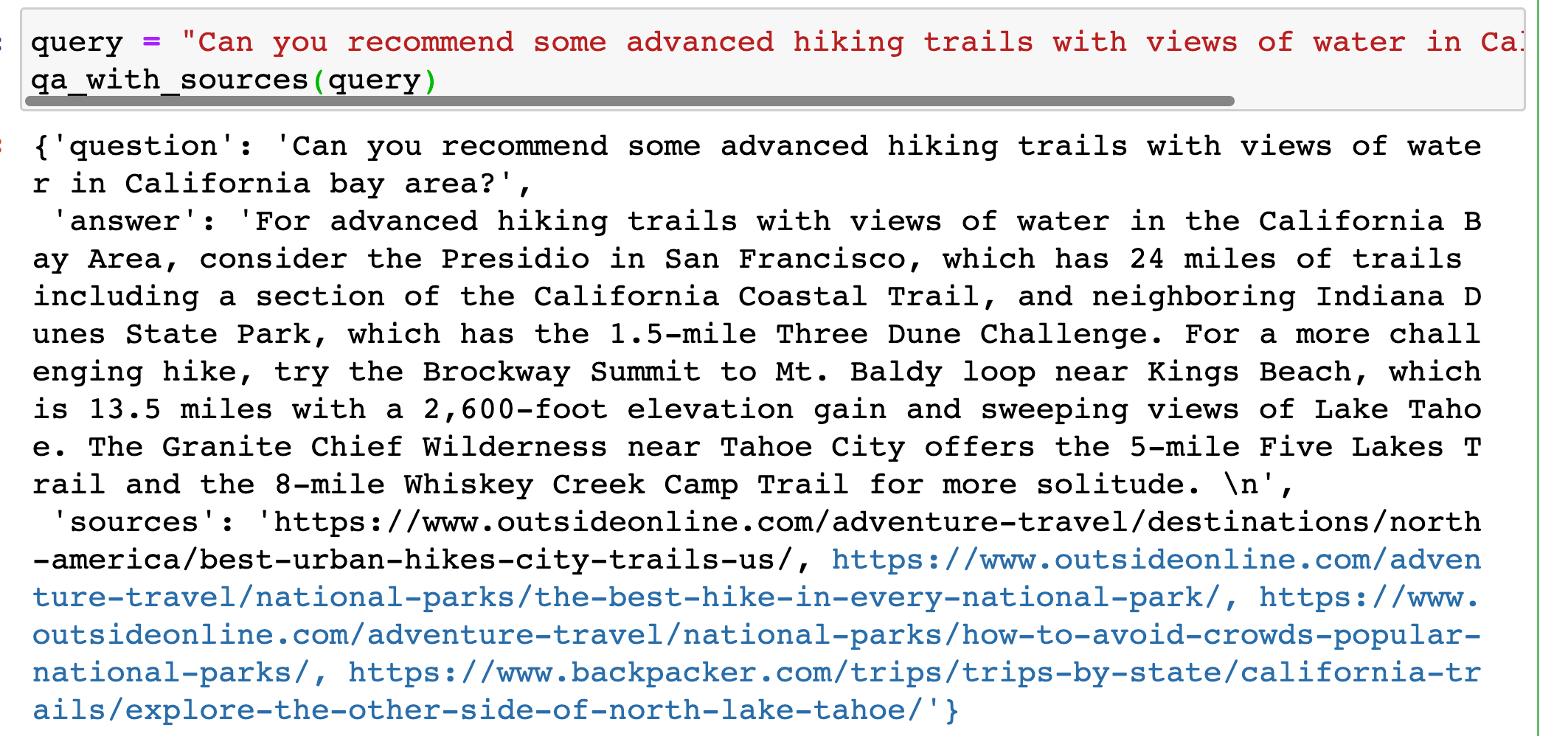
Now we can test by asking a hiking-related question: "Can you recommend some advanced hiking trails with views of water in California bay area?"
Step 3: Build our app in Streamlit
After verifying the logic is working in Jupyter notebook, we can assemble everything together and build a frontend using streamlit. In our streamlit app, there are two python files:
app.py: the main python file for frontend and power the apputils.py: the supporting function which will be called byapp.py
Here's what my utils.py looks like:
And finally, here's what my app.pylooks like:
3. Production considerations
Alrighty, enough coding!
The app is actually pretty nice already as it is. But if we want to move to production, there are a few additional things to consider:
Ingesting new and updated data in Pinecone: we did a one-time batch upsert for article data. In reality, new articles are added to our websites every day, and some fields may get updated for data already ingested into Pinecone. This is not a machine learning problem but it's ever-present for media companies: how to keep your data updated in every service. The potential solution is to set up a cron job to run the upsert and update the job periodically. There's an instruction on how to send upserts in parallel, which might be quite useful if we can use asynchronous tasks with Django and Celery.
Limitation for Pinecone pod storage: the app is currently using p1 pod, which can store up to 1M vectors with 768 dimensions, or roughly 500k vectors if we use OpenAI's
ada-002embedding model (which has a dimension of 1536).Stream capability for faster response times: To reduce the perceived latency for users, it may be helpful to add stream capability to the app. This would mimic the chatGPT by returning generated output token by token, rather than showing the entire response at once. While this functionality works for REST API using LangChain function, it poses a unique challenge for us since we use GraphQL instead of REST.
4. Common misconceptions and questions
chatGPT remembers the internet data up to Sep 2021. And it is retrieve answers based on memory.
This is not how it works. After training, chatGPT deletes the data from memory and uses its 175 billion parameters (weights) to predict what's the most probable token (text). It doesn't retrieve answers based on memory. That's why if you just copy the answer generated by chatGPT, it's unlikely that you can find any source from the internet.
We can train/fine-tune/prompt-engineering chatGPT.
Training and fine-tuning Large Language Models meant actually changing the model parameters. You need to have access to the actual model file and guide the model for your specific use cases. In most cases, we wouldn't train or fine-tune chatGPT. Prompt engineering is all we need: providing extra context to chatGPT and allowing it to answer based on the contexts.
What's the difference between a token and a word? - Token is a word piece. 100 tokens are roughly equal to 75 words. For example, "Unbelievable" is one word but 3 tokens (un, belie, able).
What does the 4000-token limitation mean? - OpenAI gpt-3.5 has a token limitation of 4096 for combining user input, context, and response. When using Langchain's memory, the total number of words used in (user question + context + memory + chatGPT response) needs to be less than 3000 words (4000 tokens).
gpt-4 has a higher token limit but it's also 20X more expensive! (gpt-3.5: $0.002/1K tokens; gpt-4: $0.045/1K tokens assuming 500 for prompt and 500 for completion).
Do I have to use Vector Store like Pinecone? - No. Pinecone is not the only option for vector storage. Other vector store options include Chroma, FAISS, Redis, and more. Additionally, you don't always need a vector store. For example, if you want to build a Q&A for a specific website, you can crawl the web page and follow this openai-cookbook-recipe.
Parting Words
Thank you for reading this lengthy post! If you have any questions or tips on using Langchain, please feel free to reach out.
Also, I will be going to the LLM Bootcamp where I hope to learn more best practices on productionize LLMs-powered apps. If you are interested in this topic, stay tuned for my future posts! 😃