Repository navigation
Releases
Dev preview v0.103.3151.0

Dev preview v0.103.3151.0
This development preview adds an Awake lock-screen option, redesigns Command Palette's CPU card, and fixes shortcut conflict detection and Mouse Without Borders IP mappings, alongside build and test updates since v0.103.3131.
Installer Hashes
| Description | Filename | SHA256 |
|---|---|---|
| Per user - x64 | PowerToysUserSetup-0.103.3151.0-x64.exe | CB663FA04B2AAACEDE19CB35013545417A372A16D96A720C8352B411358692AB |
| Per user - ARM64 | PowerToysUserSetup-0.103.3151.0-arm64.exe | 0A80468C6DC7955ADD69BB48AF5EFF1BF1E15DCFAE92A5EA44F47039491C0D46 |
| Machine wide - x64 | PowerToysSetup-0.103.3151.0-x64.exe | D96EABA3B4144375DDADB2FC09F09A5432451260825CD52CBB868876DE56F67A |
| Machine wide - ARM64 | PowerToysSetup-0.103.3151.0-arm64.exe | D35191592D6D52DE57F79F5E712BBE2E0DB7AA9FFF4AB3BA38B6541620D4139F |
Highlights
- Awake: Choose whether the Keep screen on request remains active while Windows is locked.
- Command Palette: The redesigned Performance Monitor CPU card shows a 60-second history, per-processor utilization, top processes and system details.
- Command Palette: Extension-supplied Adaptive Cards can render native vertical, horizontal and stacked bar charts.
- Command Palette: Performance cards show their first sample immediately, and CPU base-speed reporting better handles multi-cluster processors.
- General: Removed a false system-shortcut conflict warning for
Win+Shift+Con Windows 11. - Mouse Without Borders: Administrator-defined IP mappings now work without user-defined rules.
Awake
- Added Allow screen to turn off while locked in Settings and the tray menu. Turn it off to keep the Keep screen on request active while Windows is locked; the previous behavior remains the default. On Modern Standby systems, Windows may still turn off the display, in #51880 by @lorinc-ambrozy-work and @Meister1977.
Command Palette
- Added native vertical, horizontal and stacked horizontal bar charts for Adaptive Cards supplied by extensions, in #51210.
- Redesigned the Performance Monitor CPU card with a 60-second history, per-logical-processor utilization, the five busiest processes and system details. Performance cards now show their first sample immediately, and CPU base-speed reporting better handles multi-cluster processors, in #51211.
General
- Stopped reporting a false Windows system-shortcut conflict for
Win+Shift+Con Windows 11, in #51236 by @linghengqian.
Mouse Without Borders
- Applied administrator-defined IP mapping rules even when the user has no mapping rules or user mappings are disabled by policy, in #51127 by @rarepops.
Development
- Corrected single-project build solution-directory resolution so intermediate outputs match solution builds and are not accidentally included in context-menu packages, in #51321.
- Installed the required .NET SDK and signing runtime explicitly in the SDK build job, in #52072.
- Updated Windows App SDK packages to version 2.6.5 and removed an unused dependency from the Command Palette extension template, in #52060.
- Updated File Explorer thumbnail UI tests to recognize current initialization logs and check generation failures after visual captures, in #52071.
- Migrated twelve common C++ projects from
packages.configto centrally versionedPackageReferencedependencies, in #51324. - Updated CsWinRT to 2.3.1 and the Windows SDK .NET reference pack to 10.0.26100.87, with corresponding collection-projection compatibility fixes, in #51654.
- Moved MSVC C++ code analysis into a parallel CI job to shorten the main build path, in #51695.
Dev preview v0.103.3131.0
Dev preview v0.103.3131.0
This development preview adds JPEG file pasting and richer Adaptive Cards, with fixes for FancyZones, File Locksmith, Keyboard Manager and ZoomIt since v0.103.3099.
Installer Hashes
| Description | Filename | SHA256 |
|---|---|---|
| Per user - x64 | PowerToysUserSetup-0.103.3131.0-x64.exe | 4AC2B54997BA57823A3FD720DCEC01C269F8C06DB2DFFC3EBE1D95EF3830C25B |
| Per user - ARM64 | PowerToysUserSetup-0.103.3131.0-arm64.exe | 75E8A64CF895F440F60E0F2A4CC6BA9E6071E997A12D7613159B1575181C1B64 |
| Machine wide - x64 | PowerToysSetup-0.103.3131.0-x64.exe | DE342B73AF2CC87E48D501D3974132F327265063C7867917D21C9DC76C24D88E |
| Machine wide - ARM64 | PowerToysSetup-0.103.3131.0-arm64.exe | 0930865EA2D0C3F2FB423F32A516E562F04373F349B80F9F4E5A18826DDCD715 |
Highlights
- Advanced Paste: Paste clipboard images as JPEG files with adjustable quality to balance image fidelity and file size.
- Command Palette: Extension-supplied Adaptive Cards can render native progress bars, badges, Fluent icons, and rounded or bordered tiles.
- FancyZones: The 11-zone Priority Grid now uses its intended predefined layout.
- File Locksmith: Failed launches from File Explorer are handled cleanly.
- Keyboard Manager: Global and app-specific remaps of the same shortcut can coexist without false duplicate warnings.
- Keyboard Manager: The classic editor no longer crashes when loading supported run-program options from the new editor.
- Keyboard Manager: Backup and restore includes editor settings, with restored mappings reloaded when an open editor is activated.
- ZoomIt: Settings and Exit are available again in the PowerToys-launched tray menu.
Advanced Paste
- Added Paste as .jpg file with configurable JPEG quality, a customizable shortcut, Shortcut Guide integration, and the
paste-as-jpg-fileCLI action, in #50081 by @OrionFOTL.
Command Palette
- Added Adaptive Cards support for native progress bars, badges, Fluent icons, and rounded or bordered containers, including in-place updates, in #51209.
FancyZones
- Fixed the 11-zone Priority Grid layout falling back to a plain grid instead of using its predefined layout, in #51844 by @trevoedwards.
File Locksmith
- Handled failures to launch File Locksmith from File Explorer cleanly instead of continuing as though the window had opened, in #51857 by @Agodoy31.
Keyboard Manager
- Allowed global and app-specific remaps of the same shortcut to coexist, fixed classic-editor crashes when loading run-program options from the new editor, and included editor settings in backup and restore with reload support for open editors, in #50948 by @Alb11747.
Mouse Without Borders
- Corrected the Settings label for controlling all computers at once, in #52009 by @MrBisquit.
ZoomIt
- Restored Settings and Exit actions in the tray menu when launched through PowerToys; Settings opens the ZoomIt page, and Exit stops only ZoomIt, in #51466 by @MarioHewardt.
Dev preview v0.103.3099.0
Dev preview v0.103.3099.0
This development preview includes Command Palette, File Explorer, Keyboard Manager and Settings improvements, together with startup, packaging and test updates since v0.103.3062.
Installer Hashes
| Description | Filename | SHA256 |
|---|---|---|
| Per user - x64 | PowerToysUserSetup-0.103.3099.0-x64.exe | 4F9935320F058E9412FA4D0FFCE43CCEB73BA56E1F938E987B9947FBAF1F90C3 |
| Per user - ARM64 | PowerToysUserSetup-0.103.3099.0-arm64.exe | A8E1E29898D65FD1AD95C46C82861579939E88B9B68E98AFC50A37D666E3F03F |
| Machine wide - x64 | PowerToysSetup-0.103.3099.0-x64.exe | 0C564D379C3F4F41CF354902EA19CC43C8897634E321344CA8BBE04CC943D68E |
| Machine wide - ARM64 | PowerToysSetup-0.103.3099.0-arm64.exe | B114DD2EC9EE6DAF016FAF939CF97C289367FD6F36E455EE466CCAD33078BF00 |
Highlights
- Command Palette: Adaptive Cards now follow Fluent themes, accent colors and high-contrast settings.
- Command Palette: Extension-supplied Adaptive Cards can render native line charts and compact sparklines.
- Command Palette: Fixed settings-search result layout in wide windows.
- Command Palette: Kept fallback identity, ranking and global-result preferences separate for each provider.
- File Explorer: Improved thumbnail renderer handling, concurrent SVG requests and SVG/STL compatibility.
- General: Removed obsolete startup checks and remaining artifacts from the retired Video Conference Mute utility.
- Installer: Improved update compatibility with publisher-based application allowlists.
- Keyboard Manager: The new editor now follows the language selected in PowerToys settings.
- Mouse Without Borders: Corrected the Reconnect action label and fixed pairing failures in signed builds.
- Settings: Preserved selected Color Picker formats and device ordering while collections are reordered.
- General: Restored optional diagnostic event reporting without changing diagnostic-data preferences.
Command Palette
- Updated Adaptive Cards styling to follow Fluent light, dark, accent-color and high-contrast settings, in #51205.
- Added native line-chart support for Adaptive Cards supplied by extensions, including compact sparklines and accessible theme-aware rendering, in #51208.
- Fixed the settings-search results layout when the settings window is wide, in #51525 by @jiripolasek.
- Separated fallback identity, global-result preferences and ranking by provider while preserving existing ranking settings, in #51625.
File Explorer
- Improved handling of stalled thumbnail renderers, isolated concurrent SVG requests, and preserved supported SVG formatting and UTF-8 STL names, in #49950.
General
- Removed obsolete MSIX startup checks and remaining Video Conference Mute installer and policy artifacts; successful cleanup of its old camera registration now runs once, in #51097. The retired Video Conference Mute policy is no longer included in the updated ADMX templates.
- Updated telemetry to version 2.0.5 and restored optional diagnostic event reporting from native and managed components, without changing diagnostic-data preferences, in #51896 and #51940.
Installer
- Improved update compatibility with publisher-based application allowlists by signing and validating Windows Runtime metadata in the installer and Command Palette package, in #51295.
Keyboard Manager
- Made the new editor honor the language selected in PowerToys settings, in #51147.
Mouse Without Borders
- Corrected the Quick Access action label to show Reconnect rather than the generic module name, in #50909 by @nathancarvalhocota.
- Fixed pairing failures that could show an untrusted-signature error in signed PowerToys builds, in #51789 by @mvanhorn.
Settings
- Kept module collections stable during reordering, preserving selected Color Picker formats and persisted Mouse Without Borders device order, in #50740 by @matthudson.
Development
- Added driver-backed PowerDisplay UI coverage with deterministic virtual-monitor fixtures and related test infrastructure, in #51855.
- Stabilized startup-warning dismissal in Hosts File Editor UI tests, in #51899.
- Migrated Text Extractor UI coverage to UITest.Next and updated test signing and pipeline selection, in #51933.
- Cleaned up nullable-reference, code-analysis and StyleCop layout warnings in Mouse Without Borders UI-test infrastructure, in #51646, #51647, and #51648.
- Updated centrally managed Windows Implementation Library headers to version 1.0.260126.7, in #51624.
- Cleaned up Settings shell collection analysis while preserving public XAML collection contracts, bindings and in-place updates, in #50739 by @matthudson.
Release v0.102.3101.0
Release v0.102.3101.0
This hotfix release improves File Explorer thumbnail generation, fixes Mouse Without Borders pairing failures, and restores optional diagnostic event reporting. See the v0.102.2933.0 release notes for the full list of changes in PowerToys v0.102.
Installer Hashes
| Description | Filename | SHA256 |
|---|---|---|
| Per user - x64 | PowerToysUserSetup-0.102.3101.0-x64.exe | 4B4C49A31E8B7E6A36647CCD3033ACB0AD56C306595A9409E59865C3C27D1CF2 |
| Per user - ARM64 | PowerToysUserSetup-0.102.3101.0-arm64.exe | E80D5E784173101BBB4BD95EDE66CF1974C230CA81EBEB16FEBA25FDD5FFCE87 |
| Machine wide - x64 | PowerToysSetup-0.102.3101.0-x64.exe | F1D24A49346167322EB64A2458BD82810519920D1DA4C0AEB1788E54C345D142 |
| Machine wide - ARM64 | PowerToysSetup-0.102.3101.0-arm64.exe | 65663AFB8FA77B4DB257BC9494F66AC91A2B063AE0BFE2CD85E9DE958C92EE8B |
Highlights
This patch addresses three areas since the previous stable release.
File Explorer
- Improved handling of stalled thumbnail renderers, isolated concurrent SVG requests, and preserved supported SVG formatting and UTF-8 STL names, in #49950.
General
- Updated telemetry to version 2.0.5 and restored optional diagnostic event reporting from native and managed components, without changing diagnostic-data preferences, in #51896 and #51940.
Mouse Without Borders
Release v0.102.3001.0
This hotfix release addresses crashes in File Locksmith and Quick Accent. See the v0.102.2933.0 release notes for the full list of changes in PowerToys v0.102.
Installer Hashes
| Description | Filename | SHA256 |
|---|---|---|
| Per user - x64 | PowerToysUserSetup-0.102.3001.0-x64.exe | 4459B9F1AD5D70A342E109FFB66DBBB08EA07B2D2EC5634B314F878700F9FF0B |
| Per user - ARM64 | PowerToysUserSetup-0.102.3001.0-arm64.exe | 074208C93541BE77BB6E875D436A8A765E21649F2613196CEE62D9CA936611F2 |
| Machine wide - x64 | PowerToysSetup-0.102.3001.0-x64.exe | 3FB386E628296D6F960F8EFC92B47FAFA9E29C915C5EFD774255A95190DCC87D |
| Machine wide - ARM64 | PowerToysSetup-0.102.3001.0-arm64.exe | 1D6A23E643B4E34EA1C3292AD4F8615BC1082AC938B0998D56899264DDA5E2AD |
Highlights
This patch contains two fixes since the previous stable release.
File Locksmith
- Fixed crashes when File Locksmith encounters a stalled file-handle scan, including crashes after the scan completes, in #51507.
Quick Accent
- Fixed Quick Accent crashes when using arrow-key activation after changing languages or switching from a shorter character list, in #51583.
Release v0.102.2933.0

Installer Hashes
| Description | Filename | sha256 hash |
|---|---|---|
| Per user - x64 | PowerToysUserSetup-0.102.2933.0-x64.exe | EC0FD364AE1689A5E8FBEFB46BAD5C274C7BF0FBE9E828E14C88B44432ADA816 |
| Per user - ARM64 | PowerToysUserSetup-0.102.2933.0-arm64.exe | FDC0F3D06000264DC0947E7B0AE3EC63D682C5BA13198FBFBD49149EF69A94F5 |
| Machine wide - x64 | PowerToysSetup-0.102.2933.0-x64.exe | EBADDACFA615614D8B8EC695009EA092C2B64D039AE629A4B9BF0B541E854C3D |
| Machine wide - ARM64 | PowerToysSetup-0.102.2933.0-arm64.exe | C98C741E283D13C8308491D9E185F287323F2727F1C3C1C9E59DC6843330B6CD |
Highlights
PowerToys 0.102 introduces two new mouse utilities, Mouse Button Lock and CursorHide, a quick-access shelf for Command Palette, and snip dictation in ZoomIt. This release also adds command-line tools for Advanced Paste, Light Switch, Settings, and Peek, brings tap-alone remaps and easier editing to Keyboard Manager, and moves Color Picker and Text Extractor to WinUI 3.
🖱️ Mouse Button Lock and CursorHide
Holding a mouse button down during a long drag or selection can be tiring. With Mouse Button Lock, press and hold a button for a moment, then let go. Windows keeps treating it as held, so you can continue dragging or selecting until you click any button. This is especially useful for gaming, working in professional applications that require extensive dragging and selection, and improving accessibility for users who find it difficult to hold down a mouse button for extended periods.

PR: #49279 (Thanks, @owenpkent!)
CursorHide is the second new mouse utility. It hides the mouse pointer while you type, after a period of inactivity, or both, and shows it again as soon as you move the mouse.

PR: #50271 (Thanks, @DamianEdwards!)
⚡ Command Palette gets a quick-access shelf
Compact mode in 0.101 kept Command Palette out of the way until you needed results. Now your favorite commands can be one keystroke away too. Turn on the quick-access shelf in Settings > Appearance > Compact mode to show your pins below the search box while the palette is collapsed. Press Alt+1 through Alt+9 to launch them, or Alt+Shift+number to select one without running it. Drag to reorder, right-click for more actions, and optionally show recent commands and apps next to your pins.

The shelf is just one part of a big Command Palette update:
- Settings search: Fuzzy search finds options, extensions, commands, aliases, and assigned shortcuts, then takes you straight to them.
- Keyboard-first Dock: Press Win+Alt+J to focus the dock and move between its items from the keyboard.
- Copilot key support: Choose Command Palette as the Copilot key app in Windows Settings, and press the key again to toggle the palette.
- Multiple clocks: Pin several dock clocks, each with its own time zone and format.
- Language and links: Pick an app language for Command Palette, and copy links that open a page, run a command, or jump to a specific setting.
- Polish: Sharper app icons, faster grid and gallery browsing, results that keep loading at the end of a list, and clearer nested menus.
Massive thanks to @jiripolasek for the sustained Command Palette work across this release!
PRs: #49915, #50894, and #50812
🎥 ZoomIt adds snip dictation
ZoomIt can now capture what you say along with what you snip. Turn on Snip with dictation in the ZoomIt settings, then press Space while you drag out a snip and describe what you're capturing. ZoomIt transcribes your speech on your device, and a single paste delivers both the screenshot and your text. Dictation uses the microphone selected under Record.
ZoomIt also gets smooth zoom transitions, better audio pacing in recordings, and a fix for silent recordings on multichannel and spatial-audio devices.
💻 New command-line tools
More of PowerToys can now be scripted from the terminal:
- Advanced Paste: Run built-in and custom actions without opening the UI, using files, stdin/stdout, or the clipboard. AI actions use your configured providers and policies.
- Light Switch: Check status, set or toggle the theme, and manage schedules, with JSON output.
- Settings: See which utilities are enabled, and turn them on or off even while PowerToys isn't running.
- Peek: Preview multiple files and folders from the command line.
- PowerDisplay: JSON Lines output makes results and errors easy to consume from scripts.
- On your PATH: FancyZones, Image Resizer, File Locksmith, and PowerDisplay commands now work from any terminal folder.

PRs: #50834, #50459, #50507, and #49724 (Thanks, @daverayment!)
⌨️ Keyboard Manager adds tap-alone remaps and easier editing
Keyboard Manager now supports tap-alone remaps. Tap a key by itself to trigger a different action, while the key keeps working normally in shortcuts and mouse combinations. Large remapping lists are easier to manage too, with search, modifier and app filters, and bulk deletion.
The new editor also gets a searchable key picker, so you can select any key, including media keys or keys your keyboard doesn't have, and build a full shortcut with just the mouse. Recording now only listens while the editor is in focus, and Tab moves you out of the recording field. IT admins can also deploy and export remapping profiles with DSC v3.

PRs: #49136 and #49287 (Thanks, @MasaYan24!), #51150, and #49427 (Thanks, @Gijsreyn!)
🧩 Other notable changes
- Color Picker and Text Extractor: Both move to WinUI 3, with a new overlay, editor, and magnifier for Color Picker. Your existing shortcuts and settings carry over.
- FancyZones: Scroll the mouse wheel while dragging a window to switch layouts, with an optional indicator showing the selected layout's name.
- Peek: Added read-only SQLite previews, file and subfolder counts with scanning progress for folders, a plain-text fallback, and Alt+Left/Alt+Right navigation between files.
- Screen Ruler: Measure in device-independent pixels to account for each monitor's scaling, with improved edge detection.
- Environment Variables: A new Remove duplicates action cleans up PATH while keeping the original order.
- Quick Accent: A searchable character reference in Settings lets you browse language sets and copy characters directly.
- Grab and Move: Exclude specific apps so they keep their normal modifier-key behavior.
- Shortcut Guide: Added shortcuts for Claude Desktop and Ableton Live, and made indexing more resilient to malformed manifests.
- Workspaces: Now asks for confirmation before launching an unverified app configured to run as administrator.
- Awake: Windows can now turn off the display while the PC is locked, without ending your keep-awake session.
- New+: Fixed a File Explorer memory leak and improved long-path handling.
- Settings: Added an interactive animated welcome scene, fixed a memory leak when switching pages, and kept module on/off preferences when a utility fails to load.
✨ Big thanks to the community
As always, a big thank-you to everyone who contributed — we couldn't do this release without you! Thanks @DamianEdwards, @AkazaRenn, @Meister1977, @LE0-Lin, @namdpran8, @MarcelSchm, @jiripolasek, [Subhrajyoti Singha (@Subhro-ai)](https://github.com/Subhr...
Release v0.101.2362.0

Installer Hashes
| Description | Filename | sha256 hash |
|---|---|---|
| Per user - x64 | PowerToysUserSetup-0.101.2362.0-x64.exe | D56FA7130FA68AFE553068C15A59A6B24C8DBCC9A0989A43EF0FC5A373230DE3 |
| Per user - ARM64 | PowerToysUserSetup-0.101.2362.0-arm64.exe | 4C2AE5156B7E4F1F5BA744BA6E1CF6BFE3D9614978356E6B00AA47CAB86350DB |
| Machine wide - x64 | PowerToysSetup-0.101.2362.0-x64.exe | F27E4B4B01BFF1A74BFA0116C99F9205F7138DB6F7DFCAA9223FB8B635FE6050 |
| Machine wide - ARM64 | PowerToysSetup-0.101.2362.0-arm64.exe | BEE299302C0CD59E282BDC92CC8AAF737713EABCCA77BB8BF09F43745D43CD93 |
Highlights
PowerToys 0.101 introduces Window Hopper for quickly moving between windows from the same app, a redesigned update experience with Stable and Insider channels, and compact mode for Command Palette. This release also continues our WinUI 3 modernization, brings on-device Phi Silica transformations to Advanced Paste, and adds a big set of improvements across PowerDisplay and Shortcut Guide.
🪟 Meet Window Hopper
If you regularly have several windows open from the same app, switching between them is now much faster. Window Hopper works like Alt + Tab, but stays within the app you're currently using. Once the utility is enabled, press the configurable Alt + backtick shortcut to cycle through that app's windows without stepping through everything else on your desktop. It is especially useful when you're juggling multiple browser windows, terminals, File Explorer windows, or editor instances.
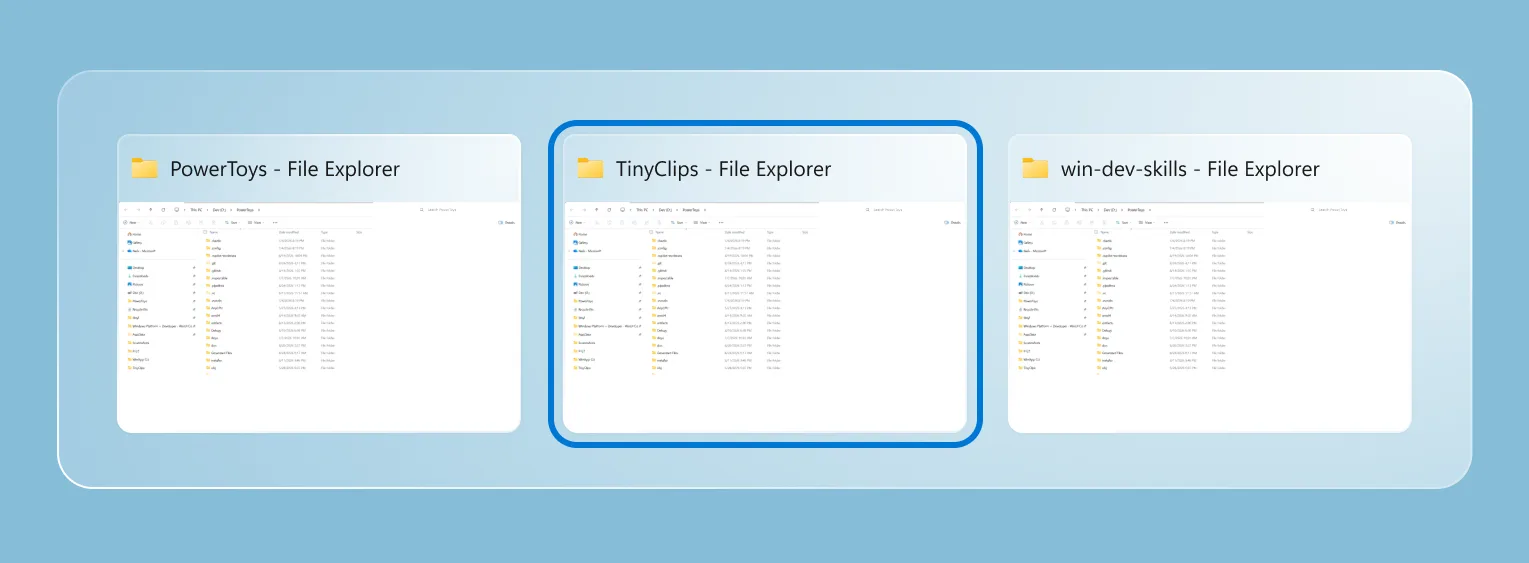
PR: #48281 (with coauthor credit to @wzhudev)
🔄 A smoother update experience and the new Insider channel
PowerToys updates now have a clearer home in Settings. Open Settings > General > Update channel to choose between Stable and Insider. Stable remains the default, while Insider lets you opt in to PowerToys Preview builds and try the latest work sooner. The selected channel remains visible when the setting is collapsed, preview builds are clearly labeled, and managed devices can still have preview updates controlled by organizational policy.
We also redesigned the update experience with clearer badges and a compact status surface that tracks each step, from checking and downloading to installation or errors. Bug reports are easier too, with progress updates, quick access to the generated ZIP, and a prefilled GitHub issue.
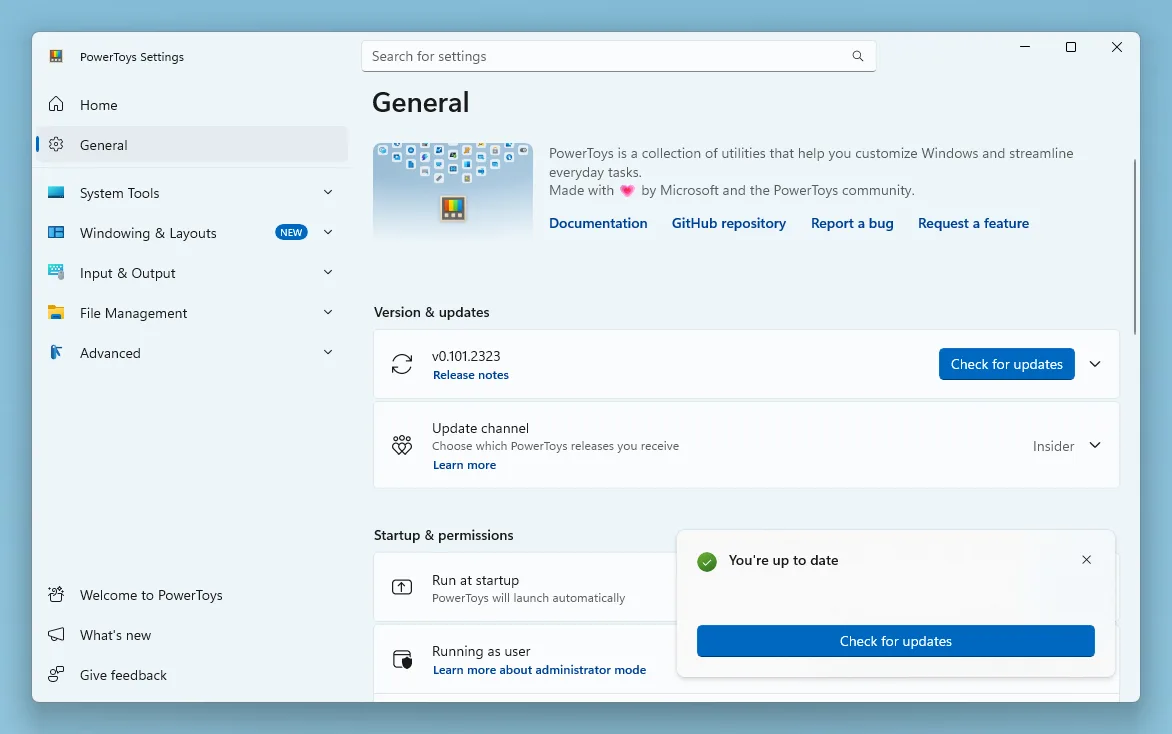
PRs: #49414, #49722, and #49872
⚡ Command Palette goes compact
Command Palette can now stay out of the way until you need the results. Enable compact mode in Command Palette Settings and the palette opens as a focused search box at a configurable vertical position. Start typing and it expands just enough to show matching results; you can also use Down Arrow or Tab to expand it from the keyboard. Pages that need more room, such as detailed views and confirmation dialogs, still expand fully when required. Compact mode is off by default, so the existing full experience remains unchanged unless you opt in.
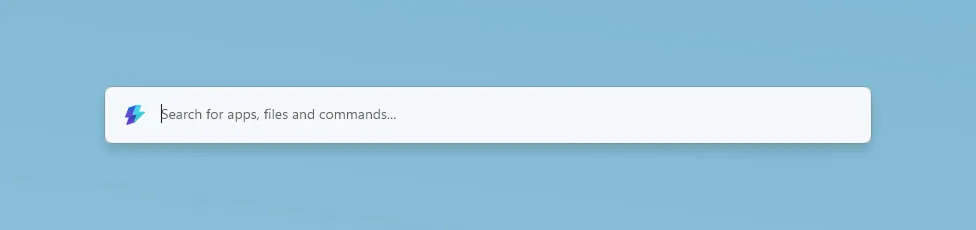
Compact mode is only one part of this Command Palette update:
- Search and responsiveness: Better ranking, cached Window Walker results, and progressive icon loading make results feel faster and more predictable.
- Reliability: Improved backdrop switching, icon loading, dock cleanup, and extension-resource management make prolonged use more stable.
- Dock improvements: Auto-hide reclaims screen space, while the dock clock and an optional bell provide quick access to Notification Center.
- Richer notifications: Extensions can show toasts with configurable positions, icons, and action buttons.
- Performance Monitor: New disk activity metrics and clearer network bands make it easier to keep an eye on system performance.
- Extension Gallery: Deep links can open the gallery or take you directly to a specific extension's installation page.
- Windows Update commands: Update and restart and Update and shut down appear when Windows is waiting for a reboot.
Massive thanks to @jiripolasek for the sustained Command Palette work across this release!
PRs: #48801, #49177, and #49780
🔄 Quick Accent and Mouse Jump move to WinUI 3
We're continuing to modernize PowerToys utilities with WinUI 3, and this release brings refreshed foundations to Quick Accent and Mouse Jump. Quick Accent keeps its familiar character picker while gaining better theming, accessibility, and DPI-aware placement. It also adds an optional Press and hold the letter activation mode: choose it in Quick Accent Settings, configure the hold duration, then hold an accent-capable letter to open the picker. Use the arrow keys or Space to select a character and release the letter to insert it. A quick tap still types the original letter, and normal Ctrl, Alt, AltGr, and Windows-key shortcuts remain unaffected.
Mouse Jump now uses a WinUI 3 interface with improved multi-monitor and mixed-DPI behavior. Invoke Mouse Jump with your configured shortcut, then click the destination in the preview or use the number keys, Home and End, or the arrow keys to select a monitor from the keyboard. Smaller improvements across the two utilities include more reliable Quick Accent activation, better first-frame rendering, expanded language, currency, punctuation, and IPA character sets, plus updated Mouse Jump layout and release support for both x64 and ARM64.
PRs: #48891, #48937, and #48393 (Thanks, @LegendaryBlair and @mikeclayton!)
🖥️ PowerDisplay gets linked controls and faster access
PowerDisplay can now control the brightness of several monitors together. Turn on linked brightness to get one All Displays slider for every included brightness-capable monitor, while keeping selected displays independent when needed. Individual display cards remain available in an expandable section, and applying a saved profile returns to per-monitor control before restoring its values. You can also opt in to brightness control from the tray icon: choose whether scrolling over it adjusts the primary display or all linked displays, then set the amount each mouse-wheel notch should change.
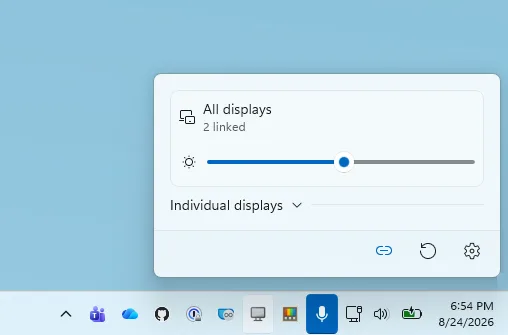
PowerDisplay can now wake supported monitors by selecting On from the display's power-state control, and a new command-line interface lets you inspect displays, change monitor settings, and apply saved profiles from scripts. This release also improves built-in panel detection on hybrid-GPU systems, makes Maximum compatibility mode more resilient with unreliable monitors, preserves recent setting changes during exit, restores saved brightness, contrast, volume, and color temperature more reliably, and cleans up monitor and tray resources more consistently.
PRs: #48207 (Thanks, @gilnatab!), #48628, and #49446
📋 Advanced Paste brings local AI to custom actions
Advanced Paste now supports on-device transformations with Phi Silica on supported Windows devices, so you can use local AI without configuring a cloud endpoint or API key. In Advanced Paste Settings, check Phi Silica availability and download the model when prompted. You can then choose Phi Silica as the provider for an action, customize its pr...
Release v0.100.2
Installer Hashes
| Description | Filename | sha256 hash |
|---|---|---|
| Per user - x64 | PowerToysUserSetup-0.100.2-x64.exe | 945FDF327E4D38E4CED61B0727B7AB8A1222958782982052989DDF7CB7096F62 |
| Per user - ARM64 | PowerToysUserSetup-0.100.2-arm64.exe | 5554984D72C30D5FD26355569D1CA8D63B74F0062EE4E59E0186E28216C837AE |
| Machine wide - x64 | PowerToysSetup-0.100.2-x64.exe | 73C04AAC8052420111FE5CDC0098EC8415D87CBDBD42DE253E9AF959781CBF9E |
| Machine wide - ARM64 | PowerToysSetup-0.100.2-arm64.exe | E78BBE00472612FA5BF91D8B253425F674DDD21A32C96B8A120681726CFF40F0 |
Highlights
This patch release fixes a Command Palette memory leak identified in v0.100.1. Check out the v0.100.1 notes for the full list of changes.
Command Palette
Release v0.100.1
Installer Hashes
| Description | Filename | sha256 hash |
|---|---|---|
| Per user - x64 | PowerToysUserSetup-0.100.1-x64.exe | AA6D47950061A856F2A6C5FB12B331658FED930A05A739DDB4FEB95BFAC06187 |
| Per user - ARM64 | PowerToysUserSetup-0.100.1-arm64.exe | 0BE062A7B74F18B54C34F78F0DA4FD5BAEBAE896A484A1B0DD41D882848967CD |
| Machine wide - x64 | PowerToysSetup-0.100.1-x64.exe | 4ADEC909794AE1489CA5D48BC318E9BE6DA6F9817195AE1B8ADBB52B99C4D179 |
| Machine wide - ARM64 | PowerToysSetup-0.100.1-arm64.exe | 4E537C7C7FA31DE6D5FA4DA6DC7479CF33E52EC28F0E2C574032BAE987A4F49B |
Highlights
This patch release fixes several important stability and behavior issues identified in v0.100.0 based on incoming reports. Check out the v0.100.0 notes for the full list of changes.
Color Picker
- Fixed a bug where the main Color Picker window could appear inside the zoomed-in picker view in #48762 by @daverayment
Command Palette
- Fixed Run history initialization in AOT builds in #48463
- Fixed a bug where the Performance Monitor dock item could show
???after restart in #48682 by @giruuuuj - Fixed the Hibernate command using the Sleep icon in #48689 by @MrBisquit
- Limited the "pin to dock" dialog to displays where the dock is enabled in #48723
Keyboard Manager
- Fixed modifier keys remapped to non-modifier keys being delivered as system-key events, which caused unexpected behavior in apps such as Alt-to-Backspace deleting whole words in #47192 by @oMatheusmol
Power Display
- Fixed a bug where selecting On in the monitor power-state control did not wake a monitor from standby in #48628
- Fixed built-in display detection and brightness control on dual-GPU laptops where the internal panel is driven by the discrete GPU in #48637
PowerToys Run
- Fixed VS Code Workspaces discovery after VS Code moved recently opened workspace data to shared storage in #47505
Quick Access
- Fixed Quick Access flyout crashes caused by unhandled XAML exceptions during launch or page navigation in #48457
Shortcut Guide
- Fixed a crash when navigating between Shortcut Guide sidebar sections in #48481
- Fixed number-key rendering in shortcut manifests and added a Postman shortcut manifest in #48461 by @brycewc
- Updated bundled shortcut manifests to use the literal number-key token so number keys render correctly across apps in #48757 by @brycewc
ZoomIt
- Fixed a race condition in audio initialization for ZoomIt video recording in #48685 by @MarioHewardt
Release v0.100.0

Installer Hashes
| Description | Filename | sha256 hash |
|---|---|---|
| Per user - x64 | PowerToysUserSetup-0.100.0-x64.exe | A5EB64B8CEEF096AAFBFC18E73312B45E9D48FC60FB16676429688468C9A08D6 |
| Per user - ARM64 | PowerToysUserSetup-0.100.0-arm64.exe | A4D7EB580A7EF36E7C98CCC84E9EBB552C9D7071DCA35B6EB395F938D03FADCF |
| Machine wide - x64 | PowerToysSetup-0.100.0-x64.exe | 740C01945528E453C02490921CA2BD0E399021A80CF90DCF01DB53158377D0E8 |
| Machine wide - ARM64 | PowerToysSetup-0.100.0-arm64.exe | 19C8BD93B9A42B7FC2FF0E6F2091590F8D89B98ADEA20CC73D9023E464707B12 |
Highlights
PowerToys 0.100 introduces the brand-new Shortcut Guide, a major Command Palette update with the new Extension Gallery and multi-monitor Dock support, and a wave of improvements to Power Display. We've also upgraded PowerToys to .NET 10, improved auto-update reliability, reduced installer size, and continued modernizing the app experience across the suite.
⌨️ Introducing the new Shortcut Guide
The new Shortcut Guide has been designed and built from the ground up. The new experience appears as a pane on the side of your screen and automatically detects the active application when invoked, showing the shortcuts that are relevant to what you're currently doing. In addition to app-specific shortcuts, Shortcut Guide also includes a wide range of Windows shortcuts and shortcuts from enabled PowerToys utilities. Want to see if your favorite app is supported? Check out the documentation for the current list of supported applications. If you'd like to add support for another app, we'd love your help! Feel free to open a pull request, or create an issue with a link to the app's shortcut documentation.

Big thanks to @noraa-junker all the great work on this new utility!
#40834 by @noraa-junker, #40834 by @noraa-junker
⚡ Command Palette: new Extension Gallery, and multi-monitor Dock (and more!)
Command Palette was built with extensibility in mind. Developers can create their own extensions, distribute them through the Microsoft Store or WinGet, and build powerful experiences that help users get things done faster. One piece of feedback we've heard consistently is that discovering and installing extensions wasn't always easy. That's why we're introducing the Extension Gallery. Available directly from Command Palette Settings, the Extension Gallery makes it easy to browse, discover, install, update, and remove extensions without leaving Command Palette. Whether you're looking for new capabilities or managing existing extensions, everything is now just a few clicks away.

The Dock has also received a major upgrade with multi-monitor support. Each monitor can now have its own independent Dock configuration, making it easy to tailor your setup for every display in your workspace. You can choose which monitors should display a Dock directly from Command Palette Settings, and the improved Pin to Dock experience now lets you choose exactly where a command should be pinned. Whether you want different tools on different screens or dedicated docks for specific workflows, configuring your setup is now more flexible than ever.
On top of that, the Performance Monitor extension has gained a new Battery widget, showing charge level, charging status, and estimated time remaining. We've also added support for pinning individual metrics such as CPU, Memory, GPU, Network, and Battery directly to the Dock.

Beyond these features, we've shipped dozens of fixes and improvements across Command Palette, including better search experiences, reliability improvements, accessibility enhancements, performance optimizations, and extension platform updates.
A huge thanks to @jiripolasek for the sustained Command Palette work across this release!
🖥️ PowerDisplay improvements
This release focuses heavily on reliability, compatibility, and monitor detection improvements. Startup is now significantly faster on many systems, monitor identification is more reliable across reboots, and monitor settings are preserved more consistently. We've also introduced a new Max Compatibility Mode for displays that don't properly advertise DDC capabilities, helping Power Display work with a wider range of monitors. Several usability improvements have landed as well. The flyout can now be dismissed using Escape, sliders support mouse wheel adjustment, and displays are automatically rescanned when your PC wakes from sleep.
🔍 ZoomIt: webcam capture and recording improvements
This release adds support for a webcam overlay while recording, making it easier to create demos, presentations, and tutorials. We've also added support for appending multiple clips with transitions, allowing you to stitch recordings together without leaving ZoomIt.

🔄 Foundations and platform improvements
This release, we have also focused on making the PowerToys foundations better: we've upgraded the project to .NET 10, helping us stay current with the latest platform improvements and tooling and making the overall experience faster! We've also reduced the installer footprint (by 15%), making downloads smaller and installations more efficient.
Big thanks to @snickler for driving the .NET 10 upgrade!
Auto-update has also become more reliable. PowerToys now properly relaunches after updating, provides clearer success notifications, and automatically backs up configuration files before updates so settings can be restored if corruption is detected.
As part of our ongoing modernization efforts, both Quick Accent and Workspaces have moved away from custom WPF theming libraries and now use native Fluent-inspired WPF styling. This helps them better align with the overall PowerToys experience and modern Windows design language. Workspaces in particular received a significant UX refresh, with updated typography, spacing, layout improvements, and a cleaner overall experience.
🧩 Other notable changes
- Keyboard Manager: The new WinUI 3 editor is now enabled by default.
- Mouse Without Borders: Added a new Refresh Connections action to quickly reconnect devices.
- Image Resizer: Changes to settings can now be picked up automatically without restarting the experience.
- Quick Accent: Improved reliability on high-DPI and multi-monitor setups, along with support for Greek Polytonic characters.
- Peek: Added an option to disable file preview tooltips.
- PowerToys Run: Improved calculator handling for complex-number scenarios and documented a new community Disk Analyzer plugin.
Full release notes
Advanced Paste
- Fixed Advanced Paste clipboard-to-JSON conversion so clipboard read failures return an empty result instead of surfacing an exception in #48124
Command Palette
Extension Gallery & Extensions
- Added the Command Palette Extension Gallery so users can discover, browse, install, update, and uninstall community extensions from within Command Palette, with cached gallery data, extension details/screenshots, and WinGet status/progress integration in #46636 by @jiripolasek
- Added Command Palette parameter pages so extensions can prompt for lightweight command inputs directly in the search experience, including sample pages and SDK support for parameter runs in #47826
- Updated Command Palette bookmarks to collect placeholder values as inline parameters, so bookmarked commands can be filled in directly instead of opening a separate placeholders page in #47886
- Improved Command Palette Extension Gallery link handling so only HTTP/HTTPS homepage, author, install, and metadata links are shown or opened from the gallery UI in #47898 by [Jiří Polášek (@jiripolasek)](https://...
