Amazon Kinesis Data Streams terminology and concepts
Before you get started with Amazon Kinesis Data Streams, learn about its architecture and terminology.
Topics
Review the high-level architecture of Kinesis Data Streams
The following diagram illustrates the high-level architecture of Kinesis Data Streams. Producers continually write records to a stream, and consumers process those records in real time. A consumer is either a stream consumer, which reads the stream directly, or a queue consumer, which consumes the stream through a queue. What a consumer produces from the records is up to you, for example a running aggregate, an enriched record, or an alert, and it can write that output to an AWS service such as Amazon DynamoDB, Amazon Redshift, or Amazon S3. For stream consumers, see Read data from Kinesis data streams. For queue consumers, see Consume records from a stream with queues.
You can also have Kinesis Data Streams deliver the data for you, without running a consumer, to streaming tables on Apache Iceberg or to Amazon S3. For more information, see Streaming tables and S3 delivery for Amazon Kinesis Data Streams.
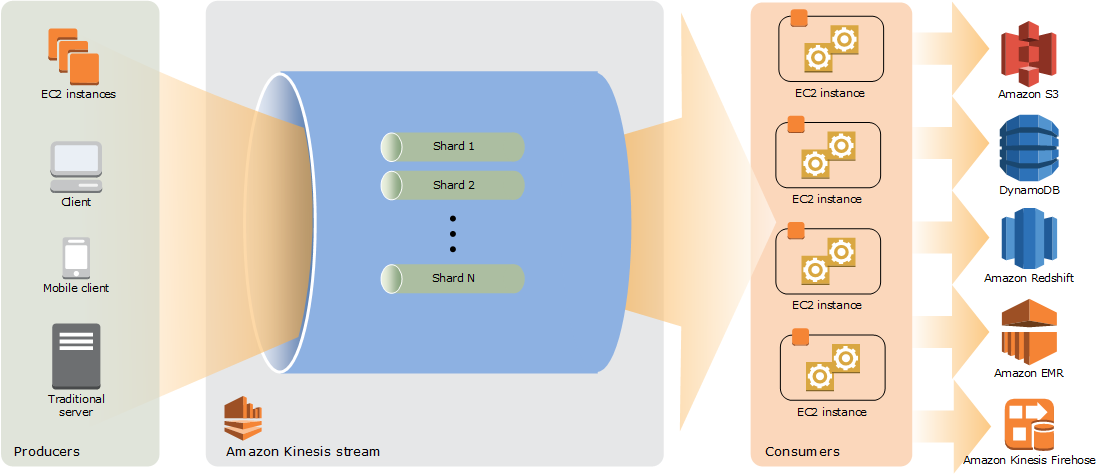
Become familiar with the terminology of Kinesis Data Streams
Kinesis data stream
A Kinesis data stream is a set of shards. Each shard has a sequence of data records. Each data record in the stream has a sequence number that is assigned by Kinesis Data Streams.
Data record
A data record is the unit of data stored in a Kinesis data stream. Data records are composed of a sequence number, a partition key, and a data blob, which is an immutable sequence of bytes. Kinesis Data Streams does not inspect, interpret, or change the data in the blob in any way. By default, a data blob can be up to 1 MB. You can raise a stream's maximum record size to 10 MiB. For more information, see Handle large records.
A queue does not return the sequence number of the records it delivers, because a sequence number identifies a record's position within its shard, and a queue consumer is decoupled from shards. For more information, see Sequence number.
Capacity mode
A data stream capacity mode determines how capacity is managed and how you are charged for the usage of your data stream. In Kinesis Data Streams, you can choose between an On-demand mode and a provisioned mode for your data streams. For more information, see Choose the right mode to stream in.
With the On-demand mode, Kinesis Data Streams automatically scales the number of shards to provide the throughput your workload needs. You are charged only for the actual throughput that you use, and the stream scales up and down as that demand changes. There are two On-demand modes. On-demand Standard is the default. On-demand Advantage is an account-level setting that applies to every On-demand stream in the Region, and it adds a simpler and discounted pricing structure, configurable warm throughput, and a higher registered consumer limit. For more information, see On-demand Standard mode features and use cases and On-demand Advantage mode features and use cases.
With the provisioned mode, you must specify the number of shards for the data stream. The total capacity of a data stream is the sum of the capacities of its shards. You can increase or decrease the number of shards in a data stream as needed and you are charged for the number of shards at an hourly rate. For more information, see Provisioned mode features and use cases.
Producer
Producers put records into Amazon Kinesis Data Streams. For example, a web server sending log data to a stream is a producer.
Consumer
Consumers get records from Amazon Kinesis Data Streams and process them. A consumer is either a stream consumer, which reads records directly from a stream, or a queue consumer, which consumes the stream through a queue. Which one fits depends on your processing requirements: read the stream directly with a stream consumer when processing has to keep state across records (stateful processing), and consume through a queue with a queue consumer when each record can be handled independently (stateless processing). Consumers are also referred to as applications or consumer applications.
Stream consumer
A stream consumer is a consumer that reads records directly from the shards of a stream. Read the stream directly with a stream consumer for Stateful processing, such as live analytics, personalization, and anomaly and pattern detection.
There are two types of stream consumer. A shared fan-out consumer shares a shard's read throughput with the other consumers reading that shard. An enhanced fan-out consumer registers on the stream and gets its own read throughput. For more information about both types and how to create them, see Read data from Kinesis data streams.
The output of a stream consumer can be input for another stream, enabling you to create complex topologies that process data in real time. A stream consumer can also send data to a variety of other AWS services. There can be multiple stream consumers for one stream, and each one can consume data from the stream independently and concurrently.
Queue
A queue delivers records from an On-demand stream to a queue consumer and tracks the delivery state of each record. Consume through a queue for stateless processing. For more information, see Consume records from a stream with queues.
Queue consumer
A queue consumer is an application that consumes records from a queue. Consume through a queue with a queue consumer for stateless processing, where each record can be handled independently.
Stateful processing
In stateful processing, a consumer processes records in sequence to keep an accurate state, because processing one record depends on the records before it. Live analytics, personalization, and anomaly and pattern detection are examples of stateful processing. For this kind of processing, read the stream directly with a stream consumer, which reads the records of a shard in order. For more information, see Read data from Kinesis data streams.
Stateless processing
In stateless processing, a consumer processes each record independently, because processing one record does not depend on any other record. Microservice integration, order processing, and per-record inference are examples of stateless processing. For this kind of processing, consume through a queue with a queue consumer. The queue tracks the delivery state of each record, so your queue consumer does not manage shards, leases, or checkpoints. Its instances acknowledge the records they finish, the queue redelivers any record that is not acknowledged, and you scale consumer instances up and down as your load changes. For more information, see Consume records from a stream with queues.
Consumer instance
A consumer instance is one running instance of a consumer, either a stream consumer or a queue consumer. Each shard is read by one stream consumer instance at a time, which preserves the order of the records in that shard. Queue consumer instances do not lease shards: each one receives the next visible record, so you add instances to process more records in parallel without resharding.
Dead-letter record
A dead-letter record is a record in the dead-letter state. You
set a queue's MaxReceiveCount, from 1 to 1,000. Once a queue consumer has
received a record that many times without acknowledging it, the queue moves the
record to the dead-letter state and stops delivering it on the normal receive path. For
more information, see Handle dead-letter records in a queue.
Shard
A shard is a uniquely identified sequence of data records in a stream. A stream is composed of one or more shards, each of which provides a fixed unit of capacity. Each shard can support up to 5 transactions per second for reads, up to a maximum total data read rate of 2 MB per second and up to 1,000 records per second for writes, up to a maximum total data write rate of 1 MB per second (including partition keys). The data capacity of your stream is a function of the number of shards that you specify for the stream. The total capacity of the stream is the sum of the capacities of its shards.
If your data rate increases, you can increase or decrease the number of shards allocated to your stream. For more information, see Reshard a stream.
Partition key
A partition key is used to group data by shard within a stream. Kinesis Data Streams segregates the data records belonging to a stream into multiple shards. It uses the partition key that is associated with each data record to determine which shard a given data record belongs to. Partition keys are Unicode strings, with a maximum length limit of 256 characters for each key. An MD5 hash function is used to map partition keys to 128-bit integer values and to map associated data records to shards using the hash key ranges of the shards. When an application puts data into a stream, it must specify a partition key.
Sequence number
Each data record has a sequence number that is unique per
partition-key within its shard. Kinesis Data Streams assigns the sequence number after you write to
the stream with client.putRecords or client.putRecord.
Sequence numbers for the same partition key generally increase over time. The longer
the time period between write requests, the larger the sequence numbers
become.
A stream consumer receives the sequence number with each record it reads. A queue consumer does not, because a sequence number identifies a record's position within its shard, and a queue consumer is decoupled from shards.
Sequence numbers cannot be used as indexes to sets of data within the same stream. To logically separate sets of data, use partition keys or create a separate stream for each dataset.
Kinesis Client Library
Kinesis Client Library is compiled into your application to enable fault-tolerant consumption of data from the stream. Kinesis Client Library makes sure that for every shard there is a record processor running and processing that shard. The library also simplifies reading data from the stream. Kinesis Client Library uses Amazon DynamoDB tables to store metadata related to data consumption. It creates three tables per application that is processing data. For more information, see Use Kinesis Client Library.
Kinesis Client Library application name
The name of a Kinesis Client Library application identifies the application. Each of your applications must have a unique name that is scoped to the AWS account and Region used by the application. This name is used as a name for the control table in Amazon DynamoDB and the namespace for Amazon CloudWatch metrics.
Server-side encryption
Amazon Kinesis Data Streams can automatically encrypt sensitive data as a producer enters it into a stream. Kinesis Data Streams uses AWS KMS keys for encryption. For more information, see Data protection in Amazon Kinesis Data Streams.
To read from or write to an encrypted stream, producer and consumer applications must have permission to access the AWS KMS key. For information about granting permissions to producer and consumer applications, see Permissions to use user-generated KMS keys.
Using server-side encryption incurs AWS Key Management Service (AWS KMS) costs. For more
information, see AWS Key
Management Service Pricing
Data delivery
Data delivery is a fully managed capability that delivers streaming data from a Kinesis data stream to an analytics or storage destination without any infrastructure to manage. There are no connectors, consumer applications, or compute resources to provision. Kinesis Data Streams reads from your stream, buffers and aggregates records, and delivers them to your configured destination within minutes. Data delivery supports two destination types: streaming tables on Apache Iceberg, and general purpose Amazon S3 buckets. For more information, see Streaming tables and S3 delivery for Amazon Kinesis Data Streams.
Delivery to streaming tables in Iceberg format
Continuously materialize streaming data as queryable Apache Iceberg tables on Amazon S3 Tables with no ETL pipeline required. Delivery to streaming tables continuously materializes stream records as Apache Iceberg tables on Amazon S3 Tables. Built-in intelligent inline compaction eliminates small file proliferation and keeps query performance predictable without sacrificing data freshness. Query or transform data with any engine, including Apache Spark, Trino, Apache Flink, or Amazon Athena, for real-time analytics directly on your streaming data.
Delivery to Amazon S3
Deliver streaming data in source format to Amazon S3 buckets for backup, archival, and downstream data processing. Delivery to Amazon S3 delivers streaming records directly to general purpose Amazon S3 buckets in the original source format. Use this capability for long-term data retention, compliance archival, replay and reprocessing workflows, or as a staging layer for downstream batch processing pipelines. Combined with delivery to streaming tables, you can build a complete lakehouse architecture with real-time queryable tables for analytics alongside full-fidelity raw backup in Amazon S3.

