



本文依据实际项目经验,介绍了BLE在Android中的应用,包括BLE设备搜索、BLE设备连接以及与BLE设备信息交换。并从工作项目中抽取上述核心代码,编写了一个BLE在Android中应用的完整demo。Demo下载地址请看文章末尾。
先上图,然后再具体介绍BLE技术实现。
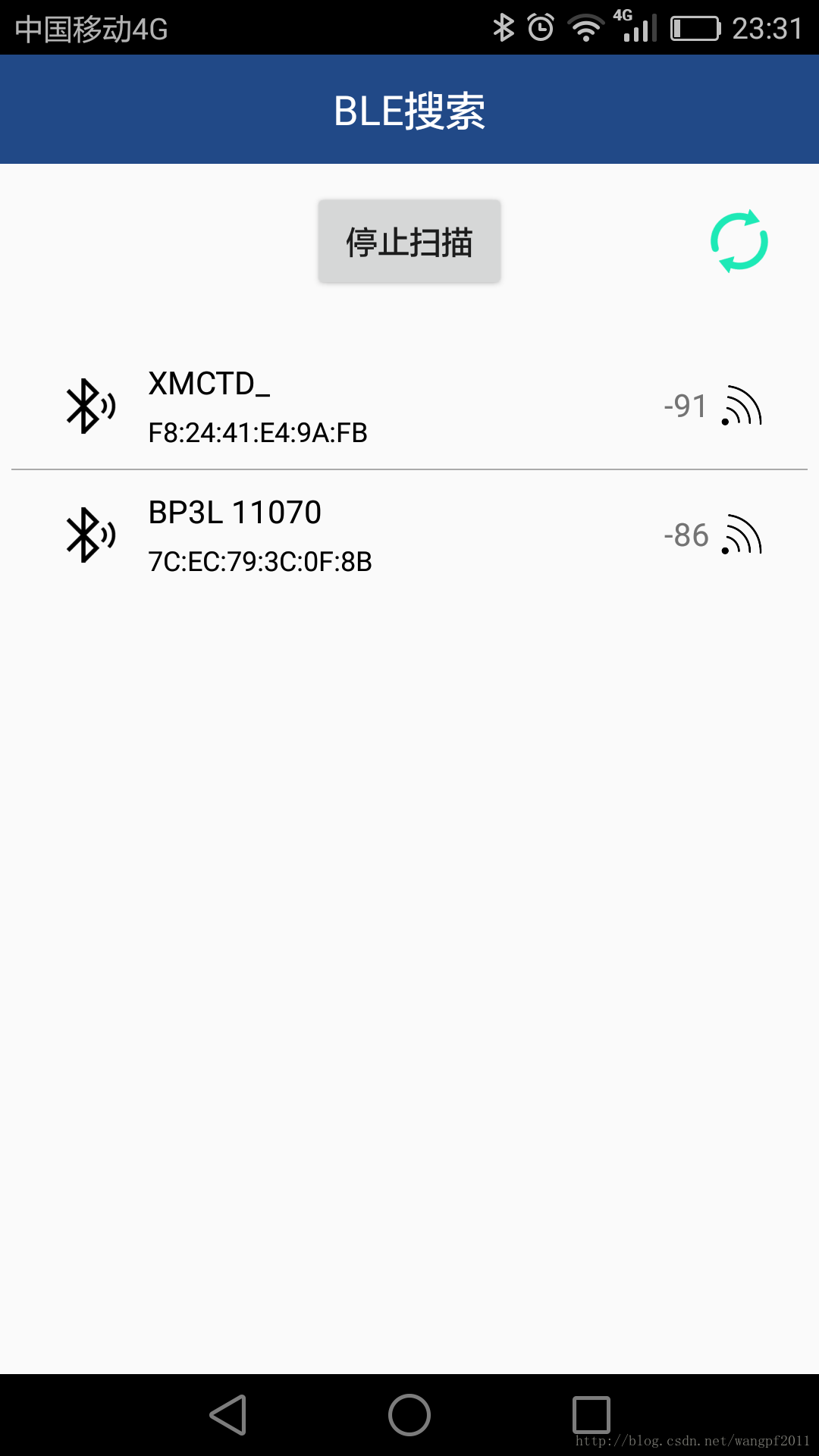

由于BLE蓝牙只能支持Android 4.3以上的系统 (SDK>=18),所以在进行BLE开发前,需要做一些准备工作。build.gradle中设置最小SDK版本为18(minSdkVersion 18),AndroidManifest.xml增加蓝牙相关权限说明。
<!-- 为了在app中使用蓝牙功能,必须声明蓝牙权限BLUETOOTH。利用这个权限去执行蓝牙通信,例如请求连接、传输数据。 -->
<uses-permission android:name="android.permission.BLUETOOTH"/>
<!-- 如果想让你的app启动设备发现或操纵蓝牙设置,必须声明BLUETOOTH_ADMIN权限。注意:如果你使用BLUETOOTH_ADMIN权限,你也必须声明BLUETOOTH权限。 -->
<uses-permission android:name="android.permission.BLUETOOTH_ADMIN"/>
<uses-permission android:name="android.permission.ACCESS_FINE_LOCATION"/>
<uses-permission android:name="android.permission.ACCESS_COARSE_LOCATION"/>
<!-- 如果想声明你的app只为具有BLE的设备提供 -->
<uses-feature android:name="android.hardware.bluetooth_le" android:required="true"/>
一、BLE设备搜索
首先检查当前手机是否支持ble 蓝牙。
if(!getPackageManager().hasSystemFeature(PackageManager.FEATURE_BLUETOOTH_LE)) {
    UIHelper.ToastMessage(MainActivity.this, R.string.ble_not_supported);
    return;
}
初始化 Bluetooth adapter, 通过蓝牙管理器得到一个参考蓝牙适配器(API必须在以上android4.3或以上和版本)
if(mBluetoothAdapter == null) {
    final BluetoothManager bluetoothManager = (BluetoothManager) getSystemService(Context.BLUETOOTH_SERVICE);
    mBluetoothAdapter = bluetoothManager.getAdapter();
    // 检查设备上是否支持蓝牙
    if (mBluetoothAdapter == null) {
        UIHelper.ToastMessage(MainActivity.this, R.string.ble_not_supported1);
        return;
    }
}
成功获取mBluetoothAdapter后,就可以进行BLE设备搜索。
// Device scan callback.
private BluetoothAdapter.LeScanCallback mLeScanCallback = new BluetoothAdapter.LeScanCallback() {
    @Override
    public void onLeScan(final BluetoothDevice device, int rssi, final byte[] scanRecord) {
        BleDevice bleDevice = new BleDevice(device, rssi, scanRecord, 0);
        mDeviceAdapter.addDevice(bleDevice);
        mDeviceAdapter.notifyDataSetChanged();
    }
};

//Device startLeScan/stopLeScan
private void scanLeDevice(final boolean enable) {
    if(enable) {
        // Stops scanning after a pre-defined scan period.
        mHandler.postDelayed(new Runnable() {
            @Override
            public void run() {
                mScanning = false;
                mBluetoothAdapter.stopLeScan(mLeScanCallback);
            }
        }, SCAN_PERIOD);

        mScanning = true;
        mBluetoothAdapter.startLeScan(mLeScanCallback);
    } else {
        mScanning = false;
        mBluetoothAdapter.stopLeScan(mLeScanCallback);
    }
}
二、BLE设备连接
BLE设备的连接以及BluetoothGatt对象的操作都封装在了一个Service(Demo中对应的是com.wf.bluetoothledemo.service.BluetoothLeService)中,不同Activity可以通过bindService复用该Service。BLE设置的连接变化状态、信息发送接收通过广播的方式发送给需要的Activity。
所有BLE设备的GATT 事务是建立在嵌套的Profiles, Services 和 Characteristics之上的。Service 是把数据分成一个个的独立逻辑项,它包含一个或者多个 Characteristic。每个 Service 有一个 UUID 唯一标识。例如Heart Rate Service包含 3 个 Characteristic:Heart Rate Measurement, Body Sensor Location 和 Heart Rate Control Point。
Characteristic 在 GATT 事务中的最低界别的是 Characteristic,Characteristic 是最小的逻辑数据单元,当然它可能包含一个组关联的数据,例如加速度计的 X/Y/Z 三轴值。
实际上,和 BLE 外设打交道,主要是通过 Characteristic。你可以从 Characteristic 读取数据,也可以往 Characteristic 写数据。这样就实现了双向的通信。所以你可以自己实现一个类似串口(UART)的 Sevice,这个 Service 中包含两个 Characteristic,一个被配置只读的通道(RX),另一个配置为只写的通道(TX)。关于GATT、Service、Characteristic 的详细说明,请参考我的另一篇博文:
http://blog.csdn.net/wangpf2011/article/details/78887510
在成功获取BLE设备的MAC地址后,就可以向BLE外围设备发起连接请求。
public boolean connect(final String address) {
    if (mBluetoothAdapter == null || address == null) {
        Log.w(TAG, "BluetoothAdapter not initialized or unspecified address.");
        return false;
    }
    final BluetoothDevice device = mBluetoothAdapter.getRemoteDevice(address);
    if (device == null) {
        Log.d(TAG, "没有设备");
        return false;
    }
    // We want to directly connect to the device, so we are setting the
    // autoConnect parameter to false.
    if (Build.VERSION.SDK_INT >= Build.VERSION_CODES.M) {
        mBluetoothGatt = device.connectGatt(this, false, mGattCallback, TRANSPORT_LE);
    } else {
        mBluetoothGatt = device.connectGatt(this, false, mGattCallback);
    }
    Log.d(TAG, "Trying to create a new connection.");
    mConnectionState = STATE_CONNECTING;
    return true;
}
BLE设备连接成功后,直接查找特定服务BluetoothLeService和读写特性BluetoothGattCharacteristic。往BLE设备写数据比较简单,直接mBluetoothGatt.writeCharacteristic(characteristic)就可以,但是怎么接收BLE设备的返回呢?其实也很简单,一行代码mBluetoothLeService.setCharacteristicNotification(characteristictx, true),这句话的作用就是检测characteristictx的数据发生变化,然后发出通知在BluetoothGattCallback回调中接收返回的数据。
BLE在Android中应用时需要注意以下几点:
1)Android6.0及以上机型上,在进行BLE设备搜索连接前,需要动态获取蓝牙相关权限,上文中没有对这方面进行陈述,想必小伙伴们早已熟练掌握动态获取权限方面技术。
2)设置MTU,即ATT最大传输单元,MTU默认是23字节(可用20个字节),Android5.0及以上可以自定义最大传输单元,Android5.0以下无法设置,所以Android5.0以下机型上传输数据大于20个字节,请分包传输。MTU设置建议在BLE设备连接成功时进行设置。
private final BluetoothGattCallback mGattCallback = new BluetoothGattCallback() {
    @Override
    public void onConnectionStateChange(BluetoothGatt gatt, int status,
                                        int newState) {
        String intentAction;
        if (newState == BluetoothProfile.STATE_CONNECTED) {
            Log.i(TAG, "Connected to GATT server.");
            //set mtu,  least Android5.0
            if(Build.VERSION.SDK_INT >= Build.VERSION_CODES.LOLLIPOP){
                mBluetoothGatt.requestMtu(requiredMtu);
            }else {
                // Attempts to discover services after successful connection.
                Log.i(TAG, "Attempting to start service discovery");
                mBluetoothGatt.discoverServices();
            }
        } else if (newState == BluetoothProfile.STATE_DISCONNECTED) {
            Log.i(TAG, "Disconnected from GATT server.");
            mBluetoothGatt.close();
        }
    }
......
};
Demo下载地址
http://download.csdn.net/download/wangpf2011/10193249


 扫一扫
扫一扫


 4614
4614

 被折叠的 条评论
为什么被折叠?
被折叠的 条评论
为什么被折叠?
 到【灌水乐园】发言


