


基于pygame 进行编写,支持拖拽各种不同的角度。
闲话少说直接上代码:
预览图:
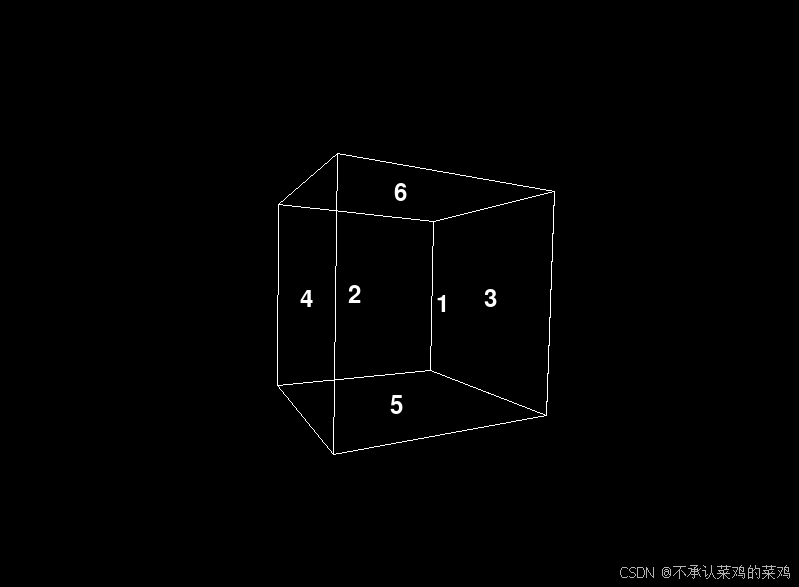
代码:
# @Time    : 2024/12/11 13:37
# @Create By  : 不承认菜鸡的菜鸡
# @File    : rotatable_cube.py
# @Description : Interactive 3D Rotating Cube with Numbered Faces

import pygame
from pygame.locals import *
import math

pygame.init()

width, height = 800, 600
screen = pygame.display.set_mode((width, height))
pygame.display.set_caption("3D Rotatable Cube")


vertices = [
    [100, 100, -100],
    [100, -100, -100],
    [-100, -100, -100],
    [-100, 100, -100],
    [100, 100, 100],
    [100, -100, 100],
    [-100, -100, 100],
    [-100, 100, 100]
]
edges = [
    (0, 1), (1, 2), (2, 3), (3, 0),
    (4, 5), (5, 6), (6, 7), (7, 4),
    (0, 4), (1, 5), (2, 6), (3, 7)
]
faces = [
    (0, 1, 2, 3),
    (4, 5, 6, 7),
    (0, 4, 5, 1),
    (3, 7, 6, 2),
    (0, 3, 7, 4),
    (1, 2, 6, 5)
]
face_numbers = [1, 2, 3, 4, 5, 6]

BLACK = (0, 0, 0)
WHITE = (255, 255, 255)

def rotate_x(vertex, angle):
    x, y, z = vertex
    rad = math.radians(angle)
    cos_theta = math.cos(rad)
    sin_theta = math.sin(rad)
    y_new = y * cos_theta - z * sin_theta
    z_new = y * sin_theta + z * cos_theta
    return [x, y_new, z_new]

def rotate_y(vertex, angle):
    x, y, z = vertex
    rad = math.radians(angle)
    cos_theta = math.cos(rad)
    sin_theta = math.sin(rad)
    x_new = x * cos_theta + z * sin_theta
    z_new = -x * sin_theta + z * cos_theta
    return [x_new, y, z_new]

def rotate_z(vertex, angle):
    x, y, z = vertex
    rad = math.radians(angle)
    cos_theta = math.cos(rad)
    sin_theta = math.sin(rad)
    x_new = x * cos_theta - y * sin_theta
    y_new = x * sin_theta + y * cos_theta
    return [x_new, y_new, z]


def project(vertex):
    factor = 400 / (400 + vertex[2])
    x = vertex[0] * factor + width // 2
    y = vertex[1] * factor + height // 2
    return [x, y]


def render_faces_with_numbers(rotated_vertices):
    font = pygame.font.SysFont(None, 36)
    for i, face in enumerate(faces):
        point_list = [project(rotated_vertices[vertex]) for vertex in face]
        pygame.draw.polygon(screen, WHITE, point_list, 1)

        center_x = sum(point[0] for point in point_list) / len(point_list)
        center_y = sum(point[1] for point in point_list) / len(point_list)

        number_surface = font.render(str(face_numbers[i]), True, WHITE)
        screen.blit(number_surface, (center_x - number_surface.get_width() / 2, center_y - number_surface.get_height() / 2))


running = True
rotation_x = 0
rotation_y = 0
mouse_down = False
last_mouse_x, last_mouse_y = 0, 0

while running:
    screen.fill(BLACK)
    for event in pygame.event.get():
        if event.type == QUIT:
            running = False
        elif event.type == MOUSEBUTTONDOWN:
            if event.button == 1:
                mouse_down = True
                last_mouse_x, last_mouse_y = event.pos
        elif event.type == MOUSEBUTTONUP:
            if event.button == 1:
                mouse_down = False
        elif event.type == MOUSEMOTION and mouse_down:
            mouse_x, mouse_y = event.pos
            dx = mouse_x - last_mouse_x
            dy = mouse_y - last_mouse_y
            rotation_x += dy * 0.5
            rotation_y += dx * 0.5
            last_mouse_x, last_mouse_y = mouse_x, mouse_y

    rotated_vertices = []
    for vertex in vertices:
        rotated = rotate_x(vertex, rotation_x)
        rotated = rotate_y(rotated, rotation_y)
        rotated_vertices.append(rotated)

    render_faces_with_numbers(rotated_vertices)

    pygame.display.flip()

pygame.quit()

 725
725


 扫一扫
扫一扫


 被折叠的 条评论
为什么被折叠?
被折叠的 条评论
为什么被折叠?
 到【灌水乐园】发言


