


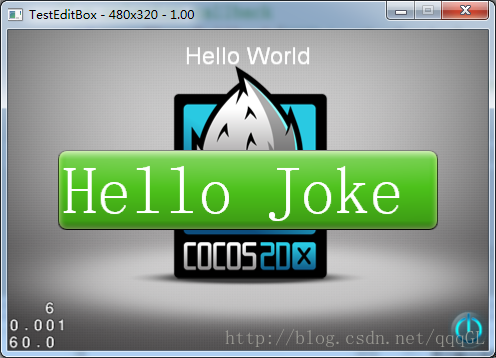
cocos2dx实现输入框,CCEditBox的简单用法,更多的设置可以查看API,看代码
#ifndef __HELLOWORLD_SCENE_H__
#define __HELLOWORLD_SCENE_H__

#include "cocos2d.h"
#include "cocos-ext.h"

class HelloWorld : public cocos2d::CCLayer,public cocos2d::extension::CCEditBoxDelegate
{
public:
    // Here's a difference. Method 'init' in cocos2d-x returns bool, instead of returning 'id' in cocos2d-iphone
    virtual bool init();

    // there's no 'id' in cpp, so we recommend returning the class instance pointer
    static cocos2d::CCScene* scene();

    // a selector callback
    void menuCloseCallback(CCObject* pSender);

    // implement the "static node()" method manually
    CREATE_FUNC(HelloWorld);


	cocos2d::extension::CCEditBox* edit_name;

	//开始进入编辑
	virtual void editBoxEditingDidBegin(cocos2d::extension::CCEditBox* editBox);

	//结束编辑
	virtual void editBoxEditingDidEnd(cocos2d::extension::CCEditBox* editBox);

	//编辑框文本改变
	virtual void editBoxTextChanged(cocos2d::extension::CCEditBox* editBox, const std::string& text);

	//当触发return后的回调函数
	virtual void editBoxReturn(cocos2d::extension::CCEditBox* editBox);

};

#endif // __HELLOWORLD_SCENE_H__
#include "HelloWorldScene.h"

USING_NS_CC;
USING_NS_CC_EXT;

CCScene* HelloWorld::scene()
{
    // 'scene' is an autorelease object
    CCScene *scene = CCScene::create();

    // 'layer' is an autorelease object
    HelloWorld *layer = HelloWorld::create();

    // add layer as a child to scene
    scene->addChild(layer);

    // return the scene
    return scene;
}

// on "init" you need to initialize your instance
bool HelloWorld::init()
{
    //////////////////////////////
    // 1. super init first
    if ( !CCLayer::init() )
    {
        return false;
    }

    CCSize visibleSize = CCDirector::sharedDirector()->getVisibleSize();
    CCPoint origin = CCDirector::sharedDirector()->getVisibleOrigin();

    /////////////////////////////
    // 2. add a menu item with "X" image, which is clicked to quit the program
    //    you may modify it.

    // add a "close" icon to exit the progress. it's an autorelease object
    CCMenuItemImage *pCloseItem = CCMenuItemImage::create(
                                        "CloseNormal.png",
                                        "CloseSelected.png",
                                        this,
                                        menu_selector(HelloWorld::menuCloseCallback));

	pCloseItem->setPosition(ccp(origin.x + visibleSize.width - pCloseItem->getContentSize().width/2 ,
                                origin.y + pCloseItem->getContentSize().height/2));

    // create menu, it's an autorelease object
    CCMenu* pMenu = CCMenu::create(pCloseItem, NULL);
    pMenu->setPosition(CCPointZero);
    this->addChild(pMenu, 1);

    /////////////////////////////
    // 3. add your codes below...

    // add a label shows "Hello World"
    // create and initialize a label

    CCLabelTTF* pLabel = CCLabelTTF::create("Hello World", "Arial", 24);

    // position the label on the center of the screen
    pLabel->setPosition(ccp(origin.x + visibleSize.width/2,
                            origin.y + visibleSize.height - pLabel->getContentSize().height));

    // add the label as a child to this layer
    this->addChild(pLabel, 1);

    // add "HelloWorld" splash screen"
    CCSprite* pSprite = CCSprite::create("HelloWorld.png");

    // position the sprite on the center of the screen
    pSprite->setPosition(ccp(visibleSize.width/2 + origin.x, visibleSize.height/2 + origin.y));

    // add the sprite as a child to this layer
    this->addChild(pSprite, 0);

	//输入框的大小
	CCSize edit_size=CCSizeMake(visibleSize.width-100,80);

	edit_name=CCEditBox::create(edit_size,CCScale9Sprite::create("green_edit.png"));
	edit_name->setPosition(ccp(visibleSize.width/2,visibleSize.height/2));
	edit_name->setPlaceHolder("test");//设置提示的文字?
	edit_name->setReturnType(KeyboardReturnType::kKeyboardReturnTypeDefault);
	/*edit_name->setInputFlag(kEditBoxInputFlagPassword);*/ //设置密码输入
	edit_name->setDelegate(this);//设置监听器
	this->addChild(edit_name);

    return true;
}

void HelloWorld::editBoxEditingDidBegin(cocos2d::extension::CCEditBox* editBox){

}
void HelloWorld::editBoxEditingDidEnd(cocos2d::extension::CCEditBox* editBox){

	CCLog("------gettext-------%s",editBox->getText());

}
void HelloWorld::editBoxTextChanged(cocos2d::extension::CCEditBox* editBox, const std::string& text){
	CCLog("-----text-------%s",editBox->getText());
}
void HelloWorld::editBoxReturn(cocos2d::extension::CCEditBox* editBox){

}


void HelloWorld::menuCloseCallback(CCObject* pSender)
{
#if (CC_TARGET_PLATFORM == CC_PLATFORM_WINRT) || (CC_TARGET_PLATFORM == CC_PLATFORM_WP8)
	CCMessageBox("You pressed the close button. Windows Store Apps do not implement a close button.","Alert");
#else
    CCDirector::sharedDirector()->end();
#if (CC_TARGET_PLATFORM == CC_PLATFORM_IOS)
    exit(0);
#endif
#endif
}





 2616
2616


 扫一扫
扫一扫


 被折叠的 条评论
为什么被折叠?
被折叠的 条评论
为什么被折叠?
 到【灌水乐园】发言


