


Service是Android中四大组件之一,在Android开发中起到非常重要的作用,先来看一下官方对Service的定义:
A Service is an application component that can perform long-running operations in the background and does not provide a user interface. Another application component can start a service and it will continue to run in the background even if the user switches to another application. Additionally, a component can bind to a service to interact with it and even perform interprocess communication (IPC). For example, a service might handle network transactions, play music, perform file I/O, or interact with a content provider, all from the background.
翻译过来就是:Service(服务)是一个没有用户界面的在后台运行执行耗时操作的应用组件。其他应用组件能够启动Service,并且当用户切换到另外的应用场景,Service将持续在后台运行。另外,一个组件能够绑定到一个service与之交互(IPC机制),例如,一个service可能会处理网络操作,播放音乐,操作文件I/O或者与内容提供者(content provider)交互,所有这些活动都是在后台进行。
Service有两种状态,“启动的”和“绑定”
Started
A service is "started" when an application component (such as an activity) starts it by calling startService(). Once started, a service can run in the background indefinitely, even if the component that started it is destroyed. Usually, a started service performs a single operation and does not return a result to the caller. For example, it might download or upload a file over the network. When the operation is done, the service should stop itself.
Bound
A service is "bound" when an application component binds to it by calling bindService(). A bound service offers a client-server interface that allows components to interact with the service, send requests, get results, and even do so across processes with interprocess communication (IPC). A bound service runs only as long as another application component is bound to it. Multiple components can bind to the service at once, but when all of them unbind, the service is destroyed.
通过startService()启动的服务处于“启动的”状态,一旦启动,service就在后台运行,即使启动它的应用组件已经被销毁了。通常started状态的service执行单任务并且不反悔任何结果给启动者。比如当下载或上传一个文件,当这项操作完成时,service应该停止它本身。
还有一种“绑定”状态的service,通过调用bindService()来启动,一个绑定的service提供一个允许组件与service交互的接口,可以发送请求、获取返回结果,还可以通过夸进程通信来交互(IPC)。绑定的service只有当应用组件绑定后才能运行,多个组件可以绑定一个service,当调用unbind()方法时,这个service就会被销毁了。
另外,在官方的说明文档中还有一个警告:
Caution: A service runs in the main thread of its hosting process—the service does not create its own thread and does not run in a separate process (unless you specify otherwise). This means that, if your service is going to do any CPU intensive work or blocking operations (such as MP3 playback or networking), you should create a new thread within the service to do that work. By using a separate thread, you will reduce the risk of Application Not Responding (ANR) errors and the application's main thread can remain dedicated to user interaction with your activities.
意思是service与activity一样都存在与当前进程的主线程中,所以,一些阻塞UI的操作,比如耗时操作不能放在service里进行,比如另外开启一个线程来处理诸如网络请求的耗时操作。如果在service里进行一些耗CPU和耗时操作,可能会引发ANR警告,这时应用会弹出是强制关闭还是等待的对话框。所以,对service的理解就是和activity平级的,只不过是看不见的,在后台运行的一个组件,这也是为什么和activity同被说为Android的基本组件。
Service生命周期中的一些方法:
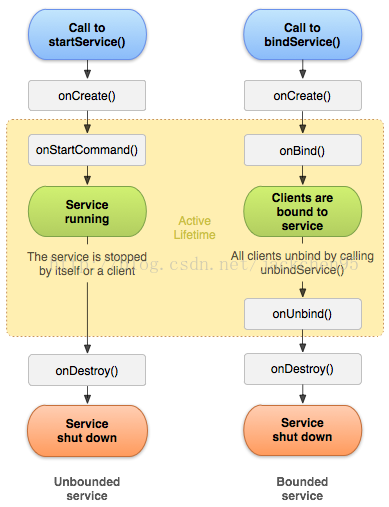
通过这个图可以看到,两种启动service的方式以及他们的声明周期,bind service的不同之处在于当绑定的组件销毁后,对应的service也就被kill了。service的声明周期相比与activity的简单了许多,只要好好理解两种启动service方式的异同就行。
service生命周期也涉及一些回调方法,这些方法都不用调用父类方法,具体如下:
- public class ExampleService extends Service {
- int mStartMode; // indicates how to behave if the service is killed
- IBinder mBinder; // interface for clients that bind
- boolean mAllowRebind; // indicates whether onRebind should be used
- @Override
- public void onCreate() {
- // The service is being created
- }
- @Override
- public int onStartCommand(Intent intent, int flags, int startId) {
- // The service is starting, due to a call to startService()
- return mStartMode;
- }
- @Override
- public IBinder onBind(Intent intent) {
- // A client is binding to the service with bindService()
- return mBinder;
- }
- @Override
- public boolean onUnbind(Intent intent) {
- // All clients have unbound with unbindService()
- return mAllowRebind;
- }
- @Override
- public void onRebind(Intent intent) {
- // A client is binding to the service with bindService(),
- // after onUnbind() has already been called
- }
- @Override
- public void onDestroy() {
- // The service is no longer used and is being destroyed
- }
- }<
-
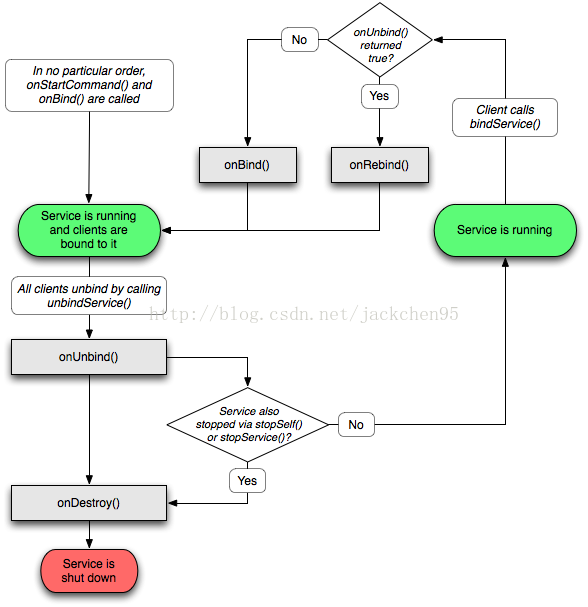
关于Service生命周期还有一张比较易懂的图(来源于网络)
另外,这里要说明Service的一个子类,IntentService,首先看下官方文档的说明:
IntentService
This is a subclass of Service that uses a worker thread to handle all start requests, one at a time. This is the best option if you don't require that your service handle multiple requests simultaneously. All you need to do is implement onHandleIntent(), which receives the intent for each start request so you can do the background work.
IntentService使用队列的方式将请求的Intent加入队列,然后开启一个worker thread(线程)来处理队列中的Intent,对于异步的startService请求,IntentService会处理完成一个之后再处理第二个,每一个请求都会在一个单独的worker thread中处理,不会阻塞应用程序的主线程,这里就给我们提供了一个思路,如果有耗时的操作与其在Service里面开启新线程还不如使用IntentService来处理耗时操作。而在一般的继承Service里面如果要进行耗时操作就必须另开线程,但是使用IntentService就可以直接在里面进行耗时操作,因为默认实现了一个worker thread。对于异步的startService请求,IntentService会处理完成一个之后再处理第二个。
看下IntentService的具体实现:
- public class HelloIntentService extends IntentService {
- /**
- * A constructor is required, and must call the super IntentService(String)
- * constructor with a name for the worker thread.
- */
- public HelloIntentService() {
- super("HelloIntentService");
- }
- /**
- * The IntentService calls this method from the default worker thread with
- * the intent that started the service. When this method returns, IntentService
- * stops the service, as appropriate.
- */
- @Override
- protected void onHandleIntent(Intent intent) {
- // Normally we would do some work here, like download a file.
- // For our sample, we just sleep for 5 seconds.
- long endTime = System.currentTimeMillis() + 5*1000;
- while (System.currentTimeMillis() < endTime) {
- synchronized (this) {
- try {
- wait(endTime - System.currentTimeMillis());
- } catch (Exception e) {
- }
- }
- }
- }
- }
关于停止Service,如果service是非绑定的,最终当任务完成时,为了节省系统资源,一定要停止service,可以通过stopSelf()来停止,也可以在其他组件中通过stopService()来停止,绑定的service可以通过onUnBind()来停止service。
关于Service还有很多知识,这里就不再一一列举,可以参考 http://developer.android.com/guide/components/services.html

 1695
1695


 扫一扫
扫一扫


 被折叠的 条评论
为什么被折叠?
被折叠的 条评论
为什么被折叠?
 到【灌水乐园】发言


