



 本文展示了如何使用C++和OpenCV库创建一个GUI程序,该程序可以将图片和视频转换为ASCII艺术。程序包括图片缩放、像素值转换为字符、GUI界面设计以及进度条显示等功能。
talk is cheap show you the code
99%的代码都是通过cursor写出来的,提示太长了会卡住,所以最好先列一个提纲,每个步骤一定要详细
比如
- 实现一个函数,输入图片路径,然后把图片转换成字符画,再把字符画保存为图片
- 实现一个函数把视频转换为字符画,调用上面的转换图片函数
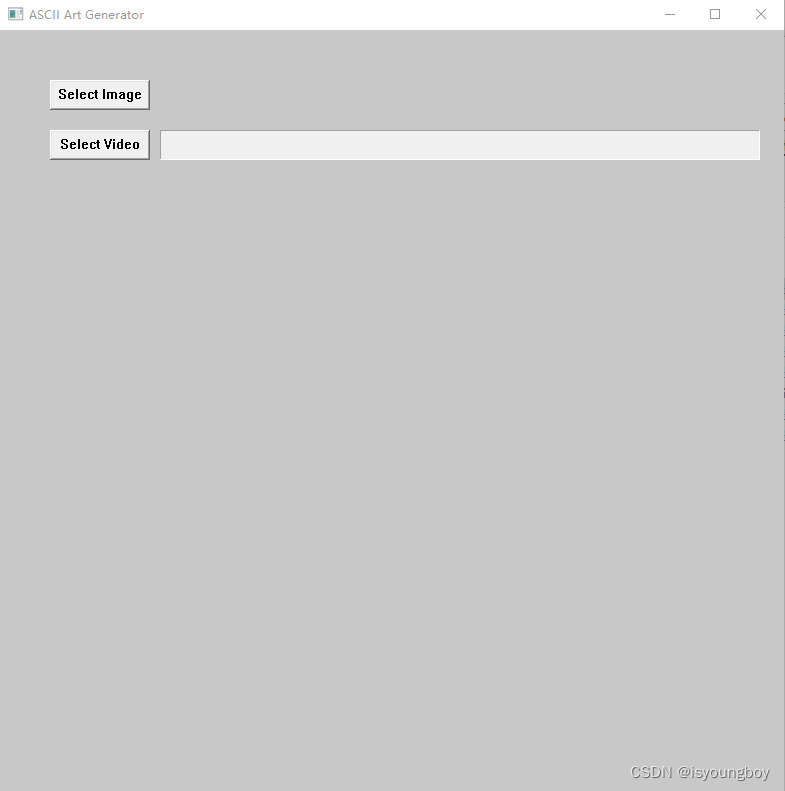
- 使用win32实现一个gui,上面是按钮内容是选择图片,下面是一个图片展示框,点击图片弹出选择文件,选择完文件调用上面的转换图片为字符画函数,然后把图片显示在下面的显示框中
- 在选择图片按钮下添加一个选择视频,在右边再添加一个进度条,弹出文件选择框选择视频调用视频转字符画函数处理视频并更新进度条
- 写一个cmake文件,编译这个项目
gui效果图
source code
#include <Windows.h>
#include <CommCtrl.h>
#include <string>
#include <iostream>
#include <fstream>
#include <thread>


#pragma comment(lib, "Comctl32.lib")

// 包含OpenCV头文件
#include <opencv2/opencv.hpp>
#include <opencv2/highgui/highgui.hpp>
#include <opencv2/imgproc/imgproc.hpp>

// Implement the pixelValueToAsciiChar function
char pixelValueToAsciiChar(int pixelValue) {
    const std::string asciiChars = "MNHQ$OC?7>!:-;. ";
    return asciiChars[pixelValue / (256 / asciiChars.length())];
}

// Convert image to ASCII art and save the ASCII art as an image
cv::Mat imageToCharPixel(const cv::Mat& inputImage) {
    // Resize the input image
    cv::Mat resizedImage;
    cv::resize(inputImage, resizedImage, cv::Size(inputImage.cols / 2, inputImage.rows / 4));

    // Create an empty image for the ASCII art
    cv::Mat asciiImage(resizedImage.rows * 16, resizedImage.cols * 8, CV_8UC1, cv::Scalar(255));

    // Convert the resized image to ASCII art
    for (int i = 0; i < resizedImage.rows; ++i) {
        for (int j = 0; j < resizedImage.cols; ++j) {
            // Get the pixel value
            int pixelValue = resizedImage.at<uchar>(i, j);

            // Convert the pixel value to an ASCII character
            char asciiChar = pixelValueToAsciiChar(pixelValue);

            // Draw the ASCII character on the ASCII image
            cv::putText(asciiImage, std::string(1, asciiChar), cv::Point(j * 8, i * 16),
                        cv::FONT_HERSHEY_SIMPLEX, 0.5, cv::Scalar(0), 1);
        }
    }

    // Return the ASCII art as an image
    return asciiImage;
}

cv::Mat imageToCharPixel2(const cv::Mat& inputImage) {
    // Resize the input image
    cv::Mat resizedImage;
    cv::resize(inputImage, resizedImage, cv::Size(inputImage.cols/2, inputImage.rows/4));

    // Create an empty image for the ASCII art
    cv::Mat asciiImage(resizedImage.rows*16 , resizedImage.cols*8, CV_8UC1, cv::Scalar(255));

    // Convert the resized image to ASCII art
    for (int i = 0; i < resizedImage.rows; ++i) {
        for (int j = 0; j < resizedImage.cols; ++j) {
            // Get the pixel value
            int pixelValue = resizedImage.at<uchar>(i, j);

            // Convert the pixel value to an ASCII character
            char asciiChar = pixelValueToAsciiChar(pixelValue);

            // Draw the ASCII character on the ASCII image
            cv::putText(asciiImage, std::string(1, asciiChar), cv::Point(j * 8, i * 16),
                        cv::FONT_HERSHEY_SIMPLEX, 0.5, cv::Scalar(0), 1);
        }
    }

    // Return the ASCII art as an image
    return asciiImage;
}

// Convert image to ASCII art and save the ASCII art as an image
cv::Mat imageToCharPixel(const std::string& imagePath) {
    // Load the input image
    cv::Mat inputImage = cv::imread(imagePath, cv::IMREAD_GRAYSCALE);

    // Convert the image to ASCII art
    cv::Mat asciiImage = imageToCharPixel(inputImage);

    // Save the ASCII art as an image
    return asciiImage;
}

HWND hLeftImage;
HWND hWnd;
HWND hProgressBar;

// Convert video to ASCII art and save the ASCII art as a video
void videoToCharPixel(const std::string& videoPath, const std::string& outputPath) {
    // Open the input video
    cv::VideoCapture inputVideo(videoPath);

    // Get the input video's frame rate
    double fps = inputVideo.get(cv::CAP_PROP_FPS);

    // Get the input video's frame size
    cv::Size frameSize = cv::Size(inputVideo.get(cv::CAP_PROP_FRAME_WIDTH)*4, inputVideo.get(cv::CAP_PROP_FRAME_HEIGHT)*4);
std::cout << "Frame size: " << frameSize.width << "x" << frameSize.height << std::endl;

    // Create the output video writer
    cv::VideoWriter outputVideo(outputPath, cv::VideoWriter::fourcc('M', 'J', 'P', 'G'), fps, frameSize, false);

    // Process each frame of the input video
    cv::Mat frame;
    int count = 1;
    while (inputVideo.read(frame)) {
        // Convert the frame to ASCII art
        cv::cvtColor(frame, frame, cv::COLOR_BGR2GRAY);

        cv::Mat asciiFrame = imageToCharPixel2(frame);
        //cv::imwrite("resf"+std::to_string(count)+".jpg", frame);
        //cv::imwrite("res"+std::to_string(count)+".jpg", asciiFrame);
        // Write the ASCII frame to the output video

        outputVideo.write(asciiFrame);
int progress = static_cast<int>((count / inputVideo.get(cv::CAP_PROP_FRAME_COUNT)) * 100);
SendMessage(hProgressBar, PBM_SETPOS, progress, 0);

        count++;
    }
    MessageBox(hWnd, "Video converted to ASCII art and saved as res.avi", "Conversion Complete", MB_OK);
}


LRESULT CALLBACK WndProc(HWND hWnd, UINT message, WPARAM wParam, LPARAM lParam) {
    switch (message) {
        // 处理WM_CLOSE消息
        case WM_CLOSE:
            DestroyWindow(hWnd); // 销毁窗口
            PostQuitMessage(0); // 退出应用程序
            break;
        // 其他消息处理
        case IDCANCEL:
            PostQuitMessage(0);
            break;
        default:
            return DefWindowProc(hWnd, message, wParam, lParam);
    }
    return 0;
}


int WINAPI WinMain(HINSTANCE hInstance, HINSTANCE hPrevInstance, LPSTR lpCmdLine, int nCmdShow) {
    // Initialize common controls
    INITCOMMONCONTROLSEX icex;
    icex.dwSize = sizeof(INITCOMMONCONTROLSEX);
    icex.dwICC = ICC_STANDARD_CLASSES;
    InitCommonControlsEx(&icex);

    WNDCLASS wc = {0};
    wc.lpfnWndProc = WndProc;
    wc.hInstance = hInstance;
    wc.hbrBackground = (HBRUSH)(COLOR_BACKGROUND);
    wc.lpszClassName = "ASCII Art Generator";
    RegisterClass(&wc);

    // Create the main window
    hWnd = CreateWindowEx(0, "ASCII Art Generator", "ASCII Art Generator", WS_OVERLAPPEDWINDOW,
                                CW_USEDEFAULT, CW_USEDEFAULT, 800, 800, nullptr, nullptr, hInstance, nullptr);

    // Create the left image display control
    hLeftImage = CreateWindowEx(0, WC_STATIC, nullptr, WS_CHILD | WS_VISIBLE | SS_BITMAP,
                                    100, 100, 600, 600, hWnd, nullptr, hInstance, nullptr);

    // Create the "Select Image" button
    HWND hSelectImageButton = CreateWindowEx(0, WC_BUTTON, "Select Image", WS_CHILD | WS_VISIBLE | BS_PUSHBUTTON,
                                            50, 50, 100, 30, hWnd, nullptr, hInstance, nullptr);

    // Create the progress bar control
    hProgressBar = CreateWindowEx(0, PROGRESS_CLASS, nullptr, WS_CHILD | WS_VISIBLE,
                                        160, 100, 600, 30, hWnd, nullptr, hInstance, nullptr);
    SendMessage(hProgressBar, PBM_SETRANGE, 0, MAKELPARAM(0, 100));
    SendMessage(hProgressBar, PBM_SETSTEP, 1, 0);


// Add an event handler for the "Select Image" button
    static OPENFILENAME ofn;
    static char szFile[260];
    ZeroMemory(&ofn, sizeof(ofn));
    ofn.lStructSize = sizeof(ofn);
    ofn.hwndOwner = hWnd;
    ofn.lpstrFile = szFile;
    ofn.lpstrFile[0] = '\0';
    ofn.nMaxFile = sizeof(szFile);
    ofn.lpstrFilter = "Image Files (*.bmp;*.jpg;*.png)\0*.bmp;*.jpg;*.png\0All Files (*.*)\0*.*\0";
    ofn.nFilterIndex = 1;
    ofn.lpstrFileTitle = nullptr;
    ofn.nMaxFileTitle = 0;
    ofn.lpstrInitialDir = nullptr;
    ofn.Flags = OFN_PATHMUSTEXIST | OFN_FILEMUSTEXIST;

    static HWND hDlg = hWnd;
    static HANDLE hImage = nullptr;

    // Create the "Select Video" button
    HWND hSelectVideoButton = CreateWindowEx(0, WC_BUTTON, "Select Video", WS_CHILD | WS_VISIBLE | BS_PUSHBUTTON,
                                            50, 100, 100, 30, hWnd, nullptr, hInstance, nullptr);

    // Add an event handler for the "Select Video" button
    static OPENFILENAME ofnVideo;
    static char szVideoFile[260];
    ZeroMemory(&ofnVideo, sizeof(ofnVideo));
    ofnVideo.lStructSize = sizeof(ofnVideo);
    ofnVideo.hwndOwner = hWnd;
    ofnVideo.lpstrFile = szVideoFile;
    ofnVideo.lpstrFile[0] = '\0';
    ofnVideo.nMaxFile = sizeof(szVideoFile);
    ofnVideo.lpstrFilter = "Video Files (*.mp4;*.avi)\0*.mp4;*.avi\0All Files (*.*)\0*.*\0";
    ofnVideo.nFilterIndex = 1;
    ofnVideo.lpstrFileTitle = nullptr;
    ofnVideo.nMaxFileTitle = 0;
    ofnVideo.lpstrInitialDir = nullptr;
    ofnVideo.Flags = OFN_PATHMUSTEXIST | OFN_FILEMUSTEXIST;

    static auto selectVideo = []() {
        if (GetOpenFileName(&ofnVideo) == TRUE) {
            // Convert the video to ASCII art
            // Execute videoToCharPixel in a separate thread
            std::thread t(videoToCharPixel, ofnVideo.lpstrFile, "res.avi");
            t.detach();
        }
    };

    SendMessage(hSelectVideoButton, BM_SETIMAGE, IMAGE_ICON, reinterpret_cast<LPARAM>(LoadIcon(nullptr, IDI_SHIELD)));
    SetWindowText(hSelectVideoButton, "Select Video");
    SetWindowSubclass(hSelectVideoButton, [](HWND hWnd, UINT uMsg, WPARAM wParam, LPARAM lParam, UINT_PTR uIdSubclass, DWORD_PTR dwRefData) -> LRESULT {
        switch (uMsg) {
        case WM_LBUTTONUP:
            selectVideo();
            break;
        }
        return DefSubclassProc(hWnd, uMsg, wParam, lParam);
    }, 0, 0);


    static auto selectImage = []() {
        if (GetOpenFileName(&ofn) == TRUE) {
            // Convert the image to ASCII art
            cv::Mat asciiImage = imageToCharPixel(ofn.lpstrFile);
            cv::imwrite("res.jpg", asciiImage);
            // Calculate the height based on the aspect ratio and resize the image
            int height = static_cast<int>(asciiImage.rows * (600.0 / asciiImage.cols));
            cv::resize(asciiImage, asciiImage, cv::Size(600, height), 0, 0, cv::INTER_AREA);
// Convert the ASCII image to a 3-channel image

            cv::cvtColor(asciiImage, asciiImage, cv::COLOR_GRAY2BGR);

            cv::flip(asciiImage, asciiImage, 0);


            // Display the ASCII art on the left image control
            HDC hdc = GetDC(hLeftImage);
            SetBkColor(hdc, RGB(255, 255, 255));
            BITMAPINFO bmi = { 0 };
            bmi.bmiHeader.biSize = sizeof(BITMAPINFOHEADER);
            bmi.bmiHeader.biWidth = asciiImage.cols;
            bmi.bmiHeader.biHeight = asciiImage.rows;
            bmi.bmiHeader.biPlanes = 1;
            bmi.bmiHeader.biBitCount = 24;
            bmi.bmiHeader.biCompression = BI_RGB;
            bmi.bmiHeader.biSizeImage = 0;
            HBITMAP hBitmap2 = CreateDIBitmap(hdc, &bmi.bmiHeader, CBM_INIT, asciiImage.data, &bmi, DIB_RGB_COLORS);
            SendMessage(hLeftImage, STM_SETIMAGE, IMAGE_BITMAP, reinterpret_cast<LPARAM>(hBitmap2));
            DeleteObject(hBitmap2);
            // Resize the window to fit the image
            RECT rect;
            GetClientRect(hLeftImage, &rect);
            int width = rect.right - rect.left;
            int newHeight = static_cast<int>(asciiImage.rows * (width / static_cast<double>(asciiImage.cols)));
            std::cout << "newHeight: " << newHeight << std::endl;

            SetWindowPos(hLeftImage, nullptr, 0, 0, width, newHeight, SWP_NOMOVE | SWP_NOZORDER);
        }
    };

    SendMessage(hSelectImageButton, BM_SETIMAGE, IMAGE_ICON, reinterpret_cast<LPARAM>(LoadIcon(nullptr, IDI_SHIELD)));
    SetWindowText(hSelectImageButton, "Select Image");
    SetWindowSubclass(hSelectImageButton, [](HWND hWnd, UINT uMsg, WPARAM wParam, LPARAM lParam, UINT_PTR uIdSubclass, DWORD_PTR dwRefData) -> LRESULT {
        switch (uMsg) {
        case WM_LBUTTONUP:
            selectImage();
            break;
        }
        return DefSubclassProc(hWnd, uMsg, wParam, lParam);
    }, 0, 0);


    // Show the main window
    ShowWindow(hWnd, nCmdShow);

    // Enter the message loop
    MSG msg;
    while (GetMessage(&msg, nullptr, 0, 0)) {
        TranslateMessage(&msg);
        DispatchMessage(&msg);
    }

    return static_cast<int>(msg.wParam);
}
cmake文件
cmake_minimum_required(VERSION 3.0)
project(ascii2img)

find_package(OpenCV REQUIRED PATHS "D:/tools/opencv/build")

include_directories(${OpenCV_INCLUDE_DIRS})

add_executable(ascii2img WIN32 ascii2img.cpp)

target_link_libraries(ascii2img ${OpenCV_LIBS})
编译程序
cmake -G “Visual Studio 17 2022” …
cmake --build .
打包绿色程序
下载打包好的程序
https://gitee.com/youngboyvip/acii2img/blob/master/ascii2img.zip


 扫一扫
扫一扫


 3922
3922

 被折叠的 条评论
为什么被折叠?
被折叠的 条评论
为什么被折叠?
 到【灌水乐园】发言


