


问题一:
Could not find the DLL(s) ‘msvcp140_1.dll’.TensorFlow requires that these DLLs be installed in a directory that is named in your %PATH% environment variable. You may install these DLLs by downloading “Microsoft C++ Redistributable for Visual Studio 2015,2017 and 2019” for your platform from this URL:https://support.microsoft.com/help/2977003/the-latest-supported-visual-c-downloads
解决办法:
打开 网址我下载的是x64:vc_redist.x64.exe 运行安装完成之后重启电脑即可解决。
问题二:
ModuleNotFoundError: No module named ‘tensorflow.python’
解决办法:
由于我之前使用如下代码进行TensorFlow的安装
pip install --user tensorflow
此时pip并没有把tensorflow安装在Python3的目录里,而Python3.6中默认调用的是pip3安装的包,所以导致其无法访问。于是在cmd中执行命令:
pip uninstall tensorflow
pip3 install --user tensorflow
先卸载pip安装的tensorflow,再用pip3重新安装tensorflow即可。
问题三:
TypeError: A Message class can only inherit from Message
解决办法:
在Spyde中找到Tools->Preferences->Python interpreter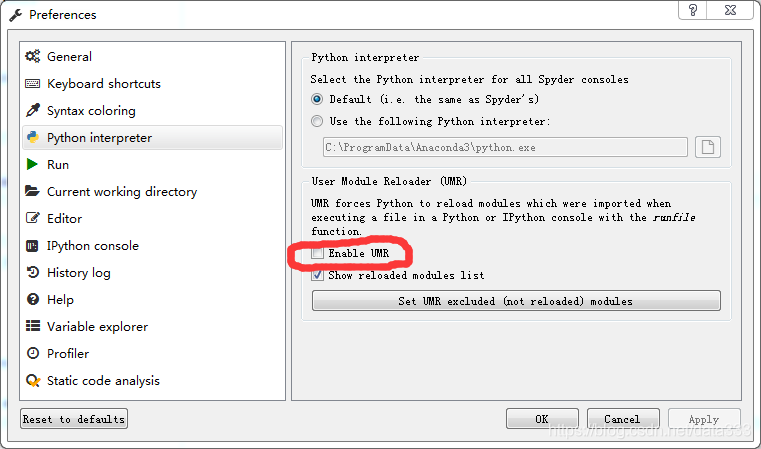
将Enable UMR前的勾选去掉,然后重启Spyder即可。

 3万+
3万+


 扫一扫
扫一扫


 被折叠的 条评论
为什么被折叠?
被折叠的 条评论
为什么被折叠?
 到【灌水乐园】发言


