



 本文介绍了如何使用Java的SWING框架开发俄罗斯方块游戏,提供了完整的源码,并详细阐述了游戏规则、操作说明以及游戏界面的绘制方法,包括GamePanel类的关键代码实现。
今天为大家分享俄罗斯方块游戏开发与制作。整个系统界面漂亮,有完整得源码,希望大家可以喜欢。喜欢的帮忙点赞和关注。一起编程、一起进步
开发环境
开发语言为Java,开发环境Eclipse或者IDEA都可以。运行主程序,或者执行打开JAR文件即可以运行本程序。
系统框架
利用JDK自带的SWING框架开发,不需要安装第三方JAR包。纯窗体模式,直接运行Main文件即可以。同时带有详细得设计文档
游戏规则
对FishFrame.java点右键,run as Application,启动大鱼吃小鱼得游戏。
俄罗斯方块简介
* 俄罗斯方块是一款益智方块游戏<
* 这款游戏最初是由苏联的电脑科学家帕吉特诺夫(Alex Pajitnov)于1985年制作的
* 作者给了他一个源自希腊字4(tetra)的名字Tetris
* 1989年由任天堂于发行GameBoy版, 推出后风靡全球,
* 成为益智方块类型游戏中知名度最高的一款
* 它看似简单但却变化无穷, 上手极其容易,
* 但是要熟练地掌握其中的操作与摆放技巧, 难度却不低
操作说明
* 游戏具有一个用于摆放小方块的平面虚拟场地
* 一组由几个小方块组成的规则形状(Tetromino)
* 游戏每次随机输出一种形状到场地顶部, 自动以一定的速度下落
* 用户在形状的过程中可以控制形状的左右移动及旋转以将形状填充到场地中
* 直至形状下落至场地底部或被场地中已有的方块阻挡而不能再下落
* 游戏再次输出一个形状, 周而复始
* 如果这次填充将场地的一行或多行完全填满, 则组成这些行的所有方块将被消除
* 并且以此来换取一定的积分奖励
* 而未被消除的方块会一直累积, 并对后来的形状摆放造成各种影响
* 如果下一个形状的输出位置已经被未消除的方块所占据,则游戏结束
运行效果
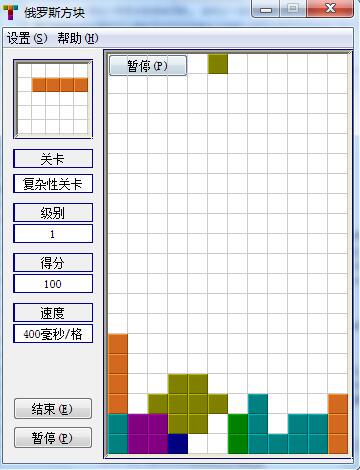

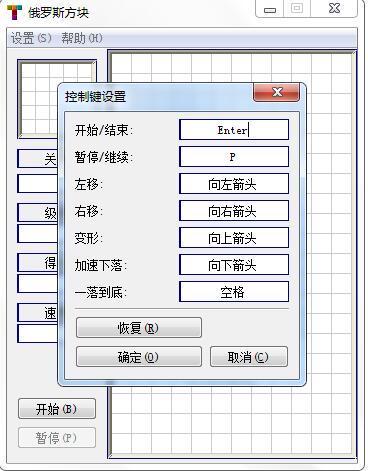
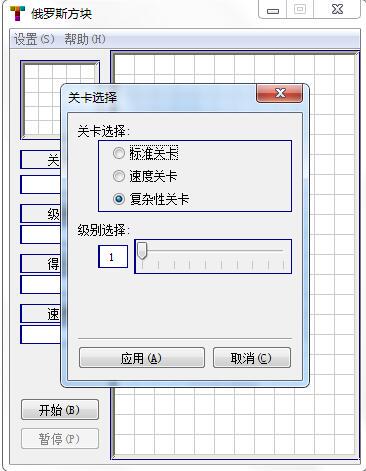
运行效果
package zhh.game.tetris.view;

import java.awt.Color;
import java.awt.Graphics;
import java.awt.Insets;

import javax.swing.JPanel;

import zhh.game.tetris.entity.Ground;
import zhh.game.tetris.entity.Shape;
import zhh.game.tetris.global.Config;
import zhh.game.tetris.listener.ConfigListener;
import zhh.game.tetris.listener.GameListener;
import zhh.game.tetris.listener.GameViewListener;

/**
 * 游戏界面
 * @author zhaohuihua
 */
public class GamePanel extends JPanel
        implements GameViewListener, GameListener, ConfigListener {

    /**
     * 串行化版本统一标识符
     */
    private static final long serialVersionUID = -4474743639789611935L;


    /**
     * 地形
     */
    private Ground ground;

    /**
     * 形状
     */
    private Shape shape;

    /**
     * 游戏是否正在进行
     */
    private boolean playing;

    /**
     * 游戏是否暂停
     */
    private boolean pause;

    /**
     * 游戏界面
     */
    public GamePanel() {
        super();
        playing = true;
        pause = false;
    }

    /**
     * 绘制地形
     * @param g Graphics
     * @param ground Ground
     */
    private void paintGround(Graphics g, Ground ground) {
        if(ground == null) return;

        // 计算坐标, 预留出边框的位置
        Insets insets = getInsets();
        int x = insets.left;
        int y = insets.top;
        g.translate(x, y);

        Color oldColor = g.getColor();
        int[][] points = ground.getPoints();
        if(points == null) return;
        int length = points.length;
        for (int i = 0; i < length; i++) {
            if(points[i][1] < 0) continue;
            g.setColor(Config.CURRENT.getGroundColor(points[i][2]));
            _paintPoint(g, points[i][0], points[i][1]);
        }

        // 还原坐标和颜色
        g.translate(-x, -y);
        g.setColor(oldColor);
    }

    /**
     * 绘制地形<br>
     * 以地形的颜色画已变为障碍物的形状<br>
     * @param g Graphics
     * @param shape Shape
     */
    private void paintGround(Graphics g, Shape shape) {
        if(shape == null) return;
        _paintShape(g, shape, Config.CURRENT.getGroundColor(shape.getType()));
    }

    /**
     * 绘制形状
     * @param g Graphics
     * @param shape Shape
     */
    private void paintShape(Graphics g, Shape shape) {
        if(shape == null) return;
        _paintShape(g, shape, Config.CURRENT.getShapeColor(shape.getType()));
    }

    /**
     * 绘制形状
     * @param g Graphics
     * @param shape Shape
     * @param color Color
     */
    private void _paintShape(Graphics g, Shape shape, Color color) {
        // 计算坐标, 预留出边框的位置
        Insets insets = getInsets();
        int x = insets.left;
        int y = insets.top;
        g.translate(x, y);

        // 设置颜色
        Color oldColor = g.getColor();
        g.setColor(color);
        int[][] points = shape.getPoints();
        int length = points.length;
        for (int i = 0; i < length; i++) {
            if(points[i][1] < 0) continue;
            _paintPoint(g, points[i][0], points[i][1]);
        }

        // 还原坐标和颜色
        g.translate(-x, -y);
        g.setColor(oldColor);
    }

    /**
     * 绘制地形的一行
     * @param g Graphics
     * @param ground Ground
     * @param line int
     * @param color Color
     */
    private void _paintGroundLine(Graphics g, Ground ground, int line, Color color) {
        // 计算坐标, 预留出边框的位置
        Insets insets = getInsets();
        int x = insets.left;
        int y = insets.top;
        g.translate(x, y);

        Color oldColor = g.getColor();

        if(ground == null) return;
        int[][] points = ground.getPoints();
        if(points == null) return;
        int length = points.length;
        for (int i = 0; i < length; i++) {
            if(points[i][1] < 0 || points[i][1] != line) continue;
            g.setColor(color == null ? Config.CURRENT.getGroundColor(points[i][2]) : color);
            _paintPoint(g, points[i][0], points[i][1]);
        }

        // 还原坐标和颜色
        g.translate(-x, -y);
        g.setColor(oldColor);
    }

    /**
     * 绘制点
     * @param g Graphics
     * @param x int
     * @param y int
     */
    private void _paintPoint(Graphics g, int x, int y) {
        g.fill3DRect(x * Config.CURRENT.getCellWidth(),
                y * Config.CURRENT.getCellHeight(),
                Config.CURRENT.getCellWidth(),
                Config.CURRENT.getCellHeight(), true);
    }

    /**
     * 绘制组件
     * @param g Graphics
     */
    protected void paintComponent(Graphics g) {
        paintBackGround(g);
        paintGround(g, ground);
        paintShape(g, shape);
        if(!playing || pause)
            paintCovering(g);
    }

    /**
     * 绘制背景
     * @param g Graphics
     */
    protected void paintBackGround(Graphics g) {
        // 计算坐标, 预留出边框的位置
        Insets insets = getInsets();
        int x = insets.left;
        int y = insets.top;
        g.translate(x, y);

        // 设置颜色
        Color oldColor = g.getColor();
        g.setColor(Config.CURRENT.getBackgroundColor());
        // 设置背景色
        int cellWidth = Config.CURRENT.getCellWidth();
        int cellHeight = Config.CURRENT.getCellHeight();
        int width = Config.CURRENT.getGroundWidth() * cellWidth;
        int height = Config.CURRENT.getGroundHeight() * cellHeight;
        g.fillRect(0, 0, width, height);
        // 绘制网格
        if(Config.CURRENT.isShowGridLine()) {
            g.setColor(Config.CURRENT.getGridLineColor());
            // 如果有边框, 不绘制第一条水平线和垂直线
            if(getBorder() == null) {
                g.drawLine(0, 0, width - 1, 0);
                g.drawLine(0, 0, 0, height - 1);
            }
            // 绘制水平线
            for (int i = 1; i <= Config.CURRENT.getGroundHeight(); i++) {
                g.drawLine(0, i * cellHeight - 1, width - 1, i * cellHeight - 1);
            }
            // 绘制垂直线
            for (int i = 1; i <= Config.CURRENT.getGroundWidth(); i++) {
                g.drawLine(i * cellWidth - 1, 0, i * cellWidth - 1, height - 1);
            }
        }

        // 还原坐标和颜色
        g.translate(-x, -y);
        g.setColor(oldColor);
    }

    /**
     * 绘制蒙色<br>
     * 用于表示游戏已经结束或正在暂停
     * @param g Graphics
     */
    protected void paintCovering(Graphics g) {
        // 计算坐标, 预留出边框的位置
        Insets insets = getInsets();
        int x = insets.left;
        int y = insets.top;
        g.translate(x, y);
        int width = getSize().width - insets.left - insets.right;
        int height = getSize().height - insets.top - insets.bottom;

        // 设置颜色
        Color oldColor = g.getColor();
        g.setColor(!playing ? Config.CURRENT.getCoveringOverColor() : Config.CURRENT.getCoveringPauseColor());
        g.fillRect(0, 0, width, height);

        // 还原坐标和颜色
        g.translate(-x, -y);
        g.setColor(oldColor);
    }

    /**
     * 如果游戏正在进行中, 且为暂停状态, 则停止显示效果, 持续等待状态改变
     */
    private void whilePauseWait() {
        if(playing && pause) {
            synchronized(this) {
                try {
                    wait();
                } catch (InterruptedException e) {
                    e.printStackTrace();
                }
            }
        }
    }

    /**
     * 创建新形状的事件响应
     * @param shape Shape 新创建的形状
     */
    public void shapeCreated(final Shape shape) {
        this.shape = shape;
        paintShape(getGraphics(), shape);
    }

    /**
     * 形状即将开始移动的事件响应
     * @param shape Shape 发生变化的形状
     */
    public void shapeWillMoved(final Shape shape) {}

    /**
     * 形状已经移动到位的事件响应
     * @param shape Shape 发生变化的形状
     */
    public void shapeMoved(final Shape shape) {
        this.shape = shape;
        Insets insets = getInsets();
        int x = insets.left;
        int y = insets.top;
        int width = getSize().width - insets.left - insets.right;
        int height = getSize().height - insets.top - insets.bottom;
        this.paintImmediately(x, y, width, height);
    }

    /**
     * 形状已经变成障碍物的事件响应
     * @param ground Ground 地形
     * @param shape Shape 发生变化的形状
     */
    public void groundFilledShape(final Ground ground, final Shape shape) {
        this.ground = ground;
        this.shape = null;
        if(Config.CURRENT.isSupportColorfulShape() != Config.CURRENT.isSupportColorfulGround())
            paintGround(getGraphics(), shape);
    }

    /**
     * 障碍物即将删除行的事件响应<br>
     * 即将删除行的闪烁效果
     * @param ground Ground 地形
     * @param line int[] 删除的行号
     */
    public void groundWillDeleteLine(final Ground ground, final int[] fullLine) {
        Graphics g = getGraphics();
        int length = fullLine.length;
        for(int i = 0; i < 2; i++) {
            // 如果游戏已停止, 不再继续显示效果
            if(!playing) break;
            // 必须使用同步, 否则在游戏暂停的会出现蒙色后还在闪烁的情况, 破坏蒙色
            // 使用同步后, 蒙色将会在一次闪烁完成后才开始, 有少许停顿感
            synchronized (this) {
                // 显示待删除行的闪烁效果
                for(int j = 0; j < length; j++) {
                    _paintGroundLine(g, ground, fullLine[j], Config.CURRENT.getWinkColor());
                }
                try {
                    Thread.sleep(Config.CURRENT.getWinkPauseTime());
                } catch (InterruptedException e) {
                    e.printStackTrace();
                }
                for(int j = 0; j < length; j++) {
                    _paintGroundLine(g, ground, fullLine[j], null);
                }
                try {
                    Thread.sleep(Config.CURRENT.getWinkPauseTime());
                } catch (InterruptedException e) {
                    e.printStackTrace();
                }
            }
            whilePauseWait();
        }
    }

    /**
     * 障碍物行已经被删除的事件响应
     * @param ground Ground 地形
     */
    public void groundDeletedLine(final Ground ground) {
        this.ground = ground;
        repaint();
    }

    /**
     * 障碍物即将被清空的事件响应<br>
     * 障碍物的闪烁效果
     * @param ground Ground 地形
     */
    public void groundWillClear(final Ground ground) {
        if(ground == null || ground.getPoints().length == 0) return;

        Ground copy = (Ground)ground.clone();
        Graphics g = getGraphics();
        int deleteCount;
        do {
            // 如果游戏已停止, 不再继续显示效果
            if(!playing) break;
            // 必须使用同步, 否则在游戏暂停的会出现蒙色后还在闪烁的情况, 破坏蒙色
            // 使用同步后, 蒙色将会在一次闪烁完成后才开始, 有少许停顿感
            synchronized(this) {
                // 显示障碍物的闪烁效果
                for(int i = 0; i < 2; i++) {
                    this._paintGroundLine(g, copy, copy.getHeight() - 1, Config.CURRENT.getWinkColor());
                    try {
                        Thread.sleep(Config.CURRENT.getWinkPauseTime());
                    } catch (InterruptedException e) {
                        e.printStackTrace();
                    }
                    this._paintGroundLine(g, copy, copy.getHeight() - 1, null);
                    try {
                        Thread.sleep(Config.CURRENT.getWinkPauseTime());
                    } catch (InterruptedException e) {
                        e.printStackTrace();
                    }
                }
                deleteCount = copy.deleteLine(new int[] {copy.getHeight() - 1});
                this.ground = copy;
                paintBackGround(g);
                paintGround(g, copy);
            }
            whilePauseWait();
        } while(deleteCount > 0);
    }

    /**
     * 增加了随机障碍物的事件响应<br>
     * 障碍物的闪烁效果
     * @param ground Ground 地形
     */
    public void groundFilledRandom(final Ground ground) {
        Ground copy = new Ground(ground.getWidth(), ground.getHeight());
        this.ground = copy;

        int[][] points = ground.getPoints();
        if(points == null) return;

        Graphics g = getGraphics();

        int length = points.length;
        for (int i = 0; i < length; i++) {
            // 如果游戏已停止, 不再继续显示效果
            if(!playing) break;
            // 必须使用同步, 否则在游戏暂停的会出现蒙色后还在闪烁的情况, 破坏蒙色
            // 使用同步后, 蒙色将会在一次闪烁完成后才开始, 有少许停顿感
            synchronized(this) {
                if(points[i][1] < 0) continue;
                copy.fill(new int[][]{points[i]});

                // 计算坐标, 预留出边框的位置
                Insets insets = getInsets();
                int x = insets.left;
                int y = insets.top;
                g.translate(x, y);

                Color oldColor = g.getColor();
                g.setColor(Config.CURRENT.getGroundColor(points[i][2]));
                _paintPoint(g, points[i][0], points[i][1]);
                // 还原坐标和颜色
                g.translate(-x, -y);
                g.setColor(oldColor);

                try {
                    Thread.sleep(Config.CURRENT.getWinkPauseTime());
                } catch (InterruptedException e) {
                    e.printStackTrace();
                }
            }
            whilePauseWait();
        }
    }

    /**
     * 障碍物已经被清空的事件响应
     */
    public void groundCleared() {
        this.ground = null;
        Graphics g = getGraphics();
        paintBackGround(g);
    }

    public void shapeDroped(boolean swift) {}

    /**
     * 有关显示的配置项已经改变的事件响应
     */
    public void viewConfigChanged() {
        repaint();
    }

    public void hotkeyConfigChanged() {}

    public void levelConfigChanged() {}

    /**
     * 游戏继续的事件响应
     */
    public void gameContinue() {
        pause = false;
        synchronized(this) {
            notify();
            // 去掉暂时游戏时蒙上的颜色
            repaint();
        }

    }

    /**
     * 游戏结束的事件响应
     */
    public void gameOver() {
        playing = false;
        synchronized(this) {
            notify();
            // 蒙上结束游戏的颜色
            if(pause)
                // 需要重画, 因为已经蒙上了一层暂时状态的颜色
                repaint();
            else
                paintCovering(getGraphics());
        }

    }

    /**
     * 游戏暂停的事件响应
     */
    public void gamePause() {
        pause = true;
        synchronized(this) {
            notify();

            // 蒙上暂时游戏的颜色
            paintCovering(getGraphics());
        }
    }

    /**
     * 游戏开始的事件响应
     */
    public void gameStart() {
        playing = true;
        ground = null;
        shape = null;
        synchronized(this) {
            notify();
            repaint();
        }
    }

    /**
     * 游戏即将停止的事件响应
     */
    public boolean gameWillStop() {
        return true;
    }
}


 扫一扫
扫一扫


 45万+
45万+


 被折叠的 条评论
为什么被折叠?
被折叠的 条评论
为什么被折叠?
 到【灌水乐园】发言


