



 本文介绍了如何在C#中创建自定义属性,以实现弹出框式的编辑方式。内容包括常用属性的编辑类型,如bool、enum等的编辑方式,以及如何通过创建PersonInfo类和自定义属性编辑器BirthPlaceEditor实现弹出框编辑。同时,文章提到了模态弹出框BirthPlaceForm的使用,并讨论了是否使用扩展转换器的影响。
常用属性与编辑方式
一般就bool,color,font,enum(枚举),string[],int,double
使用的时候,你会发现编辑属性的方式不一样
数值,字符串 ,字符,就直接输入即可
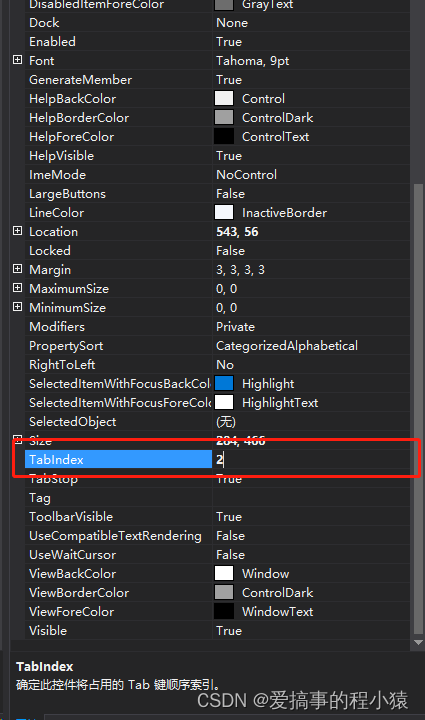
而 bool,enum枚举 等就是下拉框的方式选择
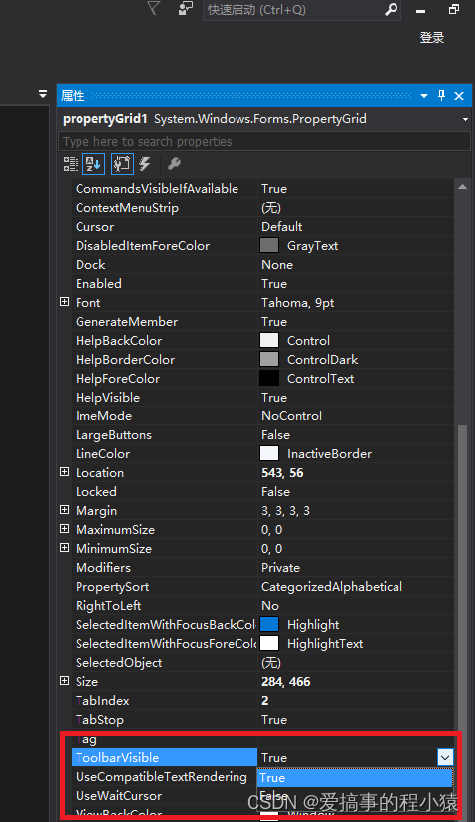
而像font,color ,string[] 就是弹出框的方式编辑,当然还有很多items,collections等等就不说了
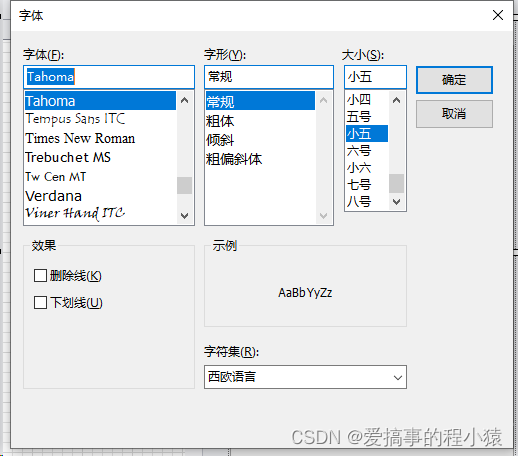
而Font ,color 都是原有的类型
自定义属性弹出框式编辑
这里我们想定义一个自定义类型,同样也能弹出框编辑
先创建一个类PersonInfo.cs,用于声明为自定义属性
using System;
using System.Collections.Generic;
using System.ComponentModel;
using System.Drawing.Design;
using System.Linq;
using System.Text;
using System.Threading.Tasks;

namespace CustomAttrForm
{
    public class Person
    {
        public string Name { set; get; }

        public int Age { set; get; }

        public Sex Sex { set; get; }

        [Browsable(true)]
        [TypeConverter(typeof(ExpandSortConverter))]	//可以扩展转换器
        [Editor(typeof(BirthPlaceEditor), typeof(UITypeEditor))]	//弹出框编辑
        public BirthPlace birthPlace { set; get; }

    }


    public class BirthPlace
    {
        public BirthPlace()
        {

        }

        public BirthPlace(string Province,string City, string County)
        {
            this.Province = Province;
            this.City = City;
            this.County = County;
        }

        public string Province { set; get; }

        public string City { set; get; }

        public string County { set; get; }

    }

    public enum Sex { Boy,Girl}


}
核心在于BirthPlaceEditor,属性编辑器BirthPlaceEditor.cs
using System;
using System.Collections.Generic;
using System.ComponentModel;
using System.Drawing.Design;
using System.Linq;
using System.Text;
using System.Threading.Tasks;
using System.Windows.Forms;
using System.Windows.Forms.Design;

namespace CustomAttrForm
{
    public class BirthPlaceEditor : UITypeEditor
    {
        public override UITypeEditorEditStyle GetEditStyle(ITypeDescriptorContext context)
        {
            if (context != null && context.Instance != null)
            {
                return UITypeEditorEditStyle.Modal;
            }

            return base.GetEditStyle(context);
        }

        public override object EditValue(ITypeDescriptorContext context, IServiceProvider provider, object value)
        {
            IWindowsFormsEditorService editorService = null;

            if (context != null && context.Instance != null && provider != null)
            {
                editorService = (IWindowsFormsEditorService)provider.GetService(typeof(IWindowsFormsEditorService));
                if (editorService != null)
                {
                    BirthPlace birthPlace = value as BirthPlace;
                    BirthPlaceForm dlg = new BirthPlaceForm(birthPlace);
                    if (dlg.ShowDialog() == DialogResult.OK)
                    {
                        value = dlg.BirthPlace;
                        return value;
                    }
                }
            }

            return value;
        }
    }
}
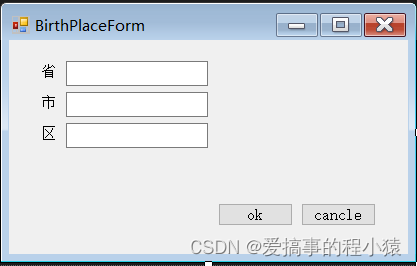
模态弹出框BirthPlaceForm.cs
using System;
using System.Collections.Generic;
using System.ComponentModel;
using System.Data;
using System.Drawing;
using System.Linq;
using System.Text;
using System.Threading.Tasks;
using System.Windows.Forms;

namespace CustomAttrForm
{
    public partial class BirthPlaceForm : Form
    {
        public BirthPlace BirthPlace = null;

        public BirthPlaceForm(BirthPlace birthPlace)
        {
            InitializeComponent();
            this.BirthPlace = birthPlace;

            textBox1.Text = birthPlace.Province;
            textBox2.Text = birthPlace.City;
            textBox3.Text = birthPlace.County;

        }

        private void button1_Click(object sender, EventArgs e)
        {
            BirthPlace.Province = textBox1.Text;
            BirthPlace.City = textBox2.Text;
            BirthPlace.County = textBox3.Text;
        }
    }
}
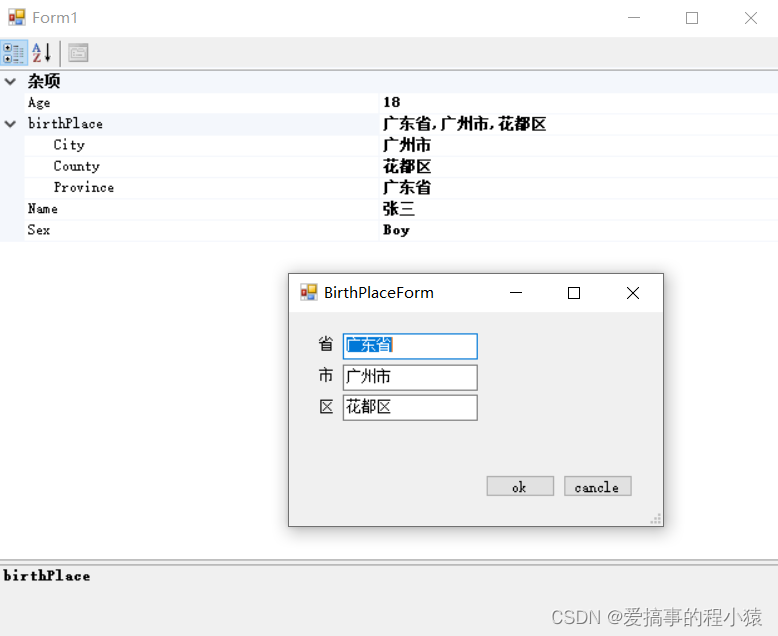
如果想扩展转换器的话可以加入ExpandSortConverter .cs
using System;
using System.Collections;
using System.Collections.Generic;
using System.ComponentModel;
using System.Globalization;
using System.Linq;
using System.Text;
using System.Threading.Tasks;

namespace CustomAttrForm
{
    public class ExpandSortConverter : ExpandableObjectConverter
    {
        #region Methods
        public override bool GetPropertiesSupported(ITypeDescriptorContext context)
        {
            return true;
        }

        public override PropertyDescriptorCollection GetProperties(ITypeDescriptorContext context, object value, Attribute[] attributes)
        {
            //
            // This override returns a list of properties in order
            //
            PropertyDescriptorCollection pdc = TypeDescriptor.GetProperties(value, attributes);
            ArrayList orderedProperties = new ArrayList();
            foreach (PropertyDescriptor pd in pdc)
            {
                Attribute attribute = pd.Attributes[typeof(PropertyOrderAttribute)];
                if (attribute != null)
                {
                    //
                    // If the attribute is found, then create an pair object to hold it
                    //
                    PropertyOrderAttribute poa = (PropertyOrderAttribute)attribute;
                    orderedProperties.Add(new PropertyOrderPair(pd.Name, poa.Order));
                }
                else
                {
                    //
                    // If no order attribute is specifed then given it an order of 0
                    //
                    orderedProperties.Add(new PropertyOrderPair(pd.Name, 0));
                }
            }
            //
            // Perform the actual order using the value PropertyOrderPair classes
            // implementation of IComparable to sort
            //
            orderedProperties.Sort();


            //
            // Build a string list of the ordered names
            //
            ArrayList propertyNames = new ArrayList();
            foreach (PropertyOrderPair pop in orderedProperties)
            {
                propertyNames.Add(pop.Name);
            }
            //
            // Pass in the ordered list for the PropertyDescriptorCollection to sort by
            //
            return pdc.Sort((string[])propertyNames.ToArray(typeof(string)));
        }
        #endregion

        #region 类型转换
        //该方法判断此类型可以转换为哪些类型
        public override bool CanConvertTo(ITypeDescriptorContext context, Type destinationType)
        {
            if (destinationType == typeof(string))
            {
                return true;
            }

            //调用基类方法处理其他情况
            return base.CanConvertTo(context, destinationType);
        }
        //该方法判断哪些类型可以转换为此类型
        public override bool CanConvertFrom(ITypeDescriptorContext context, Type sourceType)
        {
            if (sourceType == typeof(string))
            {
                return true;
            }

            return base.CanConvertFrom(context, sourceType);
        }

        // 将该类型转换为字符串
        public override object ConvertTo(ITypeDescriptorContext context, CultureInfo culture, object value, Type destinationType)
        {
            if (destinationType == typeof(string) && value != null)
            {
                BirthPlace t = (BirthPlace)value;
                string str = t.Province + "," + t.City + "," +  t.County;
                return str;
            }
            return base.ConvertTo(context, culture, value, destinationType);
        }
        //字符串转换为该类
        public override object ConvertFrom(ITypeDescriptorContext context, CultureInfo culture, object value)
        {
            if (value is string)
            {
                string str = (string)value;
                str = str.Trim();
                string[] v = str.Split(',');
                if (v.Length != 3)
                {
                    throw new NotSupportedException("Invalid parameter format");
                }

                string province = v[0];
                string city = v[1];
                string county = v[2];
                BirthPlace t = new BirthPlace(province, city, county);
                return t;
            }
            return base.ConvertFrom(context, culture, value);
        }

        #endregion
    }

    #region Helper Class - PropertyOrderAttribute
    [AttributeUsage(AttributeTargets.Property)]
    public class PropertyOrderAttribute : Attribute
    {
        //
        // Simple attribute to allow the order of a property to be specified
        //
        private int _order;
        public PropertyOrderAttribute(int order)
        {
            _order = order;
        }

        public int Order
        {
            get
            {
                return _order;
            }
        }
    }
    #endregion

    #region Helper Class - PropertyOrderPair
    public class PropertyOrderPair : IComparable
    {
        private int _order;
        private string _name;
        public string Name
        {
            get
            {
                return _name;
            }
        }

        public PropertyOrderPair(string name, int order)
        {
            _order = order;
            _name = name;
        }

        public int CompareTo(object obj)
        {
            //
            // Sort the pair objects by ordering by order value
            // Equal values get the same rank
            //
            int otherOrder = ((PropertyOrderPair)obj)._order;
            if (otherOrder == _order)
            {
                //
                // If order not specified, sort by name
                //
                string otherName = ((PropertyOrderPair)obj)._name;
                return string.Compare(_name, otherName);
            }
            else if (otherOrder > _order)
            {
                return -1;
            }
            return 1;
        }
    }
    #endregion


}
应用
在对象中声明该属性
using System;
using System.Collections.Generic;
using System.ComponentModel;
using System.Data;
using System.Drawing;
using System.Linq;
using System.Text;
using System.Threading.Tasks;
using System.Windows.Forms;

namespace CustomAttrForm
{
    public partial class Form1 : Form
    {
        public Form1()
        {
            InitializeComponent();
            this.propertyGrid1.SelectedObject = new Person()
            {
                Name = "张三",
                Age = 18,
                Sex = Sex.Boy,
                birthPlace = new BirthPlace()
                {
                    Province = "广东省",
                    City = "广州市",
                    County = "花都区",
                }
            };
        }
    }
}
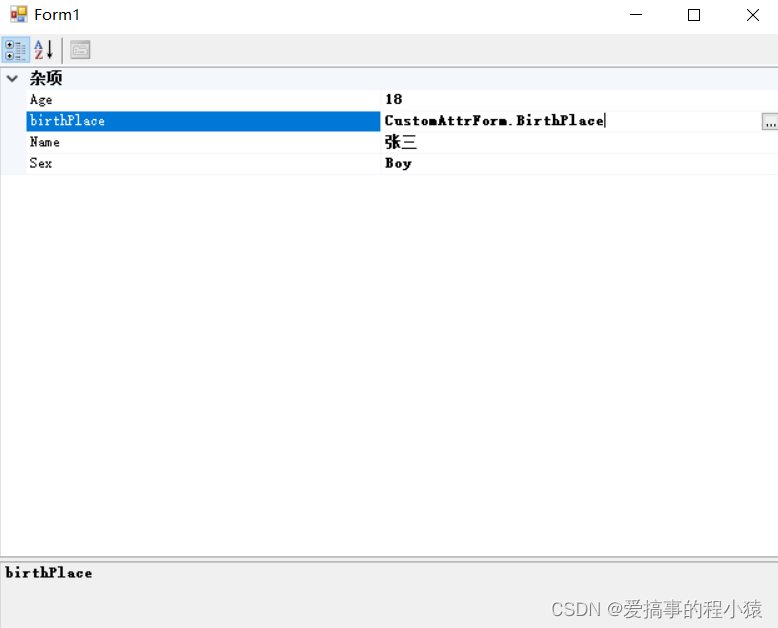
不加扩展转换器
加入扩展转换器
源码下载
链接: 下载


 扫一扫
扫一扫


 1076
1076

 被折叠的 条评论
为什么被折叠?
被折叠的 条评论
为什么被折叠?
 到【灌水乐园】发言


