


上次我们讲到XML解析网络数据,这次我们来研究研究用Json格式解析数据
照旧,我们先在web端的FQAcgtion.class模拟一组Json格式的数据:
- public String getJson() throws Exception {
- // 获取数据
- // 调用数据库查询数据,返回对象集合(….)
- List<FQ> fqs = new ArrayList<FQ>();
- for (int i = 1; i <= 100; i++) {
- Calendar calendar = Calendar.getInstance();
- int year = calendar.get(Calendar.YEAR);
- int month = calendar.get(Calendar.MONTH);
- int day = calendar.get(Calendar.DAY_OF_MONTH);
- fqs.add(new FQ(“原生态” + i, “很纯”, year + “-“ + month + “-“ + day));
- }
- //将对象集合转换为json,例如:{“class”:”150831”,”lists”:30,”fqs”“[{},{},{}]}
- JSONObject jo=new JSONObject();
- jo.put(”clazz”, “150831”);
- jo.put(”lists”, fqs.size());
- JSONArray ja=new JSONArray();
- for (FQ fq : fqs) {
- JSONObject jos=new JSONObject();
- jos.put(”name”, fq.getName());
- jos.put(”content”, fq.getContent());
- jos.put(”time”, fq.getTime());
- ja.add(jos);
- }
- jo.put(”fqs”, ja);
- // 将对象集合存放到请求域中
- // ServletActionContext.getRequest().setAttribute(“fqs”, jo.toString());
- return “dataResultJson”;
- }

public String getJson() throws Exception {
        // 获取数据
        // 调用数据库查询数据,返回对象集合(....)
        List<FQ> fqs = new ArrayList<FQ>();
        for (int i = 1; i <= 100; i++) {
            Calendar calendar = Calendar.getInstance();
            int year = calendar.get(Calendar.YEAR);
            int month = calendar.get(Calendar.MONTH);
            int day = calendar.get(Calendar.DAY_OF_MONTH);
            fqs.add(new FQ("原生态" + i, "很纯", year + "-" + month + "-" + day));
        }

        //将对象集合转换为json,例如:{"class":"150831","lists":30,"fqs""[{},{},{}]}
        JSONObject jo=new JSONObject();
        jo.put("clazz", "150831");
        jo.put("lists", fqs.size());

        JSONArray ja=new JSONArray();

        for (FQ fq : fqs) {
            JSONObject jos=new JSONObject();
            jos.put("name", fq.getName());
            jos.put("content", fq.getContent());
            jos.put("time", fq.getTime());
            ja.add(jos);
        }

        jo.put("fqs", ja);


        // 将对象集合存放到请求域中
//      ServletActionContext.getRequest().setAttribute("fqs", jo.toString());

        return "dataResultJson";
    }
dataResultJson.jsp:
- <%@ page language=“java” contentType=“text/plain; charset=utf-8” pageEncoding=“utf-8”%>{fqs} </span></span></li></ol><div class="save_code tracking-ad" data-mod="popu_249" style="display: none;"><a href="javascript:;" target="_blank"><img src="http://static.blog.csdn.net/images/save_snippets_01.png"></a></div></div><pre name="code" class="java" style="display: none;"><%@ page language="java" contentType="text/plain; charset=utf-8" pageEncoding="utf-8"%>{fqs}
struts.xml配置:- <action name=“fqAction*” class=“com.zking.action.FQAcgtion” method=“{1}”>
- <result name=”dataResult”>/dataResult.jsp</result>
- <result name=”dataResult”>/dataResultJson.jsp</result>
- </action>
<action name="fqAction*" class="com.zking.action.FQAcgtion" method="{1}">
            <result name="dataResult">/dataResult.jsp</result>
            <result name="dataResult">/dataResultJson.jsp</result>
        </action>
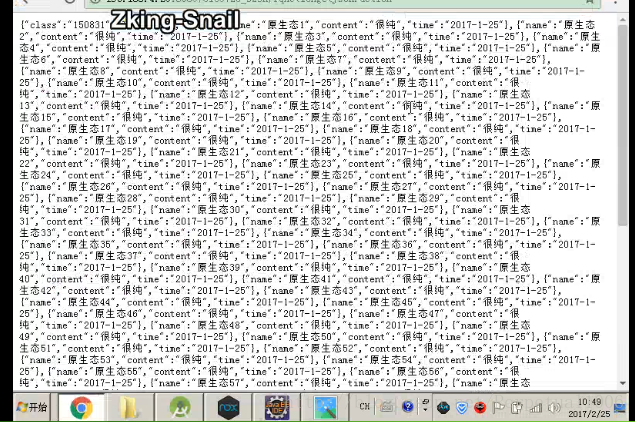
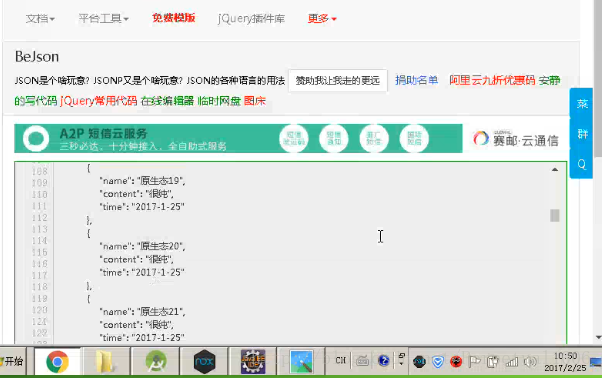
截图如下:
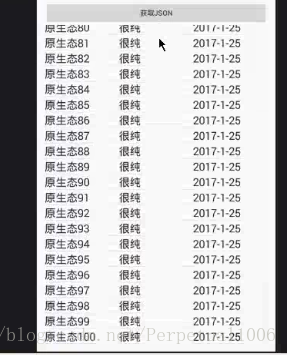
数据模拟好了,那我们现在来Android端拿取数据
首先,先来个XML页面:依然是一个按钮和一个listview展示数据
activity_get_json.xml
- <Button
- android:layout_width=”match_parent”
- android:layout_height=”wrap_content”
- android:text=”获取Json”
- android:onClick=”getJson”
- />
- <ListView
- android:layout_width=”match_parent”
- android:layout_height=”wrap_content”
- android:id=”@+id/lv_json_list”
- >
- </ListView>
<Button
        android:layout_width="match_parent"
        android:layout_height="wrap_content"
        android:text="获取Json"
        android:onClick="getJson"
        />

    <ListView
        android:layout_width="match_parent"
        android:layout_height="wrap_content"
        android:id="@+id/lv_json_list"
        >
    </ListView>
XML解析有三种方式,同样Json解析也有三种方式:
1、原生态
activity_get_json.activity
- <p><span style=“background-color: rgb(240, 240, 240);”>public class GetJsonActivity extends AppCompatActivity {</span></p><p></p> private ListView lv_json_list;
- private List<FQ> lists=new ArrayList<>();
- private MyAdapter myAdapter;
- private ProgressDialog progressDialog;
- @Override
- protected void onCreate(Bundle savedInstanceState) {
- super.onCreate(savedInstanceState);
- setContentView(R.layout.activity_get_json);
- lv_json_list = (ListView) findViewById(R.id.lv_json_list);
- myAdapter = new MyAdapter();
- lv_json_list.setAdapter(myAdapter);
- progressDialog = new ProgressDialog(this);
- progressDialog.setMessage(”正在拼命loading中…”);
- }
- class MyAdapter extends BaseAdapter {
- @Override
- public int getCount() {
- return lists.size();
- }
- @Override
- public Object getItem(int i) {
- return lists.get(i);
- }
- @Override
- public long getItemId(int i) {
- return i;
- }
- @Override
- public View getView(int i, View view, ViewGroup viewGroup) {
- if(view==null){
- view= LayoutInflater.from(GetJsonActivity.this).inflate(R.layout.item_listview,null);
- ItemTag itemTag=new ItemTag();
- itemTag.tv_content= (TextView) view.findViewById(R.id.tv_item_listview_content);
- itemTag.tv_name= (TextView) view.findViewById(R.id.tv_item_listview_name);
- itemTag.tv_time= (TextView) view.findViewById(R.id.tv_item_listview_time);
- view.setTag(itemTag);
- }
- ItemTag itemTag= (ItemTag) view.getTag();
- itemTag.tv_name.setText(lists.get(i).getName());
- itemTag.tv_content.setText(lists.get(i).getContent());
- itemTag.tv_time.setText(lists.get(i).getTime());
- return view;
- }
- }
- public void getJson(View view){
- new MyTask().execute();
- }
- class MyTask extends AsyncTask{
- @Override
- protected void onPreExecute() {
- super.onPreExecute();
- progressDialog.show();
- }
- @Override
- protected Object doInBackground(Object[] objects) {
- String path=getString(R.string.server_name)+”fqActiongetJson.action”;
- try {
- URL url=new URL(path);
- HttpURLConnection connection= (HttpURLConnection) url.openConnection();
- connection.setRequestMethod(”GET”);
- connection.setConnectTimeout(5000);
- if(connection.getResponseCode()==200){
- InputStream is=connection.getInputStream();
- //读
- BufferedReader br=new BufferedReader(new InputStreamReader(is));
- StringBuffer stringBuffer=new StringBuffer();
- String str=null;
- while((str=br.readLine())!=null){
- stringBuffer.append(str);
- }
- // Log.i(“test”,stringBuffer.toString());
- //解析JSOn
- //01.原生态
- // try {
- // JSONObject jsonObject=new JSONObject(stringBuffer.toString());
- // String clazz=jsonObject.getString(“class”);
- // Log.i(“test”,”class:”+clazz);
- // int num=jsonObject.getInt(“lists”);
- // Log.i(“test”,”lists:”+num);
- //
- // JSONArray jsonArray=jsonObject.getJSONArray(“fqs”);
- // for (int i = 0; i <jsonArray.length() ; i++) {
- // JSONObject object=jsonArray.getJSONObject(i);
- // String name=object.getString(“name”);
- // String content=object.getString(“content”);
- // String time=object.getString(“time”);
- // FQ fq=new FQ(name,content,time);
- // lists.add(fq);
- // }
- // } catch (JSONException e) {
- // e.printStackTrace();
- // }
- return null;
- }
- @Override
- protected void onPostExecute(Object o) {
- super.onPostExecute(o);
- myAdapter.notifyDataSetChanged();
- progressDialog.cancel();
- }
- }
- }
public class GetJsonActivity extends AppCompatActivity {    private ListView lv_json_list;
    private List<FQ> lists=new ArrayList<>();
    private MyAdapter myAdapter;
    private ProgressDialog progressDialog;
    @Override
    protected void onCreate(Bundle savedInstanceState) {
        super.onCreate(savedInstanceState);
        setContentView(R.layout.activity_get_json);

        lv_json_list = (ListView) findViewById(R.id.lv_json_list);
        myAdapter = new MyAdapter();
        lv_json_list.setAdapter(myAdapter);

        progressDialog = new ProgressDialog(this);
        progressDialog.setMessage("正在拼命loading中...");
    }
    class MyAdapter extends BaseAdapter {

        @Override
        public int getCount() {
            return lists.size();
        }

        @Override
        public Object getItem(int i) {
            return lists.get(i);
        }

        @Override
        public long getItemId(int i) {
            return i;
        }

        @Override
        public View getView(int i, View view, ViewGroup viewGroup) {

            if(view==null){
                view= LayoutInflater.from(GetJsonActivity.this).inflate(R.layout.item_listview,null);

                ItemTag itemTag=new ItemTag();

                itemTag.tv_content= (TextView) view.findViewById(R.id.tv_item_listview_content);
                itemTag.tv_name= (TextView) view.findViewById(R.id.tv_item_listview_name);
                itemTag.tv_time= (TextView) view.findViewById(R.id.tv_item_listview_time);

                view.setTag(itemTag);
            }

            ItemTag itemTag= (ItemTag) view.getTag();
            itemTag.tv_name.setText(lists.get(i).getName());
            itemTag.tv_content.setText(lists.get(i).getContent());
            itemTag.tv_time.setText(lists.get(i).getTime());

            return view;
        }
    }

    public void getJson(View view){
            new MyTask().execute();
    }

    class MyTask extends AsyncTask{

        @Override
        protected void onPreExecute() {
            super.onPreExecute();
            progressDialog.show();
        }

        @Override
        protected Object doInBackground(Object[] objects) {
            String path=getString(R.string.server_name)+"fqActiongetJson.action";
            try {
                URL url=new URL(path);
                HttpURLConnection connection= (HttpURLConnection) url.openConnection();
                connection.setRequestMethod("GET");
                connection.setConnectTimeout(5000);


                if(connection.getResponseCode()==200){
                    InputStream is=connection.getInputStream();
                    //读
                    BufferedReader br=new BufferedReader(new InputStreamReader(is));
                    StringBuffer stringBuffer=new StringBuffer();
                    String str=null;
                    while((str=br.readLine())!=null){
                        stringBuffer.append(str);
                    }
//                    Log.i("test",stringBuffer.toString());

                    //解析JSOn
                    //01.原生态
//                    try {
//                        JSONObject jsonObject=new JSONObject(stringBuffer.toString());
//                        String clazz=jsonObject.getString("class");
//                        Log.i("test","class:"+clazz);
//                        int num=jsonObject.getInt("lists");
//                        Log.i("test","lists:"+num);
//
//                        JSONArray jsonArray=jsonObject.getJSONArray("fqs");
//                        for (int i = 0; i <jsonArray.length() ; i++) {
//                            JSONObject object=jsonArray.getJSONObject(i);
//                            String name=object.getString("name");
//                            String content=object.getString("content");
//                            String time=object.getString("time");
//                            FQ fq=new FQ(name,content,time);
//                            lists.add(fq);
//                        }
//                    } catch (JSONException e) {
//                        e.printStackTrace();
//                    }


            return null;
        }

        @Override
        protected void onPostExecute(Object o) {
            super.onPostExecute(o);

            myAdapter.notifyDataSetChanged();

            progressDialog.cancel();
        }
    }


}
2、GJon解析
- public class GetJsonActivity extends AppCompatActivity {
- private ListView lv_json_list;
- private List<FQ> lists=new ArrayList<>();
- private MyAdapter myAdapter;
- private ProgressDialog progressDialog;
- @Override
- protected void onCreate(Bundle savedInstanceState) {
- super.onCreate(savedInstanceState);
- setContentView(R.layout.activity_get_json);
- lv_json_list = (ListView) findViewById(R.id.lv_json_list);
- myAdapter = new MyAdapter();
- lv_json_list.setAdapter(myAdapter);
- progressDialog = new ProgressDialog(this);
- progressDialog.setMessage(”正在拼命loading中…”);
- }
- class MyAdapter extends BaseAdapter {
- @Override
- public int getCount() {
- return lists.size();
- }
- @Override
- public Object getItem(int i) {
- return lists.get(i);
- }
- @Override
- public long getItemId(int i) {
- return i;
- }
- @Override
- public View getView(int i, View view, ViewGroup viewGroup) {
- if(view==null){
- view= LayoutInflater.from(GetJsonActivity.this).inflate(R.layout.item_listview,null);
- ItemTag itemTag=new ItemTag();
- itemTag.tv_content= (TextView) view.findViewById(R.id.tv_item_listview_content);
- itemTag.tv_name= (TextView) view.findViewById(R.id.tv_item_listview_name);
- itemTag.tv_time= (TextView) view.findViewById(R.id.tv_item_listview_time);
- view.setTag(itemTag);
- }
- ItemTag itemTag= (ItemTag) view.getTag();
- itemTag.tv_name.setText(lists.get(i).getName());
- itemTag.tv_content.setText(lists.get(i).getContent());
- itemTag.tv_time.setText(lists.get(i).getTime());
- return view;
- }
- }
- public void getJson(View view){
- new MyTask().execute();
- }
- class MyTask extends AsyncTask{
- @Override
- protected void onPreExecute() {
- super.onPreExecute();
- progressDialog.show();
- }
- @Override
- protected Object doInBackground(Object[] objects) {
- String path=getString(R.string.server_name)+”fqActiongetJson.action”;
- try {
- URL url=new URL(path);
- HttpURLConnection connection= (HttpURLConnection) url.openConnection();
- connection.setRequestMethod(”GET”);
- connection.setConnectTimeout(5000);
- if(connection.getResponseCode()==200){
- InputStream is=connection.getInputStream();
- //读
- BufferedReader br=new BufferedReader(new InputStreamReader(is));
- StringBuffer stringBuffer=new StringBuffer();
- String str=null;
- while((str=br.readLine())!=null){
- stringBuffer.append(str);
- }
- // Log.i(“test”,stringBuffer.toString());
- //解析JSOn
- //02.使用Gson解析json
- // Gson gson=new Gson();
- // BigFQ bigFQ=gson.fromJson(stringBuffer.toString(),BigFQ.class);
- //
- // String clazz=bigFQ.getClazz();
- // int num=bigFQ.getLists();
- //
- // Log.i(“test”,”clazz ”+clazz+” num:”+num);
- // lists.addAll(bigFQ.getFqs());
- }
- } catch (MalformedURLException e) {
- e.printStackTrace();
- } catch (IOException e) {
- e.printStackTrace();
- }
- return null;
- }
- @Override
- protected void onPostExecute(Object o) {
- super.onPostExecute(o);
- myAdapter.notifyDataSetChanged();
- progressDialog.cancel();
- }
- }
- }
public class GetJsonActivity extends AppCompatActivity {

    private ListView lv_json_list;
    private List<FQ> lists=new ArrayList<>();
    private MyAdapter myAdapter;
    private ProgressDialog progressDialog;
    @Override
    protected void onCreate(Bundle savedInstanceState) {
        super.onCreate(savedInstanceState);
        setContentView(R.layout.activity_get_json);

        lv_json_list = (ListView) findViewById(R.id.lv_json_list);
        myAdapter = new MyAdapter();
        lv_json_list.setAdapter(myAdapter);

        progressDialog = new ProgressDialog(this);
        progressDialog.setMessage("正在拼命loading中...");
    }
    class MyAdapter extends BaseAdapter {

        @Override
        public int getCount() {
            return lists.size();
        }

        @Override
        public Object getItem(int i) {
            return lists.get(i);
        }

        @Override
        public long getItemId(int i) {
            return i;
        }

        @Override
        public View getView(int i, View view, ViewGroup viewGroup) {

            if(view==null){
                view= LayoutInflater.from(GetJsonActivity.this).inflate(R.layout.item_listview,null);

                ItemTag itemTag=new ItemTag();

                itemTag.tv_content= (TextView) view.findViewById(R.id.tv_item_listview_content);
                itemTag.tv_name= (TextView) view.findViewById(R.id.tv_item_listview_name);
                itemTag.tv_time= (TextView) view.findViewById(R.id.tv_item_listview_time);

                view.setTag(itemTag);
            }

            ItemTag itemTag= (ItemTag) view.getTag();
            itemTag.tv_name.setText(lists.get(i).getName());
            itemTag.tv_content.setText(lists.get(i).getContent());
            itemTag.tv_time.setText(lists.get(i).getTime());

            return view;
        }
    }

    public void getJson(View view){
            new MyTask().execute();
    }

    class MyTask extends AsyncTask{

        @Override
        protected void onPreExecute() {
            super.onPreExecute();
            progressDialog.show();
        }

        @Override
        protected Object doInBackground(Object[] objects) {
            String path=getString(R.string.server_name)+"fqActiongetJson.action";
            try {
                URL url=new URL(path);
                HttpURLConnection connection= (HttpURLConnection) url.openConnection();
                connection.setRequestMethod("GET");
                connection.setConnectTimeout(5000);


                if(connection.getResponseCode()==200){
                    InputStream is=connection.getInputStream();
                    //读
                    BufferedReader br=new BufferedReader(new InputStreamReader(is));
                    StringBuffer stringBuffer=new StringBuffer();
                    String str=null;
                    while((str=br.readLine())!=null){
                        stringBuffer.append(str);
                    }
//                    Log.i("test",stringBuffer.toString());

                    //解析JSOn


                    //02.使用Gson解析json
//                    Gson gson=new Gson();
//                    BigFQ bigFQ=gson.fromJson(stringBuffer.toString(),BigFQ.class);
//
//                    String clazz=bigFQ.getClazz();
//                    int num=bigFQ.getLists();
//
//                    Log.i("test","clazz "+clazz+" num:"+num);
//                    lists.addAll(bigFQ.getFqs());


                }
            } catch (MalformedURLException e) {
                e.printStackTrace();
            } catch (IOException e) {
                e.printStackTrace();
            }


            return null;
        }

        @Override
        protected void onPostExecute(Object o) {
            super.onPostExecute(o);

            myAdapter.notifyDataSetChanged();

            progressDialog.cancel();
        }
    }


}
3、FastJson解析
- public class GetJsonActivity extends AppCompatActivity {
- private ListView lv_json_list;
- private List<FQ> lists=new ArrayList<>();
- private MyAdapter myAdapter;
- private ProgressDialog progressDialog;
- @Override
- protected void onCreate(Bundle savedInstanceState) {
- super.onCreate(savedInstanceState);
- setContentView(R.layout.activity_get_json);
- lv_json_list = (ListView) findViewById(R.id.lv_json_list);
- myAdapter = new MyAdapter();
- lv_json_list.setAdapter(myAdapter);
- progressDialog = new ProgressDialog(this);
- progressDialog.setMessage(”正在拼命loading中…”);
- }
- class MyAdapter extends BaseAdapter {
- @Override
- public int getCount() {
- return lists.size();
- }
- @Override
- public Object getItem(int i) {
- return lists.get(i);
- }
- @Override
- public long getItemId(int i) {
- return i;
- }
- @Override
- public View getView(int i, View view, ViewGroup viewGroup) {
- if(view==null){
- view= LayoutInflater.from(GetJsonActivity.this).inflate(R.layout.item_listview,null);
- ItemTag itemTag=new ItemTag();
- itemTag.tv_content= (TextView) view.findViewById(R.id.tv_item_listview_content);
- itemTag.tv_name= (TextView) view.findViewById(R.id.tv_item_listview_name);
- itemTag.tv_time= (TextView) view.findViewById(R.id.tv_item_listview_time);
- view.setTag(itemTag);
- }
- ItemTag itemTag= (ItemTag) view.getTag();
- itemTag.tv_name.setText(lists.get(i).getName());
- itemTag.tv_content.setText(lists.get(i).getContent());
- itemTag.tv_time.setText(lists.get(i).getTime());
- return view;
- }
- }
- public void getJson(View view){
- new MyTask().execute();
- }
- class MyTask extends AsyncTask{
- @Override
- protected void onPreExecute() {
- super.onPreExecute();
- progressDialog.show();
- }
- @Override
- protected Object doInBackground(Object[] objects) {
- String path=getString(R.string.server_name)+”fqActiongetJson.action”;
- try {
- URL url=new URL(path);
- HttpURLConnection connection= (HttpURLConnection) url.openConnection();
- connection.setRequestMethod(”GET”);
- connection.setConnectTimeout(5000);
- if(connection.getResponseCode()==200){
- InputStream is=connection.getInputStream();
- //读
- BufferedReader br=new BufferedReader(new InputStreamReader(is));
- StringBuffer stringBuffer=new StringBuffer();
- String str=null;
- while((str=br.readLine())!=null){
- stringBuffer.append(str);
- }
- // Log.i(“test”,stringBuffer.toString());
- //解析JSOn
- //03.使用FastJson
- BigFQ bigFQ=JSON.parseObject(stringBuffer.toString(),BigFQ.class);
- String clazz=bigFQ.getClazz();
- int num=bigFQ.getLists();
- Log.i(”test”,“clazz ”+clazz+“ num:”+num);
- lists.addAll(bigFQ.getFqs());
- }
- } catch (MalformedURLException e) {
- e.printStackTrace();
- } catch (IOException e) {
- e.printStackTrace();
- }
- return null;
- }
- @Override
- protected void onPostExecute(Object o) {
- super.onPostExecute(o);
- myAdapter.notifyDataSetChanged();
- progressDialog.cancel();
- }
- }
- }
public class GetJsonActivity extends AppCompatActivity {

    private ListView lv_json_list;
    private List<FQ> lists=new ArrayList<>();
    private MyAdapter myAdapter;
    private ProgressDialog progressDialog;
    @Override
    protected void onCreate(Bundle savedInstanceState) {
        super.onCreate(savedInstanceState);
        setContentView(R.layout.activity_get_json);

        lv_json_list = (ListView) findViewById(R.id.lv_json_list);
        myAdapter = new MyAdapter();
        lv_json_list.setAdapter(myAdapter);

        progressDialog = new ProgressDialog(this);
        progressDialog.setMessage("正在拼命loading中...");
    }
    class MyAdapter extends BaseAdapter {

        @Override
        public int getCount() {
            return lists.size();
        }

        @Override
        public Object getItem(int i) {
            return lists.get(i);
        }

        @Override
        public long getItemId(int i) {
            return i;
        }

        @Override
        public View getView(int i, View view, ViewGroup viewGroup) {

            if(view==null){
                view= LayoutInflater.from(GetJsonActivity.this).inflate(R.layout.item_listview,null);

                ItemTag itemTag=new ItemTag();

                itemTag.tv_content= (TextView) view.findViewById(R.id.tv_item_listview_content);
                itemTag.tv_name= (TextView) view.findViewById(R.id.tv_item_listview_name);
                itemTag.tv_time= (TextView) view.findViewById(R.id.tv_item_listview_time);

                view.setTag(itemTag);
            }

            ItemTag itemTag= (ItemTag) view.getTag();
            itemTag.tv_name.setText(lists.get(i).getName());
            itemTag.tv_content.setText(lists.get(i).getContent());
            itemTag.tv_time.setText(lists.get(i).getTime());

            return view;
        }
    }

    public void getJson(View view){
            new MyTask().execute();
    }

    class MyTask extends AsyncTask{

        @Override
        protected void onPreExecute() {
            super.onPreExecute();
            progressDialog.show();
        }

        @Override
        protected Object doInBackground(Object[] objects) {
            String path=getString(R.string.server_name)+"fqActiongetJson.action";
            try {
                URL url=new URL(path);
                HttpURLConnection connection= (HttpURLConnection) url.openConnection();
                connection.setRequestMethod("GET");
                connection.setConnectTimeout(5000);


                if(connection.getResponseCode()==200){
                    InputStream is=connection.getInputStream();
                    //读
                    BufferedReader br=new BufferedReader(new InputStreamReader(is));
                    StringBuffer stringBuffer=new StringBuffer();
                    String str=null;
                    while((str=br.readLine())!=null){
                        stringBuffer.append(str);
                    }
//                    Log.i("test",stringBuffer.toString());

                    //解析JSOn

                    //03.使用FastJson
                    BigFQ bigFQ=JSON.parseObject(stringBuffer.toString(),BigFQ.class);
                    String clazz=bigFQ.getClazz();
                    int num=bigFQ.getLists();

                    Log.i("test","clazz "+clazz+" num:"+num);
                    lists.addAll(bigFQ.getFqs());

                }
            } catch (MalformedURLException e) {
                e.printStackTrace();
            } catch (IOException e) {
                e.printStackTrace();
            }


            return null;
        }

        @Override
        protected void onPostExecute(Object o) {
            super.onPostExecute(o);

            myAdapter.notifyDataSetChanged();

            progressDialog.cancel();
        }
    }


}
 833
833


 扫一扫
扫一扫


 被折叠的 条评论
为什么被折叠?
被折叠的 条评论
为什么被折叠?
 到【灌水乐园】发言


